Does your IT organization suffer from "Keeping the Lights on Syndrome"? For those of you who are asking, what the heck is "Keeping on the Lights Syndrome" here's a quick definition of the problem. "Keeping the Lights on Syndrome" is a situation that more and more IT organizations are finding themselves in where they are spending 70% of their IT budget on "keeping the lights on" and only 30% on innovating with the business and modernizing their technology.
So, what's the right number? Should it be 60% - 40%? 50% - 50%? Well for a lot of years the number has been closer to 50-50%, and that's probably a good number to strive toward for most IT organizations. The next question I'm often asked is how can I address this problem? What can I do to get my Infrastructure and Operations costs down? I'm already virtualizing my server infrastructure, and I'm looking at more virtualization including virtualizing my storage and my networks, what more can I do to get my I&O expenses down even further?
The answer is that virtualization has been a great help to keep the number down to just 70-30%. Without virtualization a lot of organization might be staring at 80-20%, or even 90-10%. Ok, so what's the next step you ask? Please don't say "cloud", I've heard that enough already in the last year! As a matter of fact, every manufacturer of infrastructure, and infrastructure software has been telling me that all I have to do is buy their solution and I have a "cloud solution" in place.
I tend to agree, the term "cloud" is over used. So, let's not use it here, lets instead look at some practical things that the I&O organization can do to address the "Keeping the Lights on Syndrome". Longer term, yes something like IT as a Service whether it's implemented using a private (internal) cloud, a public cloud, or a combination of the two called Hybrid Cloud doesn't matter. But that's a longer term solution. So what can the I&O organization do in the shorter term to address the problem, and maybe lay the groundwork for the longer term cloud solution as well?
What can I&O do beyond completing the current drive toward virtualizing almost the entire infrastructure? They can start "comoditizing" their infrastructure. What is "commodity" infrastructure? Its the idea that you buy your infrastructure including network, server, and storage as a single unit. Some people call this converged infrastructure, but what ever you call it the idea is to buy your infrastructure as a single SKU which defines a single unit of capacity for your infrastructure.
How does this help with the "Keeping the Lights on Syndrome"? It removes a major cost from your I&O organization. That cost being the cost of developing the "right" solution for each and every application, and then building a customer infrastructure to support that "right" solution. instead you buy your infrastructure capacity in "chunks", and then carve those "chunks"into standard sized pieces. That doesn't mean that those standard peices must all be identical, but rather there should be a limited number od standard sized "chunks". For example, Small, Medium, Large, and X-Large.
How does this help your I&O organization address the "Keeping the Lights on Syndrome"? It does so by making your purchasing more efficient. It also reduces the amount of engineering you have to do by eliminating most of the custom engineering and custom building that is still happening in the I&O organization in spite of the fact that you have virtualized much of your infrastructure.
So, how would this work, you ask me? My application teams need to have their requirements met! My response is that it would work just like buying a car. If you have a family of, say, 5 people, and you like to go on family driing trips, do yo ugo to the Ford dealership and tell them what you want in a car, and then have them build you a custom car that exactly meets your needs? No, of course not, you go to the dealership and choose among several different offering that they have, and then buy the one that is closest to meeting your needs. Sure, you can "customize" that car buy picking the color, the size of the engine, maybe pick some custom wheels, etc. But all of this is based on a limited set of standard platforms that Ford builds, it's not custom from the ground up.
Right now, I would argue that, even with virtualization, most I&O organizations are still building custom cars from the ground up. What I'm suggesting is that instead the I&O organization should be buying a "standard" platform, provide some standard sized "environments" that the application teams can pick from, and then only "customize" the application environments based on the standard platforms/environments. So, lets say for example that you have a converged infrastructure where a single unit of converged infrastructure can handle any combination of 2,000 small VM's, 1,000 medium VM's, 500 large VM's, and 250 X-large VM's. When the applications teams need new VM's they simply request one of the standard sizes. No custom engineering required. If, however, none of the standard sizes fits the needs of the application teams, then a custom engineered VM is built for them. The key here is to keep the number of custom VM's down to a minimum. Mostly this can be done through the charge back process by making any custom VM cost significantly more than an X-large VM.
What does this buy the I&O organization? First it addresses the "Kepping the Lights on Syndrome" by reducing the cost of deploying new infrastructure. It also makes the I&O organization more agile since it saves all of the time that is needed to engineer custom solutions. Finally, this approach also lays the groundwork for automation the deployment of the infrastructure, otherwise known as Infrastructure as a Service and IaaS is one of the first layers on the way to ITaaS and "cloud".
So, what are the barriers to implementing a converged infrastructure solution for your I&O organization? There are a number of them, actually, and they are all organizational in nature. First, you need to pick a partner that can provide you with the right converged infrastructure for your I&O organization. This can be an issue because typically your purcasing organization already has agreements in place with your storage, server, and network vendors, so if you want to continue to use that technology you are going to have to get your purchasing people on board and they are going to have to talk with your storage, server, and network suppliers about working with a partner that can pull together all three and provide them as a single SKU. Once you have that worked out, you need to get buy in from your engineering and architecture organization. The architecture organization is going to be threatened by this move to converged infrastructure since they will perceive this a a move to reduce their control over the infrastructure in the organization. However, the engineering organization is the one that will likely feel the most threatened by the move to converged infrastructure. They will very like view it as a direct attack against them and will though up every argument for why "this won't work" you can imagine. Finally, your storage, server, and network administration organizations will need to be revamped. Managing a converged infrastructure with 3 separate teams. Unless you reorganize to support/manage your converged infrastructure by a single organization much of the advantage of pulling storage/server/network together physically can be lost.
Finally, let me say that several of our customers who are at various stages of implementation of converged infrastructure, IaaS, and Cloud infrastructure, and how successful these initiatives are is directly related to the organization's ability to change and embrace the new technology. It also is directly related to the partner's ability to deliver on the organizations needs. Without a good partner who understand the needs and goals of the organization, they are doomed to failure.
Sunday, September 23, 2012


Friday, August 17, 2012
ILM/HSM part 2, Return of ILM/HSM
Folks,
Sorry it's been so long since my last posting! Time fly's when you're having fun and I've been having a lot of fun over the last year. What have I been doing, you ask? Well a lot and among other things I've been trying to help our customers sort through a changing storage environment, and I've learned a few things in the process.
What's all this change I'm referring to? Well, among other things, Flash/SSD has really started to take off, and that has a lot of implications for the storage team. So I have spend a lot of time helping our customers sort through the different options, etc. and discovered some things in the process that I would like to share with you.
But first, a quick review of what's up with storage and Flash/SSD. As I indicated above, Flash/SSd is really beginning to make in-roads into the data center. Flash/SSD comes in basically three different flavors.
First, Flash/SSD's can be used in something that looks like a traditional storage array. There are a couple of different variations of this type of storage array. Some use SSD drives in place of traditional disk drives, and some use Flash memory directly. Typically, the arrays that use SSD's provide many of the same features as other tradition storage arrays such as snapshots, replication, etc. Arrays based on Flash memory, on the other hand, typically provide better performance than arrays that use SSD drives mainly because the avoid all of the overhead involved with the SCSI protocol, etc. However, these arrays also often don't have all of the features we need in the data center such as snaps and replication, etc. In both cases, from a storage management perspective you would manage it much like any other storage array in your data center.
Second there are the traditional storage arrays with Flash/SSD added to them. Again, these arrays come in basically two flavors. In both cases, however, an effort is made to only utilize the Flash/SSD for data which is currently "in use" or "hot" in an effort to keep the costs down. With the first flavor, SSD drives are used to hold "hot" blocks of data, with "cool" blocks of data being stored on traditional disk drives. This requires sophisticated software that monitors how "hot" the data is and moves it appropriately. With the second type of array Flash is added to the controller and used to extend the cache. This has the advantage that the software is a simple extension of the existing controller software, and as I mentioned above, the overhead of the SCSI protocol is avoided. The downside is that this only provides a performance boost for the read half of the equation.
Finally, there is the ability to add Flash memory to the servers that run your applications. Once again, there are two flavors here. The first, and simplest flavor is to utilize the Flash memory as an extended disk cache. The advantage to this is that it accelerates I/O to/from any disk arrays you may already own. The down side is that it is often limited in what kinds of OS's it works with. The second flavor makes the Flash memory appear to the OS on the server as a disk drive. This has the advantage of very high performance, but is limited in size. It is also limited in that you can't use features like server clustering, etc. since this data can't be shared among a group of servers.
So what's the lesson learned from all of the above? I think that there are a couple. One is that if we are going to utilize some or all of this technology in the data center, we are really looking at bringing back the old ILM/HSM days. For the "Flash/SSD" only arrays, because of their cost, most data centers aren't going to bring them in to replace all of their traditional storage array capacity. So some way to move data from the expensive storage to the less expense storage needs to be found if costs are going to be kept under control. With the second type of array software to move the data is supplied, but there are questions about how effective this software is particularly in keeping up with quickly changing "temperature" data. The third type of Flash/SSD certainly improves performance, but increases the "storage islands"in your data center unless some kind of ILM/HSM software can be applied.
Where this leaves us is with many of the same issues that, ultimately, derailed ILM the last time around. The main issue at the time was the classification of the data. Getting the business to classify their data was very difficult, and in the end,we often threw up our hands and just moved data based on "last access date". While this works for file based data, it doesn't work for database data, for example, at all.
Sunday, June 12, 2011
NetApp Deduplication An In-depth Look
There has been a lot of discussion lately about the NetApp deduplication technology, especially on twitter. We had a lot of misinformation and FUD flying around, so I thought that a blog entry that takes a close look at the technology was in order.
But first a bit of disclosure, I currently work for a storage reseller that sells NetApp as well as other storage. The information in this blog posting is derived from NetApp documents, as well as my own personal experience with the technology at our customer sites. This posting is not intended to promote the technology as much as it is to explain it. The intent here is to provide information from an independent perspective. Those reading this blog post are, of course, free to interpret it the way they choose.
How NetApp writes data to disk.
First lets talk about how the technology works. For those who aren't familiar with how a NetApp array stores data on disk, here's the key to understanding how NetApp approaches writes. NetApp stores data on disk using a simple file system called WAFL (Write Anywhere File Layout). The file system stores metadata which contains information about the data blocks, has inodes that point to indirect blocks, and indirect blocks point to the data blocks. One other thing that should be noted about the way that NetApp writes data is that the controller will coalesce writes into full stripes when ever possible. Furthermore, the concept of updating a block is unknown in the NetApp world. Block updates are simply handled as new writes, and the pointers to the updated blocks are moved to point to the new "updated" block.
How deduplication works.
First, it should be noted that NetApp deduplication operates on a volume level. In other words,all of the data within a single NetApp volume is a candidate for deduplication. This includes both file data, and block (LUN) data that is stored within that Netapp volume. NetApp deduplication is a post-process that occurs based on either a watermark for the volume, or on a schedule. For example, if the volume exceeds 80% of it's capacity a deduplication run can be started automatically. Or, a deduplication run can be started at a particular time of day, usually at a time when the user thinks the array will be less utilized.
The maximum sharing for a block is 255. This means that if there are 500 duplicate blocks,there will be 2 blocks actually stored with 1/2 of the pointers pointing to the first block and 1/2 of the pointers pointing to the second block. Note that this 255 maximum is separate from the 255 maximum for snapshots.
When deduplication runs for the first time on a NetApp volume with existing data, it scans the blocks in the volume and creates a fingerprint database, which contains a sorted list of all fingerprints for used blocks in the volume. After the fingerprint file is created, fingerprints are checked for duplicates, and, when found, first a byte- by-byte comparison of the blocks is done to make sure that the blocks are indeed identical. If they are found to be identical, the block‘s pointer is updated to the already existing data block, and the new (duplicate) data block is released. Releasing a duplicate data block entails updating the indirect inode pointing to it, incrementing the block reference count for the already existing data block, and freeing the duplicate data block.
As new data is written to the deduplicated volume, a fingerprint is created for each new block and written to a change log file. When deduplication is run subsequently, the change log is sorted, its sorted fingerprints are merged with those in the fingerprint file, and then the deduplication processing occurs as described above. There are two change log files, so that as deduplication is running and merging the new blocks from one change log file into the fingerprint file, new data that is being written to the flexible volume is causing fingerprints for these new blocks to be written to the second change log file. The roles of the two files are then reversed the next time that deduplication is run. (For those familiar with Data ONTAP usage of NVRAM, this is analogous to when it switches from one half to the other to create a consistency point.) Note that when deduplication is run an an empty volume, the fingerprint file is still created from the log file.
Performance of NetApp deduplication.
There has been a lot of discussion about the performance of Netapp deduplication. In general, deduplication will use CPU and memory in the controller. How much CPU will be ustilied is very had to determine ahead of time, however in general you can expect to use from 0% to 15% of the CPU in most cases, but as much as 50% has been observed in some cases. The impact of deduplication on a host or application can very significantly and depends on a number of different factors including:
• The application and the type of dataset being used
• The data access pattern (for example, sequential versus random access, the size and pattern of the
• I/O)
• The amount of duplicate data, the compressibility of the data, the amount of total data, and the
• average file size
• The nature of the data layout in the volume
• The amount of changed data between deduplication runs
• The number of concurrent deduplication processes and compression scanners running
• The number of volumes that have compression/deduplication enabled on the system
• The hardware platform—the amount of CPU/memory in the system
• The amount of load on the system
• Disk types ATA/FC, and the RPM of the disk
• The number of disk spindles in the aggregate
The deduplication is a low priority process, so host I/O will take precedence over dedupllication. However, all of the items above will effect the performance of the deduplication process itself. In general you can expect to get somewhere between 100MB/sec to 200/MB/sec of data dedupication from a NetApp controller.
The effect of deduplication on the write performance of a system is very dependent on the model of controller and the amont of load that is being put on the system. For deduplicated volumes, if the load on a system is low—that is, for systems where the CPU utilization is around 50% or lower—there is a negligible difference in performance when writing data to a deduplicated volume, and there is no noticeable impact on other applications running on the system. On heavily used systems, however, where the system is nearly saturated, the impact on write performance can be expected to be around 15% for most models of controllers.
Read performance of a deduplicated volume depends on the type of reads being performed. The implicit on random reads is negligible. In early versions of ONTAP the impact of deduplication was noticeable with heavy sequential read applications. However with version 7.3.1 and above NetApp added something they called "intelligent cache" to ONTAP specifically to help with the performance of sequential reads on deduplicated volumes and were able to mitigate the performance impact of sequential reads nearly completely. Finally, with the addition of FlashCache cards to a controller, performance of deduplicated volumes can actually be better than non-deduplicated volumes.
Deuplication Interoperability with Snapshots.
Snapshots and their interoperability with deduplication has been a hotly debated topic on the internet lately. Snapshot copies lock blocks on disk that cannot be freed until the Snapshot copy expires or is deleted. On any volume, once a Snapshot copy of data is made, any subsequent changes to that data temporarily require additional disk space, until the snapshot is deleted or expires. The is true with deduplicated volumes as well as non-deduplicated volumes. Thus the space savings from deuplication for any data held by a snapshot prior to a deduplication run will not be recognized until after that snapshot expires or is deleted.
Some best practices to achieve the best space savings from deduplication-enabled volumes that contain Snapshot copies include:
• Run deduplication before creating new Snapshot copies.
• Limit the number of Snapshot copies you maintain.
• If possible, reduce the retention duration of Snapshot copies.
• Schedule deduplication only after significant new data has been written to the volume.
• Configure appropriate reserve space for the Snapshot copies.
Some Application Best Practices
VMWare
In general VMware deduplicates well, especially if a few best practices in laying out the VMDK files are considered. The following best practices should be considered for VMware implementations:
• Operating system data deduplicates very well therefore you should stack as many OS's onto the same volume as possible.
• Keep VM swap files, pagefiles, user and system temp directories on separate VMDK files.
• Utilize FlashCache where ever possible to cache frequently accessed blocks (like those from the OS).
• Always perform proper alignment of your VM's on the NetApp 4K boundaries.
•
Microsoft Exchange
In general deduplication provides little benefit for versions of Microsoft Exchange prior to Exchange 2010. Starting with Exchange 2010 Microsoft has eliminated single instance storage and deduplication can reclaim much of the additional space created by this change.
Backups (NDMP, SnapMirror and SnapVault)
The following are some best practices to consider for backups of deduplicated volumes:
• Ensure deduplication operations initiate only after your backup completes.
• Deduplication operations on the destination volume complete prior to initiating the next backup.
• If backing up data from multiple volumes to a single volume you may achieve significant space savings from deduplication beyond that of the deduplication savings from the source volumes. This is because you are able to run deduplication on the destination volume which could contain duplicate
• data from multiple source volumes.
• If you are backing up data from your backup disk to tape consider using SMTape to preserve the deduplication/compression savings. Utilizing NDMP to tape will not preserve the deduplication savings on tape.
• Data compression can affect the throughput of your backups. The amount of impact is dependent upon the type of data, compressibility, storage system type and available resources on the destination storage system. It is important to test the affect on your environment before implementing
• into production.
• If the application that you are using to perform backups already does compression, NetApp data compression will not add significant additional savings.
Conclusions
In general, NetApp deduplication can help drive down the TCO of your storage systems significantly, especially when combined with FlashCache in a VMware or Virtual Desktop environment. If best practices are followed carefully, the performance impact of deduplication is negligible, and the space savings for some applications can be considerable. Some careful planning and testing in the customers environment are necessary to ensure that maximum advantage is taken of deduplication, however the ability to schedule when the operations take place combined with the ability to turn on and off deduplication provide significant flexibility in to tune the environment for a customer's particular application profile.
But first a bit of disclosure, I currently work for a storage reseller that sells NetApp as well as other storage. The information in this blog posting is derived from NetApp documents, as well as my own personal experience with the technology at our customer sites. This posting is not intended to promote the technology as much as it is to explain it. The intent here is to provide information from an independent perspective. Those reading this blog post are, of course, free to interpret it the way they choose.
How NetApp writes data to disk.
First lets talk about how the technology works. For those who aren't familiar with how a NetApp array stores data on disk, here's the key to understanding how NetApp approaches writes. NetApp stores data on disk using a simple file system called WAFL (Write Anywhere File Layout). The file system stores metadata which contains information about the data blocks, has inodes that point to indirect blocks, and indirect blocks point to the data blocks. One other thing that should be noted about the way that NetApp writes data is that the controller will coalesce writes into full stripes when ever possible. Furthermore, the concept of updating a block is unknown in the NetApp world. Block updates are simply handled as new writes, and the pointers to the updated blocks are moved to point to the new "updated" block.
How deduplication works.
First, it should be noted that NetApp deduplication operates on a volume level. In other words,all of the data within a single NetApp volume is a candidate for deduplication. This includes both file data, and block (LUN) data that is stored within that Netapp volume. NetApp deduplication is a post-process that occurs based on either a watermark for the volume, or on a schedule. For example, if the volume exceeds 80% of it's capacity a deduplication run can be started automatically. Or, a deduplication run can be started at a particular time of day, usually at a time when the user thinks the array will be less utilized.
The maximum sharing for a block is 255. This means that if there are 500 duplicate blocks,there will be 2 blocks actually stored with 1/2 of the pointers pointing to the first block and 1/2 of the pointers pointing to the second block. Note that this 255 maximum is separate from the 255 maximum for snapshots.
When deduplication runs for the first time on a NetApp volume with existing data, it scans the blocks in the volume and creates a fingerprint database, which contains a sorted list of all fingerprints for used blocks in the volume. After the fingerprint file is created, fingerprints are checked for duplicates, and, when found, first a byte- by-byte comparison of the blocks is done to make sure that the blocks are indeed identical. If they are found to be identical, the block‘s pointer is updated to the already existing data block, and the new (duplicate) data block is released. Releasing a duplicate data block entails updating the indirect inode pointing to it, incrementing the block reference count for the already existing data block, and freeing the duplicate data block.
As new data is written to the deduplicated volume, a fingerprint is created for each new block and written to a change log file. When deduplication is run subsequently, the change log is sorted, its sorted fingerprints are merged with those in the fingerprint file, and then the deduplication processing occurs as described above. There are two change log files, so that as deduplication is running and merging the new blocks from one change log file into the fingerprint file, new data that is being written to the flexible volume is causing fingerprints for these new blocks to be written to the second change log file. The roles of the two files are then reversed the next time that deduplication is run. (For those familiar with Data ONTAP usage of NVRAM, this is analogous to when it switches from one half to the other to create a consistency point.) Note that when deduplication is run an an empty volume, the fingerprint file is still created from the log file.
Performance of NetApp deduplication.
There has been a lot of discussion about the performance of Netapp deduplication. In general, deduplication will use CPU and memory in the controller. How much CPU will be ustilied is very had to determine ahead of time, however in general you can expect to use from 0% to 15% of the CPU in most cases, but as much as 50% has been observed in some cases. The impact of deduplication on a host or application can very significantly and depends on a number of different factors including:
• The application and the type of dataset being used
• The data access pattern (for example, sequential versus random access, the size and pattern of the
• I/O)
• The amount of duplicate data, the compressibility of the data, the amount of total data, and the
• average file size
• The nature of the data layout in the volume
• The amount of changed data between deduplication runs
• The number of concurrent deduplication processes and compression scanners running
• The number of volumes that have compression/deduplication enabled on the system
• The hardware platform—the amount of CPU/memory in the system
• The amount of load on the system
• Disk types ATA/FC, and the RPM of the disk
• The number of disk spindles in the aggregate
The deduplication is a low priority process, so host I/O will take precedence over dedupllication. However, all of the items above will effect the performance of the deduplication process itself. In general you can expect to get somewhere between 100MB/sec to 200/MB/sec of data dedupication from a NetApp controller.
The effect of deduplication on the write performance of a system is very dependent on the model of controller and the amont of load that is being put on the system. For deduplicated volumes, if the load on a system is low—that is, for systems where the CPU utilization is around 50% or lower—there is a negligible difference in performance when writing data to a deduplicated volume, and there is no noticeable impact on other applications running on the system. On heavily used systems, however, where the system is nearly saturated, the impact on write performance can be expected to be around 15% for most models of controllers.
Read performance of a deduplicated volume depends on the type of reads being performed. The implicit on random reads is negligible. In early versions of ONTAP the impact of deduplication was noticeable with heavy sequential read applications. However with version 7.3.1 and above NetApp added something they called "intelligent cache" to ONTAP specifically to help with the performance of sequential reads on deduplicated volumes and were able to mitigate the performance impact of sequential reads nearly completely. Finally, with the addition of FlashCache cards to a controller, performance of deduplicated volumes can actually be better than non-deduplicated volumes.
Deuplication Interoperability with Snapshots.
Snapshots and their interoperability with deduplication has been a hotly debated topic on the internet lately. Snapshot copies lock blocks on disk that cannot be freed until the Snapshot copy expires or is deleted. On any volume, once a Snapshot copy of data is made, any subsequent changes to that data temporarily require additional disk space, until the snapshot is deleted or expires. The is true with deduplicated volumes as well as non-deduplicated volumes. Thus the space savings from deuplication for any data held by a snapshot prior to a deduplication run will not be recognized until after that snapshot expires or is deleted.
Some best practices to achieve the best space savings from deduplication-enabled volumes that contain Snapshot copies include:
• Run deduplication before creating new Snapshot copies.
• Limit the number of Snapshot copies you maintain.
• If possible, reduce the retention duration of Snapshot copies.
• Schedule deduplication only after significant new data has been written to the volume.
• Configure appropriate reserve space for the Snapshot copies.
Some Application Best Practices
VMWare
In general VMware deduplicates well, especially if a few best practices in laying out the VMDK files are considered. The following best practices should be considered for VMware implementations:
• Operating system data deduplicates very well therefore you should stack as many OS's onto the same volume as possible.
• Keep VM swap files, pagefiles, user and system temp directories on separate VMDK files.
• Utilize FlashCache where ever possible to cache frequently accessed blocks (like those from the OS).
• Always perform proper alignment of your VM's on the NetApp 4K boundaries.
•
Microsoft Exchange
In general deduplication provides little benefit for versions of Microsoft Exchange prior to Exchange 2010. Starting with Exchange 2010 Microsoft has eliminated single instance storage and deduplication can reclaim much of the additional space created by this change.
Backups (NDMP, SnapMirror and SnapVault)
The following are some best practices to consider for backups of deduplicated volumes:
• Ensure deduplication operations initiate only after your backup completes.
• Deduplication operations on the destination volume complete prior to initiating the next backup.
• If backing up data from multiple volumes to a single volume you may achieve significant space savings from deduplication beyond that of the deduplication savings from the source volumes. This is because you are able to run deduplication on the destination volume which could contain duplicate
• data from multiple source volumes.
• If you are backing up data from your backup disk to tape consider using SMTape to preserve the deduplication/compression savings. Utilizing NDMP to tape will not preserve the deduplication savings on tape.
• Data compression can affect the throughput of your backups. The amount of impact is dependent upon the type of data, compressibility, storage system type and available resources on the destination storage system. It is important to test the affect on your environment before implementing
• into production.
• If the application that you are using to perform backups already does compression, NetApp data compression will not add significant additional savings.
Conclusions
In general, NetApp deduplication can help drive down the TCO of your storage systems significantly, especially when combined with FlashCache in a VMware or Virtual Desktop environment. If best practices are followed carefully, the performance impact of deduplication is negligible, and the space savings for some applications can be considerable. Some careful planning and testing in the customers environment are necessary to ensure that maximum advantage is taken of deduplication, however the ability to schedule when the operations take place combined with the ability to turn on and off deduplication provide significant flexibility in to tune the environment for a customer's particular application profile.
Monday, May 30, 2011
EMC FAST and NetApp FlashCache a Comparison
Introduction
This article is intended to provide the reader with an introduction to two technologies, EMC FAST and NetApp FlashCache. Both of these technologies are intended to improve the performance of storage arrays, while also helping to bend the cost curve of storage downward. With the amount of data that needs to be stored increasing on a daily basis, anything that addresses the cost of storage is a welcome addition to the data center portfolio.
EMC FAST
EMC FAST (Fully Automated Storage Tiering) is actually a suite made of of two different products. the first, called FAST Cache operates by keeping a copy of "hot" blocks of data on SSD drives. In effect it acts as a very fast disk cache for data that is currently being accessed while the data itself is being stored on either 15K SAS or 7200 RPM NL-SAS (SATA) drives.
FAST Cache provides the ability to improve the performance of SATA drives, as well as to turbo charge the performance of fiber channel and SAS drives as well. In general, this kind of technology helps to divide performance from spindle count, which helps drive down the number of drives required for many workloads, thus driving down the cost of storage, and the overall TCO of storage.

The other product in the FAST suite is FAST Virtual Pool. This is the product that most people associate with FAST since it is the one that leverages three different disk technologies, SSD, high speed drives such as 15K RPM SAS, and slower high capacity drives such as 7200 RPM NL-SAS. By placing only data that requires high speed access on the SSD drives, data that is receiving a moderate amount of access on the 15K SAS drives, and putting the rest on the slower, high capacity disks EMC FAST is able to drive the TCO of storage downward.

NetApp FlashCache
NetApp approaches the overall issue of improved performance while simultaneously driving down the TCO of storage in a different way. NetApp believes that using fewer disks to store the same amount of data is the best way to drive down TCO. Therefore NetApp has spent a significant amount of time developing storage efficiency tools to help their customer's store more data in less space. For example, they developed a variant of RAID-6 called RAID-DP which provides the protection and performance of RAID-10, while utilizing significantly less space. NetApp has also developed block level de-duplication which can be utilized with primary production data.
However, as with many technologies of this type there could be a performance penalty paid for it's utilization. Therefore, Netapp needed to develop a way to improve the performance if it's arrays while also supporting it's storage efficiency technology. With the advent of Flash memory, Netapp found a way to do this without any need for significant changes in the architecture of it's arrays. Thus was born FlashCache.
FlashCahce provides a secondary read cache for hot blocks of data. This proves a way to separate performance from spindle count, and thus not only allows workloads intended for Fiber Channel or SAS drives to potentially run on SATA drives, but it also addresses some of the performance issues with the storage efficiency technologies that NetApp developed. For example, with FlashCache utilized in a virtual desktop environment Netapp de-duplication allows many individual Windows images to be represented in a very small footprint on disk. However a problem arrises when a large numer of desktops all try to access their Windows image at once. However with the addition of FlashCache, most, if not all of the Windows image would end up being storage in Flash memory, thus avoiding the performance issue of a boot storm, virus checking storm, etc.

Conclusion
Both EMC and Netapp have developed ways to help both improve the performance, and drive the TCO of storage downward. the two vendors approached the problem is somewhat different ways, but in the end they have both solved the problem in unique and effective ways.
The NetApp technology requires that the user buy-in completely to the NetApp vision of storage efficiency. If the user ignores the advantages of de-dupication in particular, or has data or workloads that simply don't allow for the application of the NetApp storage efficiency technology then the TCO saving that NetApp promises will not be achieved. Utilizing FlashCache to seperate performance from spindle count is also critical in maintaining the performance of the array. This separation of performance from spindle count also in and of itself drives dwn the number ofd drives needed to support a workload, and thus also drives down the TCO.
The EMC technology requires a very good understanding of your application workloads, and careful planning and sizing of the different tiers of storage. EMC could do more to make the two sub-products work together so that a single solution could provide both the TCO and the performance improvements at the same time. However, EMC FAST is a product that provides the TCO improvement promised, and doe it with a clean and elegant solution.
Finally, a little on the future. With the cost of Flash memory coming down 50% year over year, it will soon reach the same price point that we currently see 15K HDD's at. Once that happens one has to wonder what role 15K HHDs will fill? If 15K HDDs are, indeed, squeezed out of existence by this reduction in the price of Flash memory, what purpose will 3 tiered automated storage tiering fill? Or, will the future simply be 2 tiers of storage, one that provides bulk capacity, and one that accelerates the performance of this bult capacity? if that predication is correct, then FAST VP will have a limited life, and FAST Cache and FlashCache will be the longer surviving technology.
This article is intended to provide the reader with an introduction to two technologies, EMC FAST and NetApp FlashCache. Both of these technologies are intended to improve the performance of storage arrays, while also helping to bend the cost curve of storage downward. With the amount of data that needs to be stored increasing on a daily basis, anything that addresses the cost of storage is a welcome addition to the data center portfolio.
EMC FAST
EMC FAST (Fully Automated Storage Tiering) is actually a suite made of of two different products. the first, called FAST Cache operates by keeping a copy of "hot" blocks of data on SSD drives. In effect it acts as a very fast disk cache for data that is currently being accessed while the data itself is being stored on either 15K SAS or 7200 RPM NL-SAS (SATA) drives.
FAST Cache provides the ability to improve the performance of SATA drives, as well as to turbo charge the performance of fiber channel and SAS drives as well. In general, this kind of technology helps to divide performance from spindle count, which helps drive down the number of drives required for many workloads, thus driving down the cost of storage, and the overall TCO of storage.

The other product in the FAST suite is FAST Virtual Pool. This is the product that most people associate with FAST since it is the one that leverages three different disk technologies, SSD, high speed drives such as 15K RPM SAS, and slower high capacity drives such as 7200 RPM NL-SAS. By placing only data that requires high speed access on the SSD drives, data that is receiving a moderate amount of access on the 15K SAS drives, and putting the rest on the slower, high capacity disks EMC FAST is able to drive the TCO of storage downward.

NetApp FlashCache
NetApp approaches the overall issue of improved performance while simultaneously driving down the TCO of storage in a different way. NetApp believes that using fewer disks to store the same amount of data is the best way to drive down TCO. Therefore NetApp has spent a significant amount of time developing storage efficiency tools to help their customer's store more data in less space. For example, they developed a variant of RAID-6 called RAID-DP which provides the protection and performance of RAID-10, while utilizing significantly less space. NetApp has also developed block level de-duplication which can be utilized with primary production data.
However, as with many technologies of this type there could be a performance penalty paid for it's utilization. Therefore, Netapp needed to develop a way to improve the performance if it's arrays while also supporting it's storage efficiency technology. With the advent of Flash memory, Netapp found a way to do this without any need for significant changes in the architecture of it's arrays. Thus was born FlashCache.
FlashCahce provides a secondary read cache for hot blocks of data. This proves a way to separate performance from spindle count, and thus not only allows workloads intended for Fiber Channel or SAS drives to potentially run on SATA drives, but it also addresses some of the performance issues with the storage efficiency technologies that NetApp developed. For example, with FlashCache utilized in a virtual desktop environment Netapp de-duplication allows many individual Windows images to be represented in a very small footprint on disk. However a problem arrises when a large numer of desktops all try to access their Windows image at once. However with the addition of FlashCache, most, if not all of the Windows image would end up being storage in Flash memory, thus avoiding the performance issue of a boot storm, virus checking storm, etc.

Conclusion
Both EMC and Netapp have developed ways to help both improve the performance, and drive the TCO of storage downward. the two vendors approached the problem is somewhat different ways, but in the end they have both solved the problem in unique and effective ways.
The NetApp technology requires that the user buy-in completely to the NetApp vision of storage efficiency. If the user ignores the advantages of de-dupication in particular, or has data or workloads that simply don't allow for the application of the NetApp storage efficiency technology then the TCO saving that NetApp promises will not be achieved. Utilizing FlashCache to seperate performance from spindle count is also critical in maintaining the performance of the array. This separation of performance from spindle count also in and of itself drives dwn the number ofd drives needed to support a workload, and thus also drives down the TCO.
The EMC technology requires a very good understanding of your application workloads, and careful planning and sizing of the different tiers of storage. EMC could do more to make the two sub-products work together so that a single solution could provide both the TCO and the performance improvements at the same time. However, EMC FAST is a product that provides the TCO improvement promised, and doe it with a clean and elegant solution.
Finally, a little on the future. With the cost of Flash memory coming down 50% year over year, it will soon reach the same price point that we currently see 15K HDD's at. Once that happens one has to wonder what role 15K HHDs will fill? If 15K HDDs are, indeed, squeezed out of existence by this reduction in the price of Flash memory, what purpose will 3 tiered automated storage tiering fill? Or, will the future simply be 2 tiers of storage, one that provides bulk capacity, and one that accelerates the performance of this bult capacity? if that predication is correct, then FAST VP will have a limited life, and FAST Cache and FlashCache will be the longer surviving technology.
Friday, May 20, 2011
Flash Storage and Automated Storage Tiering
In recent years, a move toward automated storage tiering has begun in the data center. This move has been inspired by the desire to continue to drive down the cost of storage, as well as the introduction of faster, but more expensive storage in the form of Flash memory in the storage array marketplace. Flash memory is significantly faster than spinning disks, and thus it’s ability to provide very high performance storage has been of interest. However, its cost is considerable, and therefore a way to utilize it and still bend the cost curve downward was needed. Note that Flash memory has been implemented in different ways. It can be obtained as a card for the storage array controller, or as SSD disk drives, and even, as cache on regular spinning disks. However it is implemented, it’s speed and expense remains the same.
Enter the concept of tiered storage again. The idea was to place only that data which absolutely required the very high performance of Flash on Flash, and to leave the remaining data on spinning disk. The challenge with tiered storage in the way that it has been defined in the past was that it meant that too much data would be placed on very expensive Flash since traditionally an entire application would have all it’s data placed on a single tier. Even if only specific parts of the data at the file, or LUN level were placed on Flash, the quantity needed would still be very high, thus driving the costs of for a particular application up. It was quickly recognized that the only way to make Flash cost effective would be to place only the blocks which are “hot” for an application in Flash storage, thereby minimizing the footprint of Flash storage.
The issue addressed by automated storage tiering is that you no longer need to know ahead of time what the proper tier of storage for a particular application’s data needs to be. Furthermore the classification of the data can occur at a much more fine-grained block level rather than the file or the LUN as with some earlier automated storage tiering implementations.
Flash has changed the landscape of storage for the enterprise. Currently, Fash/SSD storage can cost 16-20X what Fiber channel, SAS, or SATA storage can cost. The dollars per GB model ends up looking something like the following:

However the IOPS per $ model looks more like this:

The impact on the tiered storage architectural model of Flash storage has been, in effect, to add a tier-0 level of storage where application data is placed that requires extremely fast random I/O performance. Typical examples of such data are database index tables or key lookup tables, etc. Placing this kind of data, which may only be part of an application’s data, on Flash storage can often have a dramatically positive effect on the performance of an application. However, due to the cost of Flash storage the question is often raised, how can data centers ensure that only data that requires this level of performance resides on SSD or Flash storage so that they can continue to contain costs? Furthermore, is there a way to put only the “hot” parts of the data in the very expensive tier-0 capacity, and leave less hot, and cold data in slower, less expensive capacity? Block based automated storage tiering is the answer to these questions.
Different storage array vendors have approached this problem in different ways. However, in all cases, the object is to place data at a block level, on tier-0 or Flash storage only while that data is actually being accessed, and then to store the rest of the data on lower tiered storage while the data is at rest. Note that this movement must be done at the block level in order to avoid performance issues, and to truly minimize the capacity of the tier-0 storage.
One approach used by several storage vendors is to move blocks of data between multiple tiers of storage via a policy. For example, the policy might dictate that writes always occur to tier-0, and then if that data is not read immediately it is moved to tier-1. Then if the data isn’t read for 3 months that data is then moved to tier-2. The policy might also dictate that if the data is then read from the tier-2 disk then it is placed back on tier-0 in case additional reads are required and the entire process starts all over again. Logically this mechanism provides what enterprises are looking for, minimizing tier-0 storage and placing blocks of data on the lowest-cost storage possible. The challenge with this approach is that the I/O profile of the application needs to be well understood when the policies are developed in order to avoid accessing data from tier-2 storage too frequently and generally moving data up and down the stack too often since this movement is not “free” from a performance perspective. Additionally, EVT has found that for most customers, data rarely needs to spend time in tier-1 (FC or SAS) storage, that most of the data ends up spending most of it’s live on the SATA storage.
Therefore as the cost of Flash storage continues to come down, the need for the SAS or Fiber Channel storage will continue to decline, and eventually disappear leaving just Flash and SATA storage in most arrays.
Another approach that at least one storage vendor is using is to avoid all the policy based movement and to treat the Flash storage as a large read cache. This places the blocks that are most used on tier-0, and leaves the rest on spinning disk. When the fact that the sequential write performance of Flash, SAS/FC, and SATA is similar is taken into consideration along with a controller that orders its random writes, this approach can provide a much more robust way to implement Flash storage. In some cases, it allows an application that would not normally be considered a good candidate for SAS or Fiber Channel storage to be able to utilize SATA disks instead. In general, this technique de-couples spindle count from performance thus providing more subtle advantages as well. For example, applications which has traditionally required very small disk drives so that the spindle could would be might (many, many 146GB FC drives, for example) can now be run on much higher capacity 600GB SAS drives and still provide the same, or better performance.
Overall, automated storage tiering is becoming a de-facto standard in the storage industry. However different storage array vendors have taken very different approaches to the implementation of automated tiering, but in the end the result is uniformly the same. The ability of the enterprise to purchase Flash storage to help improve the performance of their applications while at the same time continuing to bend the cost curve of storage downward.
Enter the concept of tiered storage again. The idea was to place only that data which absolutely required the very high performance of Flash on Flash, and to leave the remaining data on spinning disk. The challenge with tiered storage in the way that it has been defined in the past was that it meant that too much data would be placed on very expensive Flash since traditionally an entire application would have all it’s data placed on a single tier. Even if only specific parts of the data at the file, or LUN level were placed on Flash, the quantity needed would still be very high, thus driving the costs of for a particular application up. It was quickly recognized that the only way to make Flash cost effective would be to place only the blocks which are “hot” for an application in Flash storage, thereby minimizing the footprint of Flash storage.
The issue addressed by automated storage tiering is that you no longer need to know ahead of time what the proper tier of storage for a particular application’s data needs to be. Furthermore the classification of the data can occur at a much more fine-grained block level rather than the file or the LUN as with some earlier automated storage tiering implementations.
Flash has changed the landscape of storage for the enterprise. Currently, Fash/SSD storage can cost 16-20X what Fiber channel, SAS, or SATA storage can cost. The dollars per GB model ends up looking something like the following:
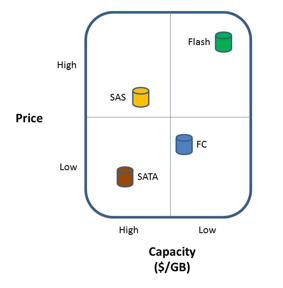
However the IOPS per $ model looks more like this:

The impact on the tiered storage architectural model of Flash storage has been, in effect, to add a tier-0 level of storage where application data is placed that requires extremely fast random I/O performance. Typical examples of such data are database index tables or key lookup tables, etc. Placing this kind of data, which may only be part of an application’s data, on Flash storage can often have a dramatically positive effect on the performance of an application. However, due to the cost of Flash storage the question is often raised, how can data centers ensure that only data that requires this level of performance resides on SSD or Flash storage so that they can continue to contain costs? Furthermore, is there a way to put only the “hot” parts of the data in the very expensive tier-0 capacity, and leave less hot, and cold data in slower, less expensive capacity? Block based automated storage tiering is the answer to these questions.
Different storage array vendors have approached this problem in different ways. However, in all cases, the object is to place data at a block level, on tier-0 or Flash storage only while that data is actually being accessed, and then to store the rest of the data on lower tiered storage while the data is at rest. Note that this movement must be done at the block level in order to avoid performance issues, and to truly minimize the capacity of the tier-0 storage.
One approach used by several storage vendors is to move blocks of data between multiple tiers of storage via a policy. For example, the policy might dictate that writes always occur to tier-0, and then if that data is not read immediately it is moved to tier-1. Then if the data isn’t read for 3 months that data is then moved to tier-2. The policy might also dictate that if the data is then read from the tier-2 disk then it is placed back on tier-0 in case additional reads are required and the entire process starts all over again. Logically this mechanism provides what enterprises are looking for, minimizing tier-0 storage and placing blocks of data on the lowest-cost storage possible. The challenge with this approach is that the I/O profile of the application needs to be well understood when the policies are developed in order to avoid accessing data from tier-2 storage too frequently and generally moving data up and down the stack too often since this movement is not “free” from a performance perspective. Additionally, EVT has found that for most customers, data rarely needs to spend time in tier-1 (FC or SAS) storage, that most of the data ends up spending most of it’s live on the SATA storage.
Therefore as the cost of Flash storage continues to come down, the need for the SAS or Fiber Channel storage will continue to decline, and eventually disappear leaving just Flash and SATA storage in most arrays.
Another approach that at least one storage vendor is using is to avoid all the policy based movement and to treat the Flash storage as a large read cache. This places the blocks that are most used on tier-0, and leaves the rest on spinning disk. When the fact that the sequential write performance of Flash, SAS/FC, and SATA is similar is taken into consideration along with a controller that orders its random writes, this approach can provide a much more robust way to implement Flash storage. In some cases, it allows an application that would not normally be considered a good candidate for SAS or Fiber Channel storage to be able to utilize SATA disks instead. In general, this technique de-couples spindle count from performance thus providing more subtle advantages as well. For example, applications which has traditionally required very small disk drives so that the spindle could would be might (many, many 146GB FC drives, for example) can now be run on much higher capacity 600GB SAS drives and still provide the same, or better performance.
Overall, automated storage tiering is becoming a de-facto standard in the storage industry. However different storage array vendors have taken very different approaches to the implementation of automated tiering, but in the end the result is uniformly the same. The ability of the enterprise to purchase Flash storage to help improve the performance of their applications while at the same time continuing to bend the cost curve of storage downward.
Monday, August 16, 2010
Dell Buys 3PAR and Monolithic vs. Modular Storage
Well, it’s been a while since I blogged, but something happened today that warrants comment.Dell has offered to buy 3PAR for about $1.1 billion. So, a number of my customers have called and emailed me asking what this all means? They want to know how I view the addition of 3PAR to Dell’s storage portfolio? What does this mean for the storage industry, and should they seriously start/stop looking at 3PAR? What about all this discussion about monolithic vs. modular storage? Is 3PAR really Tier-1 storage?
From a Sales Perspective
So, what does the fact that Dell has paid a lot of money to get 3PAR mean to those who are buying storage out there? Certainly 3PAR has been one of the innovators in storage ever since it appear back in 1999 bring things like thin provisioning and tiered storage to market. The question is, will Dell leave 3PAR alone as a business unit to continue to operate pretty much as they have in the past?
Obviously, the fact that 3PAR was on the block for sale says that they weren’t exactly burning it up, so I would expect Dell to make some changes. For example, 3PAR wasn’t the most channel friendly storage company in the world. They preferred to sell direct, especially to larger customers. I expect that this might change once Dell management starts to make more of the decisions at 3PAR. Dell depends a lot on the channel, and certainly they expect integrated sales. In other words, Dell expects that sales to their bigger clients be integrated between servers, storage, and desktops where possible, etc. HP and IBM tend to do the same thing. Once you let in the IBM server guy, for example, expect IBM storage to be right behind, and that and “integrated offering of servers and storage” will get pushed at the highest (CIO) levels of your organization.
My view of this is that it’s never a good thing, since HP, IBM, and now Dell have strengths and weaknesses in their different lines, and just because I happen to think that, say, HP servers are the best technical fit for me, doesn’t mean that HP storage is as well. I might think that Dell/3PAR is the right storage, but that doesn’t mean that Dell’s servers are really what I need. Don’t misunderstand here, I think that HP, IBM, and now Dell will have a lot of success selling an integrated solution to the top by touting cost savings, having a single throat to choke, and “integration” between the technologies. I think that this is a topic for another blog posting, so I’ll leave it here for now.
Where does 3PAR fit? Is it an Enterprise Array?
3PAR has traditionally marketed themselves as an Enterprise array which brings up a lot of discussion about what is and isn’t an Enterprise array. Some people have suggested that in order to be truly Enterprise an array needs to be Tier-1, monolithic, and be capable of supporting mainframe storage. Based on that definition, 3Par doesn’t qualify on a number of counts since it is a modular array that doesn’t support mainframe. Many people suggest that 3PAR fits in a new category called Tier 1.5. But certainly 3PAR plays at the upper end of the storage array space and competes with the EMC, IBM, HP, and HDS’s of the world for block based storage.
This begs the question is Tier 1.5 “good enough”? I’ve been arguing for some time, that for a lot of applications in today’s economic climate, that yes, Tier 1.5 is fine. That monolithic Tier 1 storage arrays are overkill for the vast majority of applications, and that the cost savings of a Tier 1.5 array is enough that for many, many, applications it is very attractive for customers who are looking to save on storage expenditures. There is also a school of thought that modular, perhaps federated, arrays are the wave of the future. That monolithic arrays will be around for some time, but that their share of the overall market will shrink down to a very small percentage. Again, this is a great topic for a future blog posting.
Will There Be Synergy?
Certainly the addition of 3PAR to the Dell fold fills a major gap in Dell’s storage portfolio. But it also might help 3PAR play in areas that it hasn’t been able to play in before. For example, 3PAR has never has a NAS offering, so the question is, can a combination of products from Dell, including 3PAR as the block storage underneath, provide a high end NAS solution from Dell? Also, now that Dell owns Ocarina, will this mean that 3PAR will have a de-dupe solution available? But it also raises some questions, such as what about Exanet? Will Dell turn them into just software that sits on top of 3PAR or EqualLogic hardware? Lots of questions to be answered here going forward, but certainly Dell has the pieces in place to provide added value to each of the individual components.
What about the EMC/Dell Relationship?
A lot of people predicted the end of the EMC/Dell relationship when Dell bought EqualLogic. That didn’t happen, Dell is still a major storage partner for EMC, and they still sell a lot of EMC arrays. So that begs the question, is the 3PAR purchase the death nell for the EMC/Dell partnership? Only time will tell, but certainly Dell is now in a much stronger competitive position against EMC than they were after the EqualLogic acquisition.
From a Sales Perspective
So, what does the fact that Dell has paid a lot of money to get 3PAR mean to those who are buying storage out there? Certainly 3PAR has been one of the innovators in storage ever since it appear back in 1999 bring things like thin provisioning and tiered storage to market. The question is, will Dell leave 3PAR alone as a business unit to continue to operate pretty much as they have in the past?
Obviously, the fact that 3PAR was on the block for sale says that they weren’t exactly burning it up, so I would expect Dell to make some changes. For example, 3PAR wasn’t the most channel friendly storage company in the world. They preferred to sell direct, especially to larger customers. I expect that this might change once Dell management starts to make more of the decisions at 3PAR. Dell depends a lot on the channel, and certainly they expect integrated sales. In other words, Dell expects that sales to their bigger clients be integrated between servers, storage, and desktops where possible, etc. HP and IBM tend to do the same thing. Once you let in the IBM server guy, for example, expect IBM storage to be right behind, and that and “integrated offering of servers and storage” will get pushed at the highest (CIO) levels of your organization.
My view of this is that it’s never a good thing, since HP, IBM, and now Dell have strengths and weaknesses in their different lines, and just because I happen to think that, say, HP servers are the best technical fit for me, doesn’t mean that HP storage is as well. I might think that Dell/3PAR is the right storage, but that doesn’t mean that Dell’s servers are really what I need. Don’t misunderstand here, I think that HP, IBM, and now Dell will have a lot of success selling an integrated solution to the top by touting cost savings, having a single throat to choke, and “integration” between the technologies. I think that this is a topic for another blog posting, so I’ll leave it here for now.
Where does 3PAR fit? Is it an Enterprise Array?
3PAR has traditionally marketed themselves as an Enterprise array which brings up a lot of discussion about what is and isn’t an Enterprise array. Some people have suggested that in order to be truly Enterprise an array needs to be Tier-1, monolithic, and be capable of supporting mainframe storage. Based on that definition, 3Par doesn’t qualify on a number of counts since it is a modular array that doesn’t support mainframe. Many people suggest that 3PAR fits in a new category called Tier 1.5. But certainly 3PAR plays at the upper end of the storage array space and competes with the EMC, IBM, HP, and HDS’s of the world for block based storage.
This begs the question is Tier 1.5 “good enough”? I’ve been arguing for some time, that for a lot of applications in today’s economic climate, that yes, Tier 1.5 is fine. That monolithic Tier 1 storage arrays are overkill for the vast majority of applications, and that the cost savings of a Tier 1.5 array is enough that for many, many, applications it is very attractive for customers who are looking to save on storage expenditures. There is also a school of thought that modular, perhaps federated, arrays are the wave of the future. That monolithic arrays will be around for some time, but that their share of the overall market will shrink down to a very small percentage. Again, this is a great topic for a future blog posting.
Will There Be Synergy?
Certainly the addition of 3PAR to the Dell fold fills a major gap in Dell’s storage portfolio. But it also might help 3PAR play in areas that it hasn’t been able to play in before. For example, 3PAR has never has a NAS offering, so the question is, can a combination of products from Dell, including 3PAR as the block storage underneath, provide a high end NAS solution from Dell? Also, now that Dell owns Ocarina, will this mean that 3PAR will have a de-dupe solution available? But it also raises some questions, such as what about Exanet? Will Dell turn them into just software that sits on top of 3PAR or EqualLogic hardware? Lots of questions to be answered here going forward, but certainly Dell has the pieces in place to provide added value to each of the individual components.
What about the EMC/Dell Relationship?
A lot of people predicted the end of the EMC/Dell relationship when Dell bought EqualLogic. That didn’t happen, Dell is still a major storage partner for EMC, and they still sell a lot of EMC arrays. So that begs the question, is the 3PAR purchase the death nell for the EMC/Dell partnership? Only time will tell, but certainly Dell is now in a much stronger competitive position against EMC than they were after the EqualLogic acquisition.
Wednesday, April 14, 2010
Path Management Software Recommendations
I haven’t posted in a while; it’s been pretty nuts, which is a good thing if you’re in the business of selling computer hardware/software, but it puts a crimp on my free time to post blog entries.
Lately I have been asked a lot about a topic in storage management that I thought most companies have a solid handle on already. But I’m being asked more and more what my recommendations are around path management. I suspect that this has something to do with the path management changes in VMware vSphere causing people to readdress this topic for VMware, and ask if they should look at it on a wider level in the data center.
In the following blog entry I describe the current state of path management and outline some recommendations for the use/implementation of path management software in the data center.
Background
The history of path management is very wrapped up with the history of the storage array vendors. Prior to the advent of PowerPath from EMC, path management was very much a part of the operating system. OS’s such as IBM’s VM, DEC’s VMS, and other mainframe and mini-computer operating systems all had the ability to communicate with their storage via more than one path and to load balance the I/O across those paths. However, when EMC and other storage vendors started to move into the open systems world, where the OS’s had a “small system” background, they found that path management was not something offered by the operating system. Early version of MS Windows, and various flavors of UNIX all had no way to address storage across more than one path, or if they did, it was simply a failover path without the ability to load-balance the I/Os. In response to this situation EMC developed PowerPath, and other storage vendors such as Hitachi soon followed suit. At that time, the path management software developed by the storage vendors only supported that storage vendor’s particular arrays. In other words EMC’s PowerPath only supported EMC arrays, Hitachi’s HDLM software only supported Hitachi arrays, and so forth. While this allowed a customer to optimize the connections between their hosts and their storage, it also had the effect of locking the customer into a single vendors arrays simply because it became very difficult to support more than one vendor’s array on the same host, and switching vendors also became more difficult by adding a significant level of effort to the migration process since all of the path management software all had to be replaced as well.
This situation remained the same for a number of years, until EMC announced support for non-EMC vendors in their PowerPath product. This announcement was a part of EMC’s plans at the time to move from a pure hardware company to a more software driven business. Along with the announcement of PowerPath for other storage vendors, EMC also announced a set of APIs that would allow management of non-EMC arrays from their flagship Control Center product and several other smaller changes to help position EMC as a software company.
Unfortunately, these changes were never fully recognized in the EMC software, nor were the EMC Sales teams particularly enthusiastic about the move away from a focus on “big iron” hardware that they had made so much money with for such a long time. This left some of the EMC products, such as PowerPath, in a position where they had some support for other vendors arrays, but that support was not complete from either an array specific feature perspective, or in the case of PowerPath, from a array vendor perspective. For example, aside from support for their own arrays, EMC PowerPath provides support for HDS (and some of the OEMs of HDS products such as HP) and some IBM arrays as well. However, support for other significant array vendors in the market such as 3PAR, Compellant, NetApp, etc. is notably missing. As a matter of fact, EMC has not added support for any array vendor since their original announcement in 2003 of support for HDS, IBM, and HP.
Things began to change when Microsoft introduced MPIO as part of the Windows operating system starting with the Windows 2000/2003 versions of the software. Microsoft, having learned from those that went before them, decided to provide a standardized mechanism for path management, but at the same time they also allow the storage array vendors to provide a plug-in (call a DSM) if they wanted to add additional capabilities for path management to MPIO. SUN developed it’s version of MPIO, called MPxIO in 2003, IBM introduced it’s version of MPIO in 2002, Linux announced Device Mapper in 2005, and the last vendor to announce MPIO software as part of the operating system was HP which announced their version of MPIO in 2007. Note that HP had a non-OS integrated version of path management called PVLinks available since the early 1990s. Therefore, by 2005 virtually every operating system in use in the data center had path management built in and the need for array vendor supported software simply no longer existed in order to provide path management.
At the same time as all of the above was happening, a company called VERITAS as part of their VERIAS Volume Manager was developing one true independent piece of path management software. VERITAS was positioning itself as an OS and array independent storage management company, and therefore it developed it’s own suite of tools for volume management, a file system, and path management software called DMP (Dynamic Multi Pathing). DMP has had its issues over the years, but was particularly popular with SUN customers, if for no other reason than it came with Foundation Suite which was very popular with SUN Solaris customers.
VMware Path Management
All of the above addresses path management purely from a host and storage array perspective. However, with the introduction of VMware another player entered the path management landscape. From the beginning, VMware required users to utilize the path management tat was built into VMware. The path management software built into VMware 3.5 and older provided basic path management feature, specifically path failover, but did not provide load balancing or any array specific features. This provided users of VMware some ability to tolerate path outages, but defiantly limited VMware’s ability to provide for high I/O applications. This limit wasn’t the only reason that early versions of VMware didn’t support high I/O applications, but it certainly needed to be addressed should VMware ever want to be able to support these high I/O applications. With the introduction of vSphere, VMware has finally addressed this issue, and more. Much like with MPIO VMware has now introduced a mechanism for storage array vendors to provide a “plug-in” into the path management functions built into vSphere called a storage array type plug-in (SATP) for the new Native Multipathing Plugins (NMP) module. One of the first vendors to take advantage of this capability was EMC with their PowerPath/VE product which provides support for EMC arrays.
Recommendations for Current Approach
There currently is no panacea when it comes to picking an approach to path management in the data center. Once again it boils down to two philosophies. Do you want to try to utilize a single path management software, or do you want to utilize the path management software that is built into the operating system?
Option #1 – Utilize a single path management software
For this option, a single piece of software is chosen and then loaded on every host to provide path management. There are really only two options for this software. You can utilize Symantec (once VERITAS) DMP, or you can use EMC PowerPath. These are the only two products in wide distribution that provide multi-vendor array support and a wide variety of host support as well.
PROs
The main advantage to utilizing a single piece of software is management of the path management software. You have a single product that is well understood provided by a single vendor to manage. Theoretically this should reduce your management costs, and provide for a more reliable and stable environment.
CONS
The down side to this approach is the cost involved. Since the software is a purchased product, a license for every host in the datacenter must be purchased from the vendor, or some kind of enterprise license obtained. In either case, tracking of the software licenses, and general management of the software often offsets the cost benefits of having a single vendor for path management. The second major disadvantage of utilizing a single path management software product is that you are locked into the list of supported hosts and arrays that the vendor chooses to provide. In the case of PowerPath the list of non-EMC arrays is very short, and appears to show no signs of ever growing any larger. In the case of DMP, there is also a question of where that product is heading, and how much development in the form of additional array support Symantec intends to provide. This creates a situation where the path management policy can prevent the organization from purchasing a new array that might provide significant cost benefit advantages. Finally, the management of versions of the path management software, the switch firmware, the operating system, and the array firmware create a complex matrix and increase the cost of support significantly. It can also slow down the rollout of newer models of arrays, switches, and host operating systems delaying cost saving.
Option #2 – Utilize the path management software built into the operating system
For this option, the built in path management software supplied with the operating system is utilized, along with the DSM (where available) to provide path management for all of the arrays in the datacenter.
PROS
With this approach dependence on third party software to provide path management is eliminated, and the support matrix for the host OS, switch and array is reduced making support much more straightforward. With the addition of a DSM to provide array specific features, all of the capabilities of the array are made available, without the need for third part software or vendor lock in. The operating system vendor, with whom a close support relationship already exists, provides support for the path management software reducing the possibility of three way finger pointing in the case of a problem. Finally, the ability to support any array which you feel provides you with a business advantage in terms of saving costs, providing additional features, and/or additional speed is once again on the table rather than the short list of arrays supported by the third party path management software vendors.
CONS
Since each operating system provides it’s own path management software some additional learning and understanding of those different path management software products would need to be maintained by the appropriate support team (storage or OS). This could add some additional costs in terms of training and support.
RECOMMENDATIONS
At this point in time, it is my recommendation that path management software integrated with the operating system be utilized rather than third party software. I believe that the flexibility to utilize nearly any array on the market today to address any storage issues you might face without being locked into a particular vendor, or even a short list of vendors, far outweighs any minor added overhead involved with learning multiple path management software interfaces.
Subscribe to:
Posts (Atom)