Monday, May 30, 2011

EMC FAST and NetApp FlashCache a Comparison

Introduction

This article is intended to provide the reader with an introduction to two technologies,  EMC FAST and NetApp FlashCache. Both of these technologies are intended to improve the performance of storage arrays, while also helping to bend the cost curve of storage downward. With the amount of data that needs to be stored increasing on a daily basis, anything that addresses the cost of storage is a welcome addition to the data center portfolio.

EMC FAST

EMC FAST (Fully Automated Storage Tiering) is actually a suite made of of two different products. the first, called FAST Cache operates by keeping a copy of "hot" blocks of data on SSD drives. In effect it acts as a very fast disk cache for data that is currently being accessed while the data itself is being stored on either 15K SAS or 7200 RPM NL-SAS (SATA) drives.

FAST Cache provides the ability to improve the performance of SATA drives, as well as to turbo charge the performance of fiber channel and SAS drives as well. In general, this kind of technology helps to divide performance from spindle count, which helps drive down the number of drives required for many workloads, thus driving down the cost of storage, and the overall TCO of storage.


The other product in the FAST suite is FAST Virtual Pool.  This is the product that most people associate with FAST since it is the one that leverages  three different disk technologies, SSD, high speed drives such as 15K RPM SAS, and slower high capacity drives such as 7200 RPM NL-SAS. By placing only data that requires high speed access on the SSD drives, data that is receiving a moderate amount of access on the 15K SAS drives, and putting the rest on the slower, high capacity disks EMC FAST is able to drive the TCO of storage downward.


NetApp FlashCache

NetApp approaches the overall issue of improved performance while simultaneously driving down the TCO of storage in a different way. NetApp believes that using fewer disks to store the same amount of data is the best way to drive down TCO. Therefore NetApp has spent a significant amount of time developing storage efficiency tools to help their customer's store more data in less space.  For example, they developed a variant of RAID-6 called RAID-DP which provides the protection and performance of RAID-10, while utilizing significantly less space. NetApp has also developed block level de-duplication which can be utilized with primary production data.

However, as with many technologies of this type there could be a performance penalty paid for it's utilization. Therefore, Netapp needed to develop a way to improve the performance if it's arrays while also supporting it's storage efficiency technology. With the advent of Flash memory, Netapp found a way to do this without any need for significant changes in the architecture of it's arrays. Thus was born FlashCache.

FlashCahce provides a secondary read cache for hot blocks of data. This proves a way to separate performance from spindle count,  and thus not only allows workloads intended for Fiber Channel or SAS drives to potentially run on SATA drives, but it also addresses some of the performance issues with the storage efficiency technologies that NetApp developed. For example, with FlashCache utilized in a virtual desktop environment Netapp de-duplication allows many individual Windows images to be represented in a very small footprint on disk. However a problem arrises when a large numer of desktops all try to access their Windows image at once. However with the addition of FlashCache, most, if not all of the Windows image would end up being storage in Flash memory, thus avoiding the performance issue of a boot storm, virus checking storm, etc.


Conclusion


Both EMC and Netapp have developed ways to help both improve the performance, and drive the TCO of storage downward. the two vendors approached the problem is somewhat different ways, but in the end they have both solved the problem in unique and effective ways. 

The NetApp technology requires that the user buy-in completely to the NetApp vision of storage efficiency. If the user ignores the advantages of de-dupication in particular, or has data or workloads  that simply don't allow for the application of the NetApp storage efficiency technology then the TCO saving that NetApp promises will not be achieved. Utilizing FlashCache to seperate performance from spindle count is also critical in maintaining the performance of the array. This separation of performance from spindle count also in and of itself drives dwn the number ofd drives needed to support a workload, and thus also drives down the TCO.

The EMC technology requires a very good understanding of your application workloads, and careful planning and sizing of the different tiers of storage. EMC could do more to make the two sub-products work together so that a single solution could provide both the TCO and the performance improvements at the same time. However, EMC FAST is a product that provides the TCO improvement promised, and doe it with a clean and elegant solution.

Finally, a little on the future. With the cost of Flash memory coming down 50% year over year, it will soon reach the same price point that we currently see 15K HDD's at. Once that happens one has to wonder what role 15K HHDs will fill? If 15K HDDs are, indeed, squeezed out of existence by this reduction in the price of Flash memory, what purpose will 3 tiered automated storage tiering fill? Or, will the future simply be 2 tiers of storage, one that provides bulk capacity, and one that accelerates the performance of this bult capacity? if that predication is correct, then FAST VP will have a limited life, and FAST Cache and FlashCache will be the longer surviving technology.

Friday, May 20, 2011

Flash Storage and Automated Storage Tiering

In recent years, a move toward automated storage tiering has begun in the data center. This move has been inspired by the desire to continue to drive down the cost of storage, as well as the introduction of faster, but more expensive storage in the form of Flash memory in the storage array marketplace. Flash memory is significantly faster than spinning disks, and thus it’s ability to provide very high performance storage has been of interest. However, its cost is considerable, and therefore a way to utilize it and still bend the cost curve downward was needed. Note that Flash memory has been implemented in different ways. It can be obtained as a card for the storage array controller, or as SSD disk drives, and even, as cache on regular spinning disks. However it is implemented, it’s speed and expense remains the same.

Enter the concept of tiered storage again. The idea was to place only that data which absolutely required the very high performance of Flash on Flash, and to leave the remaining data on spinning disk. The challenge with tiered storage in the way that it has been defined in the past was that it meant that too much data would be placed on very expensive Flash since traditionally an entire application would have all it’s data placed on a single tier. Even if only specific parts of the data at the file, or LUN level were placed on Flash, the quantity needed would still be very high, thus driving the costs of for a particular application up. It was quickly recognized that the only way to make Flash cost effective would be to place only the blocks which are “hot” for an application in Flash storage, thereby minimizing the footprint of Flash storage.

The issue addressed by automated storage tiering is that you no longer need to know ahead of time what the proper tier of storage for a particular application’s data needs to be. Furthermore the classification of the data can occur at a much more fine-grained block level rather than the file or the LUN as with some earlier automated storage tiering implementations.

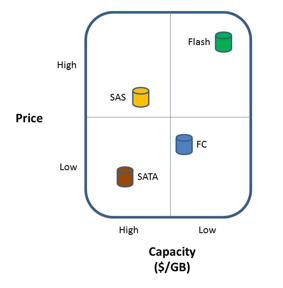
Flash has changed the landscape of storage for the enterprise. Currently, Fash/SSD storage can cost 16-20X what Fiber channel, SAS, or SATA storage can cost. The dollars per GB model ends up looking something like the following:


However the IOPS per $ model looks more like this:


The impact on the tiered storage architectural model of Flash storage has been, in effect, to add a tier-0 level of storage where application data is placed that requires extremely fast random I/O performance. Typical examples of such data are database index tables or key lookup tables, etc. Placing this kind of data, which may only be part of an application’s data, on Flash storage can often have a dramatically positive effect on the performance of an application.  However, due to the cost of Flash storage the question is often raised, how can data centers ensure that only data that requires this level of performance resides on SSD or Flash storage so that they can continue to contain costs? Furthermore, is there a way to put only the “hot” parts of the data in the very expensive tier-0 capacity, and leave less hot, and cold data in slower, less expensive capacity? Block based automated storage tiering is the answer to these questions.

Different storage array vendors have approached this problem in different ways. However, in all cases, the object is to place data at a block level, on tier-0 or Flash storage only while that data is actually being accessed, and then to store the rest of the data on lower tiered storage while the data is at rest. Note that this movement must be done at the block level in order to avoid performance issues, and to truly minimize the capacity of the tier-0 storage.

One approach used by several storage vendors is to move blocks of data between multiple tiers of storage via a policy. For example, the policy might dictate that writes always occur to tier-0, and then if that data is not read immediately it is moved to tier-1. Then if the data isn’t read for 3 months that data is then moved to tier-2. The policy might also dictate that if the data is then read from the tier-2 disk then it is placed back on tier-0 in case additional reads are required and the entire process starts all over again. Logically this mechanism provides what enterprises are looking for, minimizing tier-0 storage and placing blocks of data on the lowest-cost storage possible. The challenge with this approach is that the I/O profile of the application needs to be well understood when the policies are developed in order to avoid accessing data from tier-2 storage too frequently and generally moving data up and down the stack too often since this movement is not “free” from a performance perspective. Additionally, EVT has found that for most customers, data rarely needs to spend time in tier-1 (FC or SAS) storage, that most of the data ends up spending most of it’s live on the SATA storage.

Therefore as the cost of Flash storage continues to come down, the need for the SAS or Fiber Channel storage will continue to decline, and eventually disappear leaving just Flash and SATA storage in most arrays.

Another approach that at least one storage vendor is using is to avoid all the policy based movement and to treat the Flash storage as a large read cache. This places the blocks that are most used on tier-0, and leaves the rest on spinning disk. When the fact that the sequential write performance of Flash, SAS/FC, and SATA is similar is taken into consideration along with a controller that orders its random writes, this approach can provide a much more robust way to implement Flash storage.  In some cases, it allows an application that would not normally be considered a good candidate for SAS or Fiber Channel storage to be able to utilize SATA disks instead. In general, this technique de-couples spindle count from performance thus providing more subtle advantages as well.  For example, applications which has traditionally required very small disk drives so that the spindle could would be might (many, many 146GB FC drives, for example) can now be run on much higher capacity 600GB SAS drives and still provide the same, or better performance.

Overall, automated storage tiering is becoming a de-facto standard in the storage industry. However different storage array vendors have taken very different approaches to the implementation of automated tiering, but in the end the result is uniformly the same. The ability of the enterprise to purchase Flash storage to help improve the performance of their applications while at the same time continuing to bend the cost curve of storage downward.

Monday, August 16, 2010

Dell Buys 3PAR and Monolithic vs. Modular Storage

Well, it’s been a while since I blogged, but something happened today that warrants comment.Dell has offered to buy 3PAR for about $1.1 billion. So, a number of my customers have called and emailed me asking what this all means? They want to know how I view the addition of 3PAR to Dell’s storage portfolio? What does this mean for the storage industry, and should they seriously start/stop looking at 3PAR? What about all this discussion about monolithic vs. modular storage? Is 3PAR really Tier-1 storage?

From a Sales Perspective

So, what does the fact that Dell has paid a lot of money to get 3PAR mean to those who are buying storage out there? Certainly 3PAR has been one of the innovators in storage ever since it appear back in 1999 bring things like thin provisioning and tiered storage to market. The question is, will Dell leave 3PAR alone as a business unit to continue to operate pretty much as they have in the past?

Obviously, the fact that 3PAR was on the block for sale says that they weren’t exactly burning it up, so I would expect Dell to make some changes. For example, 3PAR wasn’t the most channel friendly storage company in the world. They preferred to sell direct, especially to larger customers. I expect that this might change once Dell management starts to make more of the decisions at 3PAR. Dell depends a lot on the channel, and certainly they expect integrated sales. In other words, Dell expects that sales to their bigger clients be integrated between servers, storage, and desktops where possible, etc. HP and IBM tend to do the same thing. Once you let in the IBM server guy, for example, expect IBM storage to be right behind, and that and “integrated offering of servers and storage” will get pushed at the highest (CIO) levels of your organization.

My view of this is that it’s never a good thing, since HP, IBM, and now Dell have strengths and weaknesses in their different lines, and just because I happen to think that, say, HP servers are the best technical fit for me, doesn’t mean that HP storage is as well. I might think that Dell/3PAR is the right storage, but that doesn’t mean that Dell’s servers are really what I need. Don’t misunderstand here, I think that HP, IBM, and now Dell will have a lot of success selling an integrated solution to the top by touting cost savings, having a single throat to choke, and “integration” between the technologies. I think that this is a topic for another blog posting, so I’ll leave it here for now.

Where does 3PAR fit? Is it an Enterprise Array?

3PAR has traditionally marketed themselves as an Enterprise array which brings up a lot of discussion about what is and isn’t an Enterprise array. Some people have suggested that in order to be truly Enterprise an array needs to be Tier-1, monolithic, and be capable of supporting mainframe storage. Based on that definition, 3Par doesn’t qualify on a number of counts since it is a modular array that doesn’t support mainframe. Many people suggest that 3PAR fits in a new category called Tier 1.5. But certainly 3PAR plays at the upper end of the storage array space and competes with the EMC, IBM, HP, and HDS’s of the world for block based storage.

This begs the question is Tier 1.5 “good enough”? I’ve been arguing for some time, that for a lot of applications in today’s economic climate, that yes, Tier 1.5 is fine. That monolithic Tier 1 storage arrays are overkill for the vast majority of applications, and that the cost savings of a Tier 1.5 array is enough that for many, many, applications it is very attractive for customers who are looking to save on storage expenditures. There is also a school of thought that modular, perhaps federated, arrays are the wave of the future. That monolithic arrays will be around for some time, but that their share of the overall market will shrink down to a very small percentage. Again, this is a great topic for a future blog posting.

Will There Be Synergy?

Certainly the addition of 3PAR to the Dell fold fills a major gap in Dell’s storage portfolio. But it also might help 3PAR play in areas that it hasn’t been able to play in before. For example, 3PAR has never has a NAS offering, so the question is, can a combination of products from Dell, including 3PAR as the block storage underneath, provide a high end NAS solution from Dell? Also, now that Dell owns Ocarina, will this mean that 3PAR will have a de-dupe solution available? But it also raises some questions, such as what about Exanet? Will Dell turn them into just software that sits on top of 3PAR or EqualLogic hardware? Lots of questions to be answered here going forward, but certainly Dell has the pieces in place to provide added value to each of the individual components.

What about the EMC/Dell Relationship?

A lot of people predicted the end of the EMC/Dell relationship when Dell bought EqualLogic. That didn’t happen, Dell is still a major storage partner for EMC, and they still sell a lot of EMC arrays. So that begs the question, is the 3PAR purchase the death nell for the EMC/Dell partnership? Only time will tell, but certainly Dell is now in a much stronger competitive position against EMC than they were after the EqualLogic acquisition.

Wednesday, April 14, 2010

Path Management Software Recommendations

I haven’t posted in a while; it’s been pretty nuts, which is a good thing if you’re in the business of selling computer hardware/software, but it puts a crimp on my free time to post blog entries. 

Lately I have been asked a lot about a topic in storage management that I thought most companies have a solid handle on already. But I’m being asked more and more what my recommendations are around path management. I suspect that this has something to do with the path management changes in VMware vSphere causing people to readdress this topic for VMware, and ask if they should look at it on a wider level in the data center.

In the following blog entry I describe the current state of path management and outline some recommendations for the use/implementation of path management software in the data center.

Background

The history of path management is very wrapped up with the history of the storage array vendors. Prior to the advent of PowerPath from EMC, path management was very much a part of the operating system. OS’s such as IBM’s VM, DEC’s VMS, and other mainframe and mini-computer operating systems all had the ability to communicate with their storage via more than one path and to load balance the I/O across those paths. However, when EMC and other storage vendors started to move into the open systems world, where the OS’s had a “small system” background, they found that path management was not something offered by the operating system. Early version of MS Windows, and various flavors of UNIX all had no way to address storage across more than one path, or if they did, it was simply a failover path without the ability to load-balance the I/Os.  In response to this situation EMC developed PowerPath, and other storage vendors such as Hitachi soon followed suit. At that time, the path management software developed by the storage vendors only supported that storage vendor’s particular arrays. In other words EMC’s PowerPath only supported EMC arrays, Hitachi’s HDLM software only supported Hitachi arrays, and so forth. While this allowed a customer to optimize the connections between their hosts and their storage, it also had the effect of locking the customer into a single vendors arrays simply because it became very difficult to support more than one vendor’s array on the same host, and switching vendors also became more difficult by adding a significant level of effort to the migration process since all of the path management software all had to be replaced as well.

This situation remained the same for a number of years, until EMC announced support for non-EMC vendors in their PowerPath product. This announcement was a part of EMC’s plans at the time to move from a pure hardware company to a more software driven business. Along with the announcement of PowerPath for other storage vendors, EMC also announced a set of APIs that would allow management of non-EMC arrays from their flagship Control Center product and several other smaller changes to help position EMC as a software company.

Unfortunately, these changes were never fully recognized in the EMC software, nor were the EMC Sales teams particularly enthusiastic about the move away from a focus on “big iron” hardware that they had made so much money with for such a long time. This left some of the EMC products, such as PowerPath, in a position where they had some support for other vendors arrays, but that support was not complete from either an array specific feature perspective, or in the case of PowerPath, from a array vendor perspective. For example, aside from support for their own arrays, EMC PowerPath provides support for HDS (and some of the OEMs of HDS products such as HP) and some IBM arrays as well. However, support for other significant array vendors in the market such as 3PAR, Compellant, NetApp, etc. is notably missing. As a matter of fact, EMC has not added support for any array vendor since their original announcement in 2003 of support for HDS, IBM, and HP.

Things began to change when Microsoft introduced MPIO as part of the Windows operating system starting with the Windows 2000/2003 versions of the software. Microsoft, having learned from those that went before them, decided to provide a standardized mechanism for path management, but at the same time they also allow the storage array vendors to provide a plug-in (call a DSM) if they wanted to add additional capabilities for path management to MPIO. SUN developed it’s version of MPIO, called MPxIO in 2003, IBM introduced it’s version of MPIO in 2002, Linux announced Device Mapper in 2005, and the last vendor to announce MPIO software as part of the operating system was HP which announced their version of MPIO in 2007. Note that HP had a non-OS integrated version of path management called PVLinks available since the early 1990s. Therefore, by 2005 virtually every operating system in use in the data center had path management built in and the need for array vendor supported software simply no longer existed in order to provide path management.

At the same time as all of the above was happening, a company called VERITAS as part of their VERIAS Volume Manager was developing one true independent piece of path management software. VERITAS was positioning itself as an OS and array independent storage management company, and therefore it developed it’s own suite of tools for volume management, a file system, and path management software called DMP (Dynamic Multi Pathing).  DMP has had its issues over the years, but was particularly popular with SUN customers, if for no other reason than it came with Foundation Suite which was very popular with SUN Solaris customers.
VMware Path Management
All of the above addresses path management purely from a host and storage array perspective. However, with the introduction of VMware another player entered the path management landscape. From the beginning, VMware required users to utilize the path management tat was built into VMware. The path management software built into VMware 3.5 and older provided basic path management feature, specifically path failover, but did not provide load balancing or any array specific features. This provided users of VMware some ability to tolerate path outages, but defiantly limited VMware’s ability to provide for high I/O applications. This limit wasn’t the only reason that early versions of VMware didn’t support high I/O applications, but it certainly needed to be addressed should VMware ever want to be able to support these high I/O applications. With the introduction of vSphere, VMware has finally addressed this issue, and more. Much like with MPIO VMware has now introduced a mechanism for storage array vendors to provide a “plug-in” into the path management functions built into vSphere called a storage array type plug-in (SATP) for the new Native Multipathing Plugins (NMP) module. One of the first vendors to take advantage of this capability was EMC with their PowerPath/VE product which provides support for EMC arrays.

Recommendations for Current Approach

There currently is no panacea when it comes to picking an approach to path management in the data center. Once again it boils down to two philosophies. Do you want to try to utilize a single path management software, or do you want to utilize the path management software that is built into the operating system?

Option #1 – Utilize a single path management software

For this option, a single piece of software is chosen and then loaded on every host to provide path management. There are really only two options for this software.  You can utilize Symantec (once VERITAS) DMP, or you can use EMC PowerPath. These are the only two products in wide distribution that provide multi-vendor array support and a wide variety of host support as well.
PROs
The main advantage to utilizing a single piece of software is management of the path management software. You have a single product that is well understood provided by a single vendor to manage.  Theoretically this should reduce your management costs, and provide for a more reliable and stable environment.

CONS
The down side to this approach is the cost involved. Since the software is a purchased product, a license for every host in the datacenter must be purchased from the vendor, or some kind of enterprise license obtained. In either case, tracking of the software licenses, and general management of the software often offsets the cost benefits of having a single vendor for path management. The second major disadvantage of utilizing a single path management software product is that you are locked into the list of supported hosts and arrays that the vendor chooses to provide. In the case of PowerPath the list of non-EMC arrays is very short, and appears to show no signs of ever growing any larger. In the case of DMP, there is also a question of where that product is heading, and how much development in the form of additional array support Symantec intends to provide. This creates a situation where the path management policy can prevent the organization from purchasing a new array that might provide significant cost benefit advantages. Finally, the management of versions of the path management software, the switch firmware, the operating system, and the array firmware create a complex matrix and increase the cost of support significantly. It can also slow down the rollout of newer models of arrays, switches, and host operating systems delaying cost saving.

Option #2 – Utilize the path management software built into the operating system

For this option, the built in path management software supplied with the operating system is utilized, along with the DSM (where available) to provide path management for all of the arrays in the datacenter.

PROS
With this approach dependence on third party software to provide path management is eliminated, and the support matrix for the host OS, switch and array is reduced making support much more straightforward. With the addition of a DSM to provide array specific features, all of the capabilities of the array are made available, without the need for third part software or vendor lock in.  The operating system vendor, with whom a close support relationship already exists, provides support for the path management software reducing the possibility of three way finger pointing in the case of a problem. Finally, the ability to support any array which you feel provides you with a business advantage in terms of saving costs, providing additional features, and/or additional speed is once again on the table rather than the short list of arrays supported by the third party path management software vendors.

CONS
Since each operating system provides it’s own path management software some additional learning and understanding of those different path management software products would need to be maintained by the appropriate support team (storage or OS). This could add some additional costs in terms of training and support.

RECOMMENDATIONS

At this point in time, it is my recommendation that path management software integrated with the operating system be utilized rather than third party software. I believe that the flexibility to utilize nearly any array on the market today to address any storage issues you might face without being locked into a particular vendor, or even a short list of vendors, far outweighs any minor added overhead involved with learning multiple path management software interfaces.


Thursday, November 5, 2009

Virtual Computing Environment Coalition

I was wondering how long it would take before these three decided to get together and try to push out the competition. For a customer that hasn’t really done anything with Virtualization due to the perceived risk with implementation this would be a tempting way to go since it would appear to reduce those risks. There are really three main parts to this announcement.

The Vblock Infrastructure Packages
This is the combined hardware and software offered by Cisco, EMC, and VMware which are made up of pre-packaged VMware, UCS, MDS, and EMC storage solutions and called a Vblock. As part of the announcement, three Vblock solutions were introduced:
  • Vblock 0 (available mid-year 2010) is an entry level system which includes Cisco compute and networking, EMC Unified Storage, and VMware vSphere software.
  • Vblock 1 is a mid-sized configuration that includes Cisco UCS, Nexus 1000v and MDS swicthes, EMC CLARiiON CX-4 storage, and VMware vSphere.
  • Vblock 2 is a high end solution that includes Cisco UCS, Nexus 1000v and MDS swicthes, EMC Symmetrix V-Max storage, and VMware vSphere.
VCE Services
There are a number of "pre-packaged" services offerings ranging from high level strategy, to actual implimentation services for the Vblock. These servcices will be delivered by a new company called Acadia which is a joint venture between Cisco and EMC. Note that a quick trip to Acadia.com indicates that Acadia will not be fully functional until 2010.

VCE Seamless Support
The three vendors have created a vutual support center which is a combination of people from each of the three. They have also created joint test labs and cooperative engineering groups, etc. to try and provide the customer with a single point of contact for support.

My experience has been that the support for Vmware solutions tends to break down around the interfaces between the components. For example, where the storage meets the server and VMware itself. When there is a problem, who do you call first? As it turns out managing the “interfaces” tends to fall on the heads of the customer's infrastructure team. They in turn need the skills and the knowledge to fill those gaps. THAT is a lot of risk to take on, especially in the beginning. The consolidated support part of this coalition would mitigate those risks since there is only one virtual support organization. The question in my mind as a customer would be, how up to speed are these support guys going to be in regards to those “gaps” on day one?

You also have to wonder how much leverage a customer ends up having when they are buying this kinds of unified solution? Since everything is unified, and there is only one game in town, you have to wonder how expensive something like this is going to be? Sure, EMC, CISCO, and Vmware are going to tell you that all of the goodness of the unification means that the solution is going to be a little more expense ... But look at what you’re getting for that extra money! ;-)

What I would be interesting in knowing is what other vendors like Microsoft, Brocade, IBM, NetApp and Hitachi are planning as a response, if anything? Perhaps a collation between VMware, DELL, Brocade, and NetApp to offer similar prepackaged solutions? Would Vmware refuse to join such a collation and turn away business? Or even if they didn’t join the collation there’s still nothing preventing the rest of those vendors from forming a collation and just buying Vmware as they need it or joing with Microsoft and offereing something based on Hyper-V instead of VMware. Could this be the start of “Coalition Wars”?

Sunday, April 5, 2009

The real cost of storage

What's the real cost of storage? I get asked this question all the time, and it's so difficult to answer because it really does depend on so many factors from storage team to storage team. What's really surprising to me is that I'm being asked the question at all. You would think that everyone who runs a storage organization would know exactly what that number is. Some people simply look at their budget and say "here you go, this is what it costs". But can you break it down? Do you know where all of that money is going, and why? I think that's really what people are asking. They know how much they are spending, but they want to know why and how they can save money. Certainly in these economic times storage managers are asked to do more with less while the data continues to grow. So that leaves them asking, how? How do I manage to address this growing pile of data with fewer people, less CAPEX budget, and more demands from the business around things like disaster recovery?

So how do you address the question? How do you do more with less? A lot of storage managers are looking at the cost per GB of their disks and asking, can I get this number down? I think that they can, but it may mean doing some things in different ways than they have in the past. Specifically, here are some things to look at.

Tiered Storage

Yup, I'm recycling that idea again. Getting data off expensive spinning disk and onto cheaper disk saves money, I think that's been well established and taking another look at how you are classifying your data is a worthwhile endeavor at this point in time. Why? Because things have changed in the last year or two, and those changes might have an impact on your data classification policies, so I think a review might be in order. For example, a few years ago when I was classifying data I used SATA disk pretty much just for dev/test and archive data. But things have changed, and now there's technology out there that will allow you to use SATA disk for some of your production workload. Some technology that will even allow you to use SATA drives for all but your most demanding workloads for that matter the IBM's new XIV are now available. So, another look at your tiering policies and the SATA technology that's available today is probably a good use of your time if you're looking to save some money.

Cost of Managing Your Storage

What does it really cost to manage your storage on a per GB basis? This is really the age old question of "how many TB of storage can a single storage admin administer?" that we have been asking for a long time. The answer to this question is critical since you probably aren't getting a whole lot more headcount right now, and you might even be asked to give some up. So how do you manage more disk space with the same or fewer people? First, you have to keep in mind all of the things that go into managing a TB of space. There's a lot more to it than just provisioning a TB to an application and then walking away, right? Here are a few examples of the kinds of things that go into managing a TB of space based on my experience:

  1. Provisioning – This one is obvious, right? But you would be surprised how many people have immature processes and procedures around disk provisioning. How many people still manage their disks based on spreadsheets and command-line scripts making the process time consuming and error prone.
  2. Backup/recovery – So you have to make sure that your data is protected, and that you can get it back should the need arise. This can be a time consuming effort, and one place that you can look for efficiencies that will save you money. It's also a place that people sometimes forget to account for when they are buying more disks. Don't forget that as you add disk capacity, you also have to add backup/restore capacity, and that means more tape, or backup disk, etc but it also means that you have to account for the increased load on your backup admins as well.
  3. Disaster recovery – All of the same things I talked about above with backup/recovery also applies to DR.
  4. Data migration – Sooner or later you're going to have to move this data around. Whether it's because the lease is up on an array, or you need to re-tier the data doesn't matter, what matters is that this can be a costly process in perms of people time, and sooner or later you're going to have to do it.
  5. Performance management – At some point you always get that call "hey, our database is slow and we've looked at everything else and haven't found the problem, can you look and see if it's the disks?" Unless you have some very mature performance management processes in place, this tends to turn into a huge people time sink.
  6. Capacity management – We all know that our data is growing, that's a given, so that means that we need to spend some time planning how we are going to address that growth. When are we going to have to make those new disk purchases, when will we have to buy a whole new array? What about the switches? Are we going to need to expand that environment when we bring in that new array as well?
  7. Documentation – yes, that's right, I said it, documentation is an important part of managing your storage, and it can take up quite a bit of the storage admins time, but it has to be done.

So the question I always ask is, "how mature and efficient are your processes?" Do you have a high degree of automation around all of the above? What use are you making of technology to help you manage the processes above? If you have very mature processes, employ a high degree of automation, and make good use of technology to help you automate as many of those processes as possible, then you probably have done everything you can to drive down the cost of managing your storage. But now is a good time to take a look and see if you can improve any of those areas. For example, does my disk vendor really provide tools to make managing my disk arrays easier? Not just from a provisioning standpoint, but from the standpoint of all of the above. If not, maybe it's time to consider looking at another vendor, one that has better tools.

Let me leave you with a final thought in this area based on my experience. What I found when I was managing storage was that the cost of managing a TB of disk could easily meet or exceed the cost of buying that disk over the 3-4 year life of that disk. So, a myopic focus on who has the cheapest disks on a per GB basis may not make much sense. Perhaps what we should focus on is how much it costs to manage a TB of a particular vendor's disk. In other words, the 3-4 year TCO for any storage acquisition needs to include the cost of management, not just the per GB cost of the space.

SSD vs. Wide Striping

So, what's this got to do with the topic at hand? Well, I think that a lot of the argument around this is really an argument around the cost of managing disks. Both technologies have their places, and both can help you address certain performance issues, and both can help you save money. The difference is that SSDs only help with a very small percentage of cases, whereas wide striping can help you with the vast majority of cases. What's more, wide striping can help you address those management costs and drive down that 3-4 year TCO I keep talking about, where-as SSDs really don't help there at all, and in a lot of cases, I believe that the 3-4 year TCO goes way up with SSDs. That's not to say that for those cases where you need the performance, that using SSDs in a targeted way isn't a good idea. But just keep in mind what I said about the cost of managing a TB of storage perhaps exceeding the cost of purchasing it in the first place. In the end, I think we need both, but I think that the bulk of your storage should be on a side striped array where your storage admins don't have to spend a lot of time trying to figure out exactly where they should place the data so that the new LUNs will perform, and the added load doesn't negatively impact existing applications.

My vision

So, ideally, I think that the storage team should have a vast majority of their data on an array that does wide striping, manage that space though some kind of virtualization engine, and purchase SSDs very tactically to address specific performance issues, again managing everything through the virtualization engine thus allowing re-tiering of the data should that be necessary, and making migrations when they are needed quicker, easier, and less impactful to the business. You also need to deploy software to help you with performance management as well as capacity management, and something to help automate the documentation process. This means that there is very likely not a single vendor that can provide all of the technology, but rather you will need to put together a "best of breed" approach you your storage environment. Here's an example of one set of technologies that I think can help get you to where you want to be.

IBM XIV storage – The XIV provides wide striped storage on SATA disks and makes it all very easy to manage. This is where I would put the bulk of my data since my admins wouldn't have to sit there and try and figure out where to place the data, etc.

EMC CLARiion – Put some flash drives in a CLARiiON and I think you have a great platform for those few LUNs you need that require the kind of performance that SSDs offer if you have that kind of need.

Datacore SANSymphony - A software approach to SAN virtualization which allows you to move data around to different arrays without the users being aware that it's going on. This is the way that you address things like re-tiering of your data as well.

Akorri – This is a software tool that helps you to manage your entire storage infrastructure find the bottlenecks, and generally free up storage admin time.

Quantum DXi 7500 – This is a deduplicating VTL that will help you reduce the amount of time that your backup admins spend troubleshooting failed backups.

Aptare Storage Console – This is software that will help you manage your backups. It will report on things like what backups failed, which of those were on SOX systems, etc.


The above are just a few examples of what's available out there to help you to create a more mature, automated, easier to manage storage environment, but they certainly aren't the only ones, just some good examples of what's available, and why you should be looking at that kind of technology. In the end, whatever you choose, just making sure that you are truly addressing the 3-4 year TCO of your environment is the key to getting those management costs under control and allowing your storage/backup admins to manage larger and larger environments.


Monday, February 23, 2009

Storage Shangri-La

Cloud Computing

I don't know about you, but I've spent a lot of time reading about "Cloud Computing" lately. A lot of space has been devoted to the topic in the blogosphere, that's for sure. Some people think it's the "next big thing", others say not on your life. But don't worry; I'm not going to bore you with another prediction. Personally, I think that the truth lies somewhere in the middle. By the end of this year, or the beginning of next I think we will see some people adopting "Cloud Computing", mostly in the SMB space. The enterprise customers will pretty much stick to their data centers, with a few exceptions for certain applications.

Ok, so now that I've bored you with a prediction after I said I wouldn't, here's why I did it. If I'm right, and enterprise customers do stick to their internal data centers it begs the question what are those data centers going to look like? How are these companies going to address the simultaneous issues of an uncertain economy, increasing demands on IT, and storage in particular, that confront them? For now, I'll stick with the storage team, since I think that they have a particularly difficult task. Data volumes continue to grow, no matter what is happening with the economy. Maybe those volumes won't grow quite as fast as they did when things were booming, but they will continue to grow. This means that the issues of increased capacity will continue to challenge the storage team. What will be new is that they will have to address those challenges with fewer dollars. As I indicated in my last blog, entitled Storage Efficiency, that means an ever more myopic focus on "storage efficiency" for most companies. But as I said, this can also present an opportunity for forward thinking leaders to implement changes in IT, and in storage in particular, that will provide not only long term cost savings, but also provide better service to the business.

Everyone into the pool!

So, what is my vision for the storage team that will do these amazing things? It's just as simple as applying what seems to be working for the server team to storage, virtualization. Actually, it's a bit more than that. It's creating a pool of storage which can be managed as a single entity and delivered in different ways (NAS, SAN, FCoE, etc.), easily backed up, and protected with a proper DR solution. I realize that some of you reading this are saying "he's talking about storage Shangri-La"! Well, maybe I am, but I think that it's something that technology today might just allow me to do. It won't necessarily come from a single vendor, but I think that it's doable, but it means some changes to the way that organizations purchase storage, and the kind of storage that they purchase. It also means that some money will need to be expended in order to create that Shangri-La. It's because of those expenditures that it's going to take forward looking leadership. The fearful and the visionless need not apply.

If you are going to use heterogeneous storage (and I think you should at least be able to) in your storage pool, then you need some way to do things like SNAPs, Replication, and DR which is not vendor dependant. Personally, I think that the virtualization engine itself should provide those features, but you could use a third party tool to perform those functions as well. The key point here is that you separate these functions from the storage array so that you aren't dependant on what's available from a single storage vendor, or a single storage vendor's array for this functionality. That is unless you pick a storage vendor who provides virtualization in the array itself as your virtualization engine. For example, if you use the Netapp V Series of virtualization engines, or the Hitachi USP or USP-VM to perform your virtualization. Those engines provide you with the ability to use the vendor's tools for replication, etc. with many other vendors' storage. They key is to find a virtualization engine which allows you to perform storage moves in a completely transparent manner to the hosts that consume that storage. This is important not only for reducing the impact of changes in your storage vendor, for example, but also when you want to re-tier you data. We often take data for certain applications which we consider borderline, and put it on tier-1 storage just to be safe. Now we can put that data on tier-2 storage (SATA), and if the performance turns out not to be what we need, we can move it to tier-1 without any disruption to the application. Thus saving CAPEX costs for the organization as well as OPEX costs.

This also means that there would be a change over time in the kind of storage I would buy. I would prefer to buy storage arrays that have little in the way of the kind of features that I describe above. Basically, just something that lets me configure different protection levels, and provides the storage out more than one port so that I can provide some high availability. All this should save on the per GB cost of the storage, and since I can use any vendor I want, my ability to negotiate price is enhanced. Again, more savings on CAPEX costs.

Storage Delivery

Once we have this pool of disk available, we need to make sure that we can deliver this storage in different ways. We need to make sure that the storage network is flexible enough to deliver the storage using iSCSI, Fiber Channel, and NAS (NFS or CIFS). Again, if you can get this from a single source, like Netapp, that's one way to go. However, if you go a different route with your virtualization engine, then you need to make sure that your NAS engines are gateways, not appliances, so that you can deliver any vendors storage out of the pool. The same is true for any other storage consumers other than your applications hosts. For example, if you want to do backup to disk using something like a Data domain box, then, again, make sure that you are using their gateway so that you can utilize any kind of disk from the storage pool with your Data Domain solution.

Backup and DR

Finally, backups and DR need to be addressed. As I mentioned above, these services need to be available in the pool regardless of the mix storage vendors used. But at some point you may need to take things to tape, and that's OK. Again, as long as the tape management system you use will play well with the virtual disk pool you have created. But more importantly, I recommend that daily backups be done to disk. The cost is within reason when you consider some of the deduplicating devices available today. This relegates tape to just an offsite (DR) role. You can even replicate some of these deduplicating devices, potentially eliminating tape entirely and saving yourself a lot of OPEX costs.

Wrap-up

So, I really believe that now is the time, under the guise of cost savings, to introduce things like storage virtualization, backup to disk, SNAPs, etc. If you have forward thinking leadership they will recognize that the ROI for the costs is reasonably short, and when it's done, the ability of the storage team to manage more storage, provision storage more quickly, and reduce the cost of a managed GB of storage will be greatly enhanced going into the future. It will also position the storage team to handle the onslaught of storage growth that we are going to see once the economy turns around.

GestaltIT

I just want to mention that this blog is now being syndicated on http://gestaltit.com/. I want to say what an honor it is for me to be associated with GestaltIT. Stephen, and all the other authors are much better known and much smarter folks, so I'm hoping to be able to provide some content that doesn't embarrass. Take a look if you get a chance, there some great stuff there.

--joerg