Sunday, September 8, 2013

Is OpenStack ready for prime time yet?

For those who've been reading this blog for a while, or who know me, you know that while I've been in the data center business for a long time, that lately I've been focused on storage and backup. However, over the last couple of years I've been watching the infrastructure business change.  What I find interesting is that what's old is new again!

When I first started out in "Open Systems", network, server, and storage was all managed as a single entity. So, here we are again. A "pod" or stack is just network, server, and storage all managed together, as a single entity.  The new wrinkle here is that we also size them as a single entity which provides a number of advantages. But that's for another blog. As a matter of fact, I plan to write a couple of blogs on IaaS/PaaS/SaaS, how to move successfully to "the cloud", and data protection a cloud environment.

In this blog, I want to talk about one of the "stacks" called "OpenStack". The first questions I get asked when I first begin to talk about OpenStack is, what's the difference between a "stack" and a "pod"?  Why is it called OpenStack and not OpenPod? The confusion is quite understandable, since the amount of hype and marketecture around everything having to do with "the cloud", including this topic, is enormous.  As a matter of fact, it's so bad, that some of the terms are, in my opinion, starting to become meaningless.  So I like to start out any discussion of any of these topics with a couple of definitions so that the audience and I are on the same page. According to Wikipedia:

OpenStack is a cloud computing project to provide an infrastructure as a service (IaaS). It is free open source software released under the terms of the Apache License. The project is managed by the OpenStack Foundation, a non-profit corporate entity established in September 2012 to promote OpenStack software and its community.

This begs a definition of IaaS (Infrastructure as a Service) again form Wikipedia:

In the most basic cloud-service model, providers of IaaS offer computers - physical or (more often) virtual machines - and other resources. (A hypervisor, such as VMware, Hyper-V, Xen or KVM, runs the virtual machines as guests. Pools of hypervisors within the cloud operational support-system can support large numbers of virtual machines and the ability to scale services up and down according to customers' varying requirements.) IaaS clouds often offer additional resources such as a virtual-machine disk image library, raw (block) and file-based storage, firewalls, load balancers, IP addresses, virtual local area networks (VLANs), and software bundles. IaaS-cloud providers supply these resources on-demand from their large pools installed in data centers. For wide-area connectivity, customers can use either the Internet or carrier clouds (dedicated virtual private networks). 

Note that IaaS can also be implemented in a private cloud (in your data center), or in both the public and a private cloud called a Hybrid Cloud.  This ability to utilize the resources of both a private cloud, and a public cloud, is becoming more and more interesting to large enterprises.  Again, more on this in a later blog where I will talk about the economics of "cloud".

OK, so enough of laying the groundwork.  Let's talk about OpenStack, and see of we can answer the basic question, is it ready for "prime time"?  Can I use it in the enterprise to implement my private cloud IaaS infrastructure? The answer is, maybe. Let's talk about it a bit.

First, clearly the interest in OpenStack is definitely growing, and growing quickly. You can see this by looking at the attendance of The OpeStack Summit which started out life with a $15,000.00 budget, and 75 people were basically coerced to go. The most recent OpenStack Summit had a $2 million budget and over 3,000 attendees. So, clearly, interest is up, but no where near the kind of interest that VMware has managed to get. The most recent VMworld had over 23,000 attendees.  So, no doubt, lots of interest. But what's driving the interest? Obviously, cost is a big consideration. Since OpenStack is open source, the cost of implementing it is significantly lower than for any of the commercial software out there.  But are there hidden costs that perhaps make it not as good a "buy" as perhaps one might think at first blush?  the short answer to that is "yes", just like it is with any open source software. Things like support costs as well as the cost of finding/training staff, etc. all add to the TCO of any open source solution, including that of OpenStack.

But lets talk about OpenStack itself a bit.  One of the things that I think was holding back OpenStack was the difficulty of deploying the solution.  However, this is rapidly being address by software such as Canonical's Juju. There are also a number of companies that provide IOpenStack based solutions such as Pistson OpenStack.  Piston provides a turn-key OpenStack solution that includes:


The other way we can tell if anything is ready for prime time is if we look at existing adoption of the technology. A year of two ago, there were almost no enterprise implementations of openStack outside of some service providers such as Rackspace, as well as NASA.  This has changed, companies such as Bloomberg, Comcast, and Best Buy have all implemented OpenStack. 

At the most recent OpenStack Summit Bloomberg CTO Pravir Chandra, one of several company executives who detailed their real-world experience with the platform at the summit, said his team set a high bar for OpenStack. Bloomberg’s goals included capabilities such as high availability, no cascading failures, and smooth scale down and scale up. As described in GigaOM:

"They were able to get there by deploying OpenStack along with considerable custom work of their own, both above and below that layer. They ended up setting up the high-availability databases and figuring out how to aggregate logs from the hypervisor level."

A story about Best Buy in ITWorld describes Bestbuy.com as "the poster child for organizations that can benefit from the cloud." The online retailer built an internal cloud on OpenStack that the company says speeds up the ecommerce site, allows faster development cycles, and scales.

For example, at the beginning of the Christmas shopping season last year, Bestbuy.com saw a spike of eight times its normal traffic, Joel Crabb, chief architect, told ITWorld. "If that doesn’t scream out for elastic scaling, I don’t know what does."

OpenStack also dramatically cut costs for Best Buy, company executives told summit attendees. Director of eBusiness Architecture Steve Eastham said past releases of the website cost about $20,000 to provision a single managed VM. With OpenStack, he said, the company is spending around $91,000 per rack.

So I think that it’s still an open question about how OpenStack will ultimately stack up against Amazon Web Services in the public cloud infrastructure sector and VMware in the (mostly) private cloud market, where legacy applications are in play. But OpenStack evangelists like Rackspace CTO John Engages are gearing up to bring their solutions to enterprise customers. In an interview, he told Ryan Cox:

The enterprise community is thirsty for the cloud and that ball will soon drop. The opportunity to innovate in open source with OpenStack is one that the legacy solutions in enterprise will soon be eaten. Mobile devices, Big Data, your and my Internet of Things … access to all of these through infrastructure that can scale quickly at low cost is a common theme we’re hearing at the OpenStack Summit 2013.

So, back to our original question, is OpenStack "ready for prime time"?  I think that the answer is, maybe. If you're looking to build a private cloud infrastructure, I think it's a ready option. If you're looking for a hybrid solution, it's a bit less clear, but it's certainly possible.

Let me know what you think in the comments. I'm particularly curious if our involved in a OpenStack deployment. 

Monday, June 3, 2013

Upgrading Your Storage Microcode

Folks,

I was just reading a posting by Chris Evans on this topic at http://architecting.it/2013/06/03/managing-microcode-upgrades/ and he makes a lot of great points.  I agree with everything that Chris posted,  only I would go even further and say that based on my experience that having a regular process for upgrading your storage microcode is critical to managing any storage environment.

There seem to be three competing philosophies that cause problems on this topic "in the wild":


  1. "If it Ain't Broke, Don't Fix It!" - This is the idea that you should only patch or upgrade your storage infrastructure if you run into a problem.  I run into this approach more often than you would think, and invariably what this means is that you will run into every problem that exists in the microcode and have to deal with it on an "emergency" basis. It also means that you will often go for long periods of time without patching or updating, and then when you hit a problem, you have a huge jump, which almost always means that you also have a lot of servers that need HBA firmware and/or driver updates.  This usually ends up being  aHUGE and painful project, that, in some people's minds simply confirms why they are avoiding doing the storage microcode upgrades in the first place.  What they don't realize is that the main reason it's so painful is that they are so far behind. If they actually kept up, then the pain would be less and spread over time.
  2. "Pick a standard, and keep it as long as possible" - This approach is one I see fairly often as well. Here the storage team picks a "standard" version of the OS, ans sticks to it only patching it when there is a problem, or until they are forced to change because new hardware doesn't support than version of the OS any longer. Then they adopt the new version of the OS as their standard, and bring everything up to that level. It's actually similar to #1, and suffers from the same sorts of issues.
  3. "Apply every patch and/or upgrade the vendor releases as soon as it becomes GA" - I see this much less frequently mainly because people are afraid, often rightfully so, that patching/upgrading this frequently will cause more problems than it solves.


The process that Chris outlines in his blog post, is, in my opinion, the right way to go. Apply your patches either quarterly, or twice per year in predefined upgrade windows.  This doesn't mean that you can't apply patches to resolve specific issues as they arise.

But I would go a bit further in my definition of the process.  Specifically, I would have a process that works something like this:


  1. Between upgrades (i.e. during the quarter or 6 month period between upgrades) I would pull down every patch and upgrade that the storage manufacturer releases into the storage team lab, and apply it to a lab box.  I would then apply a set of regression tests to validate that the patch/upgrade worked in my environment, with my servers, HBA's, etc.
  2. About a week prior to my upgrade window I would pull together an "upgrade" package where I decide what patches/upgrades, etc I was going to apply to the storage, as well as any that were required for the HBA's, host OS's, etc.  Note it's critically that the host HBA's be upgraded to the latest version of their drivers, etc. that are supported by the patches/upgrades that you are going to roll out to avoid issues. Upgrades to the servers are often avoided even more than the storage OS upgrades since they are usually the source of outages (reboot required) and due to the fact that it's not the storage team doing those upgrades in many cases.
  3. I would actually have two windows, once for arrays that support dev/test, and one for arrays that support production if it's possible. I would then roll out the patches to dev/test, and let them bake there for a week or two, and then roll them out to production. This isn't 100% necessary, especially if you've done good testing in your lab, but it would be nice.
  4. Go to step #1 and start the process all over again.
When I've described this process to people I often get push back like "hey, that means that we will constantly either testing, or performing upgrades"!  This is especially the case if you decide to go on the quarterly schedule. My response if "yup, because that's part of what a storage team does, and why you have a storage team". Frankly, the team's time is better spent on this, than on, say, doing a lot of LUN allocations which you can automate, and even delegate, once it's automated.

The bottom line is, it's a "pay me now, or pay me later" situation and I would rather do as much of my patching/upgrading in a proactive manner, than in a reactie maner where's an a big emergency, and a big project with a lot of downtime at once.

Sunday, September 23, 2012

Keeping the Lights on Syndrome

Does your IT organization suffer from "Keeping the Lights on Syndrome"? For those of you who are asking, what the heck is "Keeping on the Lights Syndrome" here's a quick definition of the problem. "Keeping the Lights on Syndrome" is a situation that more and more IT organizations are finding themselves in where they are spending 70% of their IT budget on "keeping the lights on" and only 30% on innovating with the business and modernizing their technology.

So, what's the right number? Should it be 60% - 40%? 50% - 50%?  Well for a lot of years the number has been closer to 50-50%, and that's probably a good number to strive toward for most IT organizations. The next question I'm often asked is how can I address this problem?  What can I do to get my Infrastructure and Operations costs down? I'm already virtualizing my server infrastructure, and I'm looking at more virtualization including virtualizing my storage and my networks, what more can I do to get my I&O expenses down even further?

The answer is that virtualization has been a great help to keep the number down to just 70-30%. Without virtualization a lot of organization might be staring at 80-20%, or even 90-10%.  Ok, so what's the next step you ask? Please don't say "cloud", I've heard that enough already in the last year! As a matter of fact, every manufacturer of infrastructure, and infrastructure software has been telling me that all I have to do is buy their solution and I have a "cloud solution" in place.

I tend to agree, the term "cloud" is over used. So, let's not use it here, lets instead look at some practical things that the I&O organization can do to address the "Keeping the Lights on Syndrome". Longer term, yes something like IT as a Service whether it's implemented using a private (internal) cloud, a public cloud, or a combination of the two called Hybrid Cloud doesn't matter. But that's a longer term solution. So what can the I&O organization do in the shorter term to address the problem, and maybe lay the groundwork for the longer term cloud solution as well?

What can I&O do beyond completing the current drive toward virtualizing almost the entire infrastructure? They can start "comoditizing" their infrastructure. What is "commodity" infrastructure? Its the idea that you buy your infrastructure including network, server, and storage as a single unit.  Some people call this converged infrastructure, but what ever you call it the idea is to buy your infrastructure as a single SKU which defines a single unit of capacity for your infrastructure.

How does this help with the "Keeping the Lights on Syndrome"? It removes a major cost from your  I&O organization. That cost being the cost of developing the "right" solution for each and every application, and then building a customer infrastructure to support that "right" solution. instead you buy your infrastructure capacity in "chunks", and then carve those "chunks"into standard sized pieces.  That doesn't mean that those standard peices must all be identical, but rather there should be a limited number od standard sized "chunks". For example, Small, Medium, Large, and X-Large.

How does this help your I&O organization address the "Keeping the Lights on Syndrome"? It does so by making your purchasing more efficient. It also reduces the amount of engineering you have to do by eliminating most of the custom engineering and custom building that is still happening in the I&O organization in spite of the fact that you have virtualized much of your infrastructure.

So, how would this work, you ask me?  My application teams need to have their requirements met! My response is that it would work just like buying a car. If you have a family of, say, 5 people, and you like to go on family driing trips, do yo ugo to the Ford dealership and tell them what you want in a car, and then have them build you a custom car that exactly meets your needs? No, of course not, you go to the dealership and choose among several different offering that they have, and then buy the one that is closest to meeting your needs. Sure, you can "customize" that car buy picking the color, the size of the engine, maybe pick some custom wheels, etc. But all of this is based on a limited set of standard platforms that Ford builds, it's not custom from the ground up.

Right now, I would argue that, even with virtualization, most I&O organizations are still building custom cars from the ground up. What I'm suggesting is that instead the I&O organization should be buying a "standard" platform, provide some standard sized "environments" that the application teams can pick from, and then only "customize" the application environments based on the standard platforms/environments. So, lets say for example that you have a converged infrastructure where a single unit of converged infrastructure can handle any combination of 2,000 small VM's, 1,000 medium VM's, 500 large VM's, and 250 X-large VM's.  When the applications teams need new VM's they simply request one of the standard sizes. No custom engineering required. If, however, none of the standard sizes fits the needs of the application teams, then a custom engineered VM is built for them. The key here is to keep the number of custom VM's down to a minimum. Mostly this can be done through the charge back process by making any custom VM cost significantly more than an X-large VM.

What does this buy the I&O organization? First it addresses the "Kepping the Lights on Syndrome" by reducing the cost of deploying new infrastructure.  It also makes the I&O organization more agile since it saves all of the time that is needed to engineer custom solutions.  Finally, this approach also lays the groundwork for automation the deployment of the infrastructure, otherwise known as Infrastructure as a Service and IaaS is one of the first layers on the way to ITaaS and "cloud".

So, what are the barriers to implementing a converged infrastructure solution for your I&O organization? There are a number of them, actually, and they are all organizational in nature. First, you need to pick a partner that can provide you with the right converged infrastructure for your I&O organization.  This can be an issue because typically your purcasing organization already has agreements in place with your storage, server, and network vendors, so if you want to continue to use that technology you are going to have to get your purchasing people on board and they are going to have to talk with your storage, server, and network suppliers about working with a partner that can pull together all three and provide them as a single SKU.  Once you have that worked out, you need to get buy in from your engineering and architecture organization.  The architecture organization is going to be threatened by this move to converged infrastructure since they will perceive this a a move to reduce their control over the infrastructure in the organization. However, the engineering organization is the one that will likely feel the most threatened by the move to converged infrastructure. They will very like view it as a direct attack against them and will though up every argument for why "this won't work" you can imagine. Finally, your storage, server, and network administration organizations will need to be revamped. Managing a converged infrastructure with 3 separate teams. Unless you reorganize to support/manage your converged infrastructure by a single organization much of the advantage of pulling storage/server/network together physically can be lost.

Finally, let me say that several of our customers who are at various stages of implementation of converged infrastructure, IaaS, and Cloud infrastructure, and how successful these initiatives are is directly related to the organization's ability to change and embrace the new technology. It also is directly related to the partner's ability to deliver on the organizations needs. Without a good partner who understand the needs and goals of the organization, they are doomed to failure.

Friday, August 17, 2012

ILM/HSM part 2, Return of ILM/HSM

Folks, Sorry it's been so long since my last posting! Time fly's when you're having fun and I've been having a lot of fun over the last year. What have I been doing, you ask? Well a lot and among other things I've been trying to help our customers sort through a changing storage environment, and I've learned a few things in the process. What's all this change I'm referring to? Well, among other things, Flash/SSD has really started to take off, and that has a lot of implications for the storage team. So I have spend a lot of time helping our customers sort through the different options, etc. and discovered some things in the process that I would like to share with you. But first, a quick review of what's up with storage and Flash/SSD. As I indicated above, Flash/SSd is really beginning to make in-roads into the data center. Flash/SSD comes in basically three different flavors. First, Flash/SSD's can be used in something that looks like a traditional storage array. There are a couple of different variations of this type of storage array. Some use SSD drives in place of traditional disk drives, and some use Flash memory directly. Typically, the arrays that use SSD's provide many of the same features as other tradition storage arrays such as snapshots, replication, etc. Arrays based on Flash memory, on the other hand, typically provide better performance than arrays that use SSD drives mainly because the avoid all of the overhead involved with the SCSI protocol, etc. However, these arrays also often don't have all of the features we need in the data center such as snaps and replication, etc. In both cases, from a storage management perspective you would manage it much like any other storage array in your data center. Second there are the traditional storage arrays with Flash/SSD added to them. Again, these arrays come in basically two flavors. In both cases, however, an effort is made to only utilize the Flash/SSD for data which is currently "in use" or "hot" in an effort to keep the costs down. With the first flavor, SSD drives are used to hold "hot" blocks of data, with "cool" blocks of data being stored on traditional disk drives. This requires sophisticated software that monitors how "hot" the data is and moves it appropriately. With the second type of array Flash is added to the controller and used to extend the cache. This has the advantage that the software is a simple extension of the existing controller software, and as I mentioned above, the overhead of the SCSI protocol is avoided. The downside is that this only provides a performance boost for the read half of the equation. Finally, there is the ability to add Flash memory to the servers that run your applications. Once again, there are two flavors here. The first, and simplest flavor is to utilize the Flash memory as an extended disk cache. The advantage to this is that it accelerates I/O to/from any disk arrays you may already own. The down side is that it is often limited in what kinds of OS's it works with. The second flavor makes the Flash memory appear to the OS on the server as a disk drive. This has the advantage of very high performance, but is limited in size. It is also limited in that you can't use features like server clustering, etc. since this data can't be shared among a group of servers. So what's the lesson learned from all of the above? I think that there are a couple. One is that if we are going to utilize some or all of this technology in the data center, we are really looking at bringing back the old ILM/HSM days. For the "Flash/SSD" only arrays, because of their cost, most data centers aren't going to bring them in to replace all of their traditional storage array capacity. So some way to move data from the expensive storage to the less expense storage needs to be found if costs are going to be kept under control. With the second type of array software to move the data is supplied, but there are questions about how effective this software is particularly in keeping up with quickly changing "temperature" data. The third type of Flash/SSD certainly improves performance, but increases the "storage islands"in your data center unless some kind of ILM/HSM software can be applied. Where this leaves us is with many of the same issues that, ultimately, derailed ILM the last time around. The main issue at the time was the classification of the data. Getting the business to classify their data was very difficult, and in the end,we often threw up our hands and just moved data based on "last access date". While this works for file based data, it doesn't work for database data, for example, at all.

Sunday, June 12, 2011

NetApp Deduplication An In-depth Look

There has been a lot of discussion lately about the NetApp deduplication technology, especially on twitter.  We had a lot of misinformation and FUD flying around, so I thought that a blog entry that takes a close look at the technology was in order.

But first a bit of disclosure,  I currently work for a storage reseller that sells NetApp as well as other storage. The information in this blog posting is derived from NetApp documents, as well as my own personal experience with the technology at our customer sites.  This posting is not intended to promote the technology as much as it is to explain it. The intent here is to provide information from an independent perspective. Those reading this blog post are, of course, free to interpret it the way they choose.

How NetApp writes data to disk.

First lets talk about how the technology works.  For those who aren't familiar with how a NetApp array stores data on disk, here's the key to understanding how NetApp approaches writes.  NetApp stores data on disk using a simple file system called WAFL (Write Anywhere File Layout).  The file system stores metadata which contains information about the data blocks, has inodes that point to indirect blocks, and indirect blocks point to the data blocks. One other thing that should be noted about the way that NetApp writes data is that the controller will coalesce writes into full stripes when ever possible. Furthermore, the concept of updating a block is unknown in the NetApp world. Block updates are simply handled as new writes, and the pointers to the updated blocks are moved to point to the new "updated" block. 

How deduplication works.

First, it should be noted that NetApp deduplication operates on a volume level.  In other words,all of the data within a single NetApp volume is a candidate for deduplication. This includes both file data, and block (LUN) data that is stored within that Netapp volume.  NetApp deduplication is a post-process that occurs based on either a watermark for the volume, or on a schedule.  For example, if the volume exceeds 80% of it's capacity a deduplication run can be started automatically. Or, a  deduplication run can be started at a particular time of day, usually at a time when the user thinks the array will be less utilized.

The maximum sharing for a block is 255. This means that if there are 500 duplicate blocks,there will be 2 blocks actually stored with 1/2 of the pointers pointing to the first block and 1/2 of the pointers pointing to the second block. Note that this 255 maximum is separate from the 255 maximum for snapshots.

When deduplication runs for the first time on a NetApp volume with existing data, it scans the blocks in the volume and creates a fingerprint database, which contains a sorted list of all fingerprints for used blocks in the volume.  After the fingerprint file is created, fingerprints are checked for duplicates, and, when found, first a byte- by-byte comparison of the blocks is done to make sure that the blocks are indeed identical. If they are found to be identical, the block‘s pointer is updated to the already existing data block, and the new (duplicate) data block is released. Releasing a duplicate data block entails updating the indirect inode pointing to it, incrementing the block reference count for the already existing data block, and freeing the duplicate data block.

As new data is written to the deduplicated volume, a fingerprint is created for each new block and written to a change log file. When deduplication is run subsequently, the change log is sorted, its sorted fingerprints are merged with those in the fingerprint file, and then the deduplication processing occurs as described above.  There are two change log files, so that as deduplication is running and merging the new blocks from one change log file into the fingerprint file, new data that is being written to the flexible volume is causing fingerprints for these new blocks to be written to the second change log file. The roles of the two files are then reversed the next time that deduplication is run. (For those familiar with Data ONTAP usage of NVRAM, this is analogous to when it switches from one half to the other to create a consistency point.)  Note that when deduplication is run an an empty volume, the fingerprint file is still created from the log file.

Performance of NetApp deduplication
.

There has been a lot of discussion about the performance of Netapp deduplication. In general, deduplication will use CPU and memory in the controller. How much CPU will be ustilied is very had to determine ahead of time, however in general you can expect to use from 0% to 15% of the CPU in most cases, but as much as 50% has been observed in some cases. The impact of deduplication on a host or application can very significantly and depends on a number of different factors including:

    •    The application and the type of dataset being used
    •    The data access pattern (for example, sequential versus random access, the size and pattern of the
    •    I/O)
    •    The amount of duplicate data, the compressibility of the data, the amount of total data, and the
    •    average file size
    •    The nature of the data layout in the volume
    •    The amount of changed data between deduplication runs
    •    The number of concurrent deduplication processes and compression scanners running
    •    The number of volumes that have compression/deduplication enabled on the system
    •    The hardware platform—the amount of CPU/memory in the system
    •    The amount of load on the system
    •    Disk types ATA/FC, and the RPM of the disk
    •    The number of disk spindles in the aggregate 

The deduplication is a low priority process, so host I/O will take precedence over dedupllication. However, all of the items above will effect the performance of the deduplication process itself.  In general you can expect to get somewhere between 100MB/sec to 200/MB/sec of data dedupication from a NetApp controller.

The effect of deduplication on the write performance of a system is very dependent on the model of controller and the amont of load that is being put on the system. For deduplicated volumes, if the load on a system is low—that is, for systems where the CPU utilization is around 50% or lower—there is a negligible difference in performance when writing data to a deduplicated volume, and there is no noticeable impact on other applications running on the system. On heavily used systems, however, where the system is nearly saturated, the impact on write performance can be expected to be around 15% for most models of controllers.

Read performance of a deduplicated volume depends on the type of reads being performed. The implicit on random reads is negligible. In early versions of ONTAP the impact of deduplication was noticeable with heavy sequential read applications. However with version 7.3.1 and above NetApp added something they called "intelligent cache" to ONTAP specifically to help with the performance of sequential reads on deduplicated volumes and were able to mitigate the performance impact of sequential reads nearly completely. Finally, with the addition of FlashCache cards to a controller, performance of deduplicated volumes can actually be better than non-deduplicated volumes.

Deuplication Interoperability with Snapshots.

Snapshots and their interoperability with deduplication has been a hotly debated topic on the internet lately. Snapshot copies lock blocks on disk that cannot be freed until the Snapshot copy expires or is deleted. On any volume, once a Snapshot copy of data is made, any subsequent changes to that data temporarily require additional disk space, until the snapshot is deleted or expires. The is true with deduplicated volumes as well as non-deduplicated volumes. Thus the space savings from deuplication for any data held by a snapshot prior to a deduplication run will not be recognized until after that snapshot expires or is deleted.

Some best practices to achieve the best space savings from deduplication-enabled volumes that contain Snapshot copies include:

    •    Run deduplication before creating new Snapshot copies.
    •    Limit the number of Snapshot copies you maintain.
    •    If possible, reduce the retention duration of Snapshot copies.
    •    Schedule deduplication only after significant new data has been written to the volume.
    •    Configure appropriate reserve space for the Snapshot copies.

Some Application Best Practices

VMWare

In general VMware deduplicates well, especially if a few best practices in laying out the VMDK files are considered. The following best practices should be considered for VMware implementations:

    •    Operating system data deduplicates very well therefore you should stack as many OS's  onto the same volume as possible.
    •    Keep VM swap files, pagefiles, user and system temp directories on separate VMDK files.
    •    Utilize FlashCache where ever possible to cache frequently accessed blocks (like those from the OS).
    •    Always perform proper alignment of your VM's on the NetApp 4K boundaries.
    •   

Microsoft Exchange

In general deduplication provides little benefit for versions of Microsoft Exchange prior to Exchange 2010. Starting with Exchange 2010 Microsoft has eliminated single instance storage and deduplication can reclaim much of the additional space created by this change.

Backups (NDMP, SnapMirror and SnapVault)

The following are some best practices to consider for backups of deduplicated volumes:

    •    Ensure deduplication operations initiate only after your backup completes.
    •    Deduplication operations on the destination volume complete prior to initiating the next backup.
    •    If backing up data from multiple volumes to a single volume you may achieve significant space savings from deduplication beyond that of the deduplication savings from the source volumes.  This is because you are able to run deduplication on the destination volume which could contain duplicate
    •    data from multiple source volumes.
    •    If you are backing up data from your backup disk to tape consider using SMTape to preserve the deduplication/compression savings.  Utilizing NDMP to tape will not preserve the deduplication savings on tape.
    •    Data compression can affect the throughput of your backups.  The amount of impact is dependent upon the type of data, compressibility, storage system type and available resources on the destination storage system.  It is important to test the affect on your environment before implementing
    •    into production.
    •    If the application that you are using to perform backups already does compression, NetApp data compression will not add significant additional savings.


Conclusions

In general, NetApp deduplication can help drive down the TCO of your storage systems significantly, especially when combined with FlashCache in a VMware or Virtual Desktop environment. If best practices are followed carefully, the performance impact of deduplication is negligible, and the space savings for some applications can be considerable. Some careful planning and testing in the customers environment are necessary to ensure that maximum advantage is taken of deduplication, however the ability to schedule when the operations take place combined with the ability to turn on and off deduplication provide significant flexibility in to tune the environment for a customer's particular application profile.

Monday, May 30, 2011

EMC FAST and NetApp FlashCache a Comparison

Introduction

This article is intended to provide the reader with an introduction to two technologies,  EMC FAST and NetApp FlashCache. Both of these technologies are intended to improve the performance of storage arrays, while also helping to bend the cost curve of storage downward. With the amount of data that needs to be stored increasing on a daily basis, anything that addresses the cost of storage is a welcome addition to the data center portfolio.

EMC FAST

EMC FAST (Fully Automated Storage Tiering) is actually a suite made of of two different products. the first, called FAST Cache operates by keeping a copy of "hot" blocks of data on SSD drives. In effect it acts as a very fast disk cache for data that is currently being accessed while the data itself is being stored on either 15K SAS or 7200 RPM NL-SAS (SATA) drives.

FAST Cache provides the ability to improve the performance of SATA drives, as well as to turbo charge the performance of fiber channel and SAS drives as well. In general, this kind of technology helps to divide performance from spindle count, which helps drive down the number of drives required for many workloads, thus driving down the cost of storage, and the overall TCO of storage.


The other product in the FAST suite is FAST Virtual Pool.  This is the product that most people associate with FAST since it is the one that leverages  three different disk technologies, SSD, high speed drives such as 15K RPM SAS, and slower high capacity drives such as 7200 RPM NL-SAS. By placing only data that requires high speed access on the SSD drives, data that is receiving a moderate amount of access on the 15K SAS drives, and putting the rest on the slower, high capacity disks EMC FAST is able to drive the TCO of storage downward.


NetApp FlashCache

NetApp approaches the overall issue of improved performance while simultaneously driving down the TCO of storage in a different way. NetApp believes that using fewer disks to store the same amount of data is the best way to drive down TCO. Therefore NetApp has spent a significant amount of time developing storage efficiency tools to help their customer's store more data in less space.  For example, they developed a variant of RAID-6 called RAID-DP which provides the protection and performance of RAID-10, while utilizing significantly less space. NetApp has also developed block level de-duplication which can be utilized with primary production data.

However, as with many technologies of this type there could be a performance penalty paid for it's utilization. Therefore, Netapp needed to develop a way to improve the performance if it's arrays while also supporting it's storage efficiency technology. With the advent of Flash memory, Netapp found a way to do this without any need for significant changes in the architecture of it's arrays. Thus was born FlashCache.

FlashCahce provides a secondary read cache for hot blocks of data. This proves a way to separate performance from spindle count,  and thus not only allows workloads intended for Fiber Channel or SAS drives to potentially run on SATA drives, but it also addresses some of the performance issues with the storage efficiency technologies that NetApp developed. For example, with FlashCache utilized in a virtual desktop environment Netapp de-duplication allows many individual Windows images to be represented in a very small footprint on disk. However a problem arrises when a large numer of desktops all try to access their Windows image at once. However with the addition of FlashCache, most, if not all of the Windows image would end up being storage in Flash memory, thus avoiding the performance issue of a boot storm, virus checking storm, etc.


Conclusion


Both EMC and Netapp have developed ways to help both improve the performance, and drive the TCO of storage downward. the two vendors approached the problem is somewhat different ways, but in the end they have both solved the problem in unique and effective ways. 

The NetApp technology requires that the user buy-in completely to the NetApp vision of storage efficiency. If the user ignores the advantages of de-dupication in particular, or has data or workloads  that simply don't allow for the application of the NetApp storage efficiency technology then the TCO saving that NetApp promises will not be achieved. Utilizing FlashCache to seperate performance from spindle count is also critical in maintaining the performance of the array. This separation of performance from spindle count also in and of itself drives dwn the number ofd drives needed to support a workload, and thus also drives down the TCO.

The EMC technology requires a very good understanding of your application workloads, and careful planning and sizing of the different tiers of storage. EMC could do more to make the two sub-products work together so that a single solution could provide both the TCO and the performance improvements at the same time. However, EMC FAST is a product that provides the TCO improvement promised, and doe it with a clean and elegant solution.

Finally, a little on the future. With the cost of Flash memory coming down 50% year over year, it will soon reach the same price point that we currently see 15K HDD's at. Once that happens one has to wonder what role 15K HHDs will fill? If 15K HDDs are, indeed, squeezed out of existence by this reduction in the price of Flash memory, what purpose will 3 tiered automated storage tiering fill? Or, will the future simply be 2 tiers of storage, one that provides bulk capacity, and one that accelerates the performance of this bult capacity? if that predication is correct, then FAST VP will have a limited life, and FAST Cache and FlashCache will be the longer surviving technology.

Friday, May 20, 2011

Flash Storage and Automated Storage Tiering

In recent years, a move toward automated storage tiering has begun in the data center. This move has been inspired by the desire to continue to drive down the cost of storage, as well as the introduction of faster, but more expensive storage in the form of Flash memory in the storage array marketplace. Flash memory is significantly faster than spinning disks, and thus it’s ability to provide very high performance storage has been of interest. However, its cost is considerable, and therefore a way to utilize it and still bend the cost curve downward was needed. Note that Flash memory has been implemented in different ways. It can be obtained as a card for the storage array controller, or as SSD disk drives, and even, as cache on regular spinning disks. However it is implemented, it’s speed and expense remains the same.

Enter the concept of tiered storage again. The idea was to place only that data which absolutely required the very high performance of Flash on Flash, and to leave the remaining data on spinning disk. The challenge with tiered storage in the way that it has been defined in the past was that it meant that too much data would be placed on very expensive Flash since traditionally an entire application would have all it’s data placed on a single tier. Even if only specific parts of the data at the file, or LUN level were placed on Flash, the quantity needed would still be very high, thus driving the costs of for a particular application up. It was quickly recognized that the only way to make Flash cost effective would be to place only the blocks which are “hot” for an application in Flash storage, thereby minimizing the footprint of Flash storage.

The issue addressed by automated storage tiering is that you no longer need to know ahead of time what the proper tier of storage for a particular application’s data needs to be. Furthermore the classification of the data can occur at a much more fine-grained block level rather than the file or the LUN as with some earlier automated storage tiering implementations.

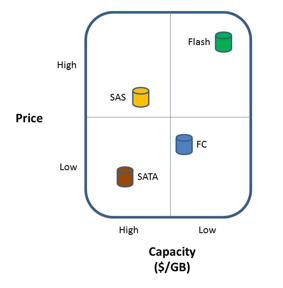
Flash has changed the landscape of storage for the enterprise. Currently, Fash/SSD storage can cost 16-20X what Fiber channel, SAS, or SATA storage can cost. The dollars per GB model ends up looking something like the following:


However the IOPS per $ model looks more like this:


The impact on the tiered storage architectural model of Flash storage has been, in effect, to add a tier-0 level of storage where application data is placed that requires extremely fast random I/O performance. Typical examples of such data are database index tables or key lookup tables, etc. Placing this kind of data, which may only be part of an application’s data, on Flash storage can often have a dramatically positive effect on the performance of an application.  However, due to the cost of Flash storage the question is often raised, how can data centers ensure that only data that requires this level of performance resides on SSD or Flash storage so that they can continue to contain costs? Furthermore, is there a way to put only the “hot” parts of the data in the very expensive tier-0 capacity, and leave less hot, and cold data in slower, less expensive capacity? Block based automated storage tiering is the answer to these questions.

Different storage array vendors have approached this problem in different ways. However, in all cases, the object is to place data at a block level, on tier-0 or Flash storage only while that data is actually being accessed, and then to store the rest of the data on lower tiered storage while the data is at rest. Note that this movement must be done at the block level in order to avoid performance issues, and to truly minimize the capacity of the tier-0 storage.

One approach used by several storage vendors is to move blocks of data between multiple tiers of storage via a policy. For example, the policy might dictate that writes always occur to tier-0, and then if that data is not read immediately it is moved to tier-1. Then if the data isn’t read for 3 months that data is then moved to tier-2. The policy might also dictate that if the data is then read from the tier-2 disk then it is placed back on tier-0 in case additional reads are required and the entire process starts all over again. Logically this mechanism provides what enterprises are looking for, minimizing tier-0 storage and placing blocks of data on the lowest-cost storage possible. The challenge with this approach is that the I/O profile of the application needs to be well understood when the policies are developed in order to avoid accessing data from tier-2 storage too frequently and generally moving data up and down the stack too often since this movement is not “free” from a performance perspective. Additionally, EVT has found that for most customers, data rarely needs to spend time in tier-1 (FC or SAS) storage, that most of the data ends up spending most of it’s live on the SATA storage.

Therefore as the cost of Flash storage continues to come down, the need for the SAS or Fiber Channel storage will continue to decline, and eventually disappear leaving just Flash and SATA storage in most arrays.

Another approach that at least one storage vendor is using is to avoid all the policy based movement and to treat the Flash storage as a large read cache. This places the blocks that are most used on tier-0, and leaves the rest on spinning disk. When the fact that the sequential write performance of Flash, SAS/FC, and SATA is similar is taken into consideration along with a controller that orders its random writes, this approach can provide a much more robust way to implement Flash storage.  In some cases, it allows an application that would not normally be considered a good candidate for SAS or Fiber Channel storage to be able to utilize SATA disks instead. In general, this technique de-couples spindle count from performance thus providing more subtle advantages as well.  For example, applications which has traditionally required very small disk drives so that the spindle could would be might (many, many 146GB FC drives, for example) can now be run on much higher capacity 600GB SAS drives and still provide the same, or better performance.

Overall, automated storage tiering is becoming a de-facto standard in the storage industry. However different storage array vendors have taken very different approaches to the implementation of automated tiering, but in the end the result is uniformly the same. The ability of the enterprise to purchase Flash storage to help improve the performance of their applications while at the same time continuing to bend the cost curve of storage downward.