Talking with our customers, I keep hearing the same thing "IT management has decided on a Cloud First strategy".
Are we working in a cloud computing bubble? That is, have business leaders (and perhaps some IT leaders) been lulled into assuming that moving or deploying to cloud is as easy as 1-2-3, without any heavy lifting required? So, have at it, spend the money, get cloud for cloud’s sake?
Listening to the cloud vendor messages, one can be forgiven for thinking that cloud deployments are a snap, and will quickly put a business on the path to digital nirvana. However, the history of enterprise software tells a different story. There have been many cases in recent decades of companies slapping expensive technology solutions on top of calcified processes and even more calcified business models, and expecting overnight success — but getting none.
Technology is essential to keep up, and the faster an organization can move to digital, the better. But like the tires on a race car, technology only makes the ride smoother, but is not the reason for success. A scan of the Forbes Global 2000 List of the World’s Largest Public Companies between 2006 and 2016 shows other forces at work that determine business success. The top companies in 2006 were Citigroup, GE, Bank of America, AIG, and HSBC — four US-based, the fifth in the UK. The top companies this year are ICBC, China Construction Bank, Agricultural Bank of China, Berkshire Hathaway, and JPMorgan Chase — the top three based in China, the next two in the United States. The point here is that no amount of advanced technology would have necessarily helped the 2006 leaders hold their leads, as they were knocked off their perches by players that emerged from other parts of the global economy with different models and markets.
Successful organizations understand that underlying corporate culture and business models, led by forward-thinking managers or leaders who nurture a spirit of innovation among all levels of employees, are what matter in the long run. They also understand that technology supports this in a big way, but cannot replace any deficiencies.
This is a point to keep in mind when considering the fact that enterprises may be investing hundreds of thousands or millions of dollars, euros, pounds or rupees in cloud computing solutions every year, yet are still uncertain about how and where this technology is best applied. IDC recently released estimates that up to $96.5 billion will be spent on cloud services worldwide this year alone, a number that will reach $195 billion by 2020. Gartner adds a few billion to the equation, suggesting that the worldwide public cloud services market is forecast to reach $204 billion this year alone.
Is this money being well spent? A recent survey of more than 400 enterprise IT executives, conducted by Wakefield Research and sponsored by LogicWorks, confirms there is general uncertainty of IT and business leaders on how to best leverage the cloud to drive growth and efficiency across their organizations, as well as the need for more thoughtful planning for both cloud migration and ongoing cloud maintenance. Eight in 10 executives believe that their company’s leadership team underestimates the time and cost required to maintain resources in the cloud.
There are issues with staffing for the new cloud and digital realities as well. The need for technically proficient people does not go away when things are shifted to the cloud. Even as the demand for enterprise-level, cloud-based services expands, the LogicWorks survey finds 43 percent believe their organization’s IT workforce is not completely prepared to address the challenges of managing their cloud resources over the next five years. It is a problem compounded by the high demand and relatively low supply for workers skilled in cloud, security, DevOps engineering and other IT positions.
Organizational preparation needs to be the most essential piece of cloud and digital engagements, and according to the LogicWorks survey, not enough is being done. In a compelling read at TechTarget, Mark Tonsetic, IT practice leader at CEB, outlines four ways to tell the “cloud story,” to ensure that the money and time spent on technology is met by appropriate transformation of the business:
Cloud and digital transformation are one in the same. Cloud may offering a compelling cost savings, but this is only one small piece of its value proposition, Tonsetic says. Information technology should be seen for what it is becoming: “an ingredient in corporate growth.” He urges cloud proponents to “stress speed and flexibility gains that can enable enterprise digital strategy,” and elevate this discussion to the board and investor level. Enterprise digitization and growth is today’s corporate holy grail.
Cloud and digital elevates the roles of IT leaders. IT leaders need to shift their focus from governance and policy to advice and education on the technology options available to their businesses. IT leaders need to serve as partners to their business users, making the “The cloud story that IT leaders need to tell their business partners should be about how IT will build new partnerships with the business to explore and exploit cloud opportunities. Relay the case for cloud computing in the language of new business opportunities, new models for business engagement and collaboration, and new opportunities for technology careers.”
Cloud and digital transform IT departments into competitive service brokers. Corporate IT no longer needs to operate as the owners and operators of email, CRM or even ERP systems, Tonsetic relates. These departments are now in a different kind of business — consulting and working with corporate leaders to define and execute transformational digital strategies.
Cloud and digital means new types of career opportunities. As mentioned in the LogicWorks survey, more than four in 10 executives say they don’t have the available skills to move forward with cloud. At the same time,there are highly capable IT staff members still involved in legacy or on-premises systems development, maintenance or operations. This pool of talent shouldn’t go to waste. “Forward-thinking IT organizations are careful to send teams the message that cloud and other technology developments present an opportunity for experimentation, innovation, and growth across IT — a refreshing change of pace for teams that have labored mostly to the tune of efficiency, Tonsetic relates.
Thursday, August 25, 2016


Tuesday, August 9, 2016
Modernizing backups, or as I like to call it, data protection
Nearly every enterprise IT organization out there is experiencing a significant increase in customer expectations around application performance and business continuity. Response time once measured in seconds are now measured in milliseconds, and downtime measured in hours or days is now expected to be minutes, if that.
To keep pace with all of that change in expectations, many organizations are implementing application modernization programs that allow them to take advantage of new technologies such as cloud enabled applications, etc. These changes are also driving changes in the infrastructure that those new/modern application run on. Modern network technologies, IaaS, even more virtualization, and containers are all being driven deep within the modern datacenter by these needs.
What hasn't been keeping up, however, are backups, or as I prefer to call it, data protection. The old full's and incremental backups to some medium such as tape, or even disk, just isn't getting it done anymore. The entire concept of backups/data protection is being replaced with Business Continuance. The focus has shifted from a siloed attempt to protect the businesses data, to ensuring that the business can continue to run.
With organizations considering availability, it’s no longer about simply needing to restore a single file or folder. It’s about complex processes like recovering a multi-tiered application that spans multiple servers and bringing each server and the data it requires into a consistent state with the others. It’s far more involved than the restore jobs of yesteryear.
In some ways, basic backup no longer has a place in the modern data center. As new technologies have come into use—the foremost being virtualization—you can now easily move workloads from one location to another. You can even performing maintenance during the day. The options around availability are much greater and more flexible than what backups alone provide.
Even so, the idea of a backup—that is, having copies of your data—is still viable. Now data centers have moved to advanced concepts like replicating data at the disk level or entire virtual machines, both from one store to another or even one site to another. This provides both increased protection and faster recoverability.
Organizations today aren’t just looking at availability on a per-application or per-server basis. The goal is to make everything available in the event of an outage. So it’s not “we have our order processing back online, but e-mail is still down.” Now it’s essential to have the entire business back up and running, not just a few services.
To keep pace with all of that change in expectations, many organizations are implementing application modernization programs that allow them to take advantage of new technologies such as cloud enabled applications, etc. These changes are also driving changes in the infrastructure that those new/modern application run on. Modern network technologies, IaaS, even more virtualization, and containers are all being driven deep within the modern datacenter by these needs.
What hasn't been keeping up, however, are backups, or as I prefer to call it, data protection. The old full's and incremental backups to some medium such as tape, or even disk, just isn't getting it done anymore. The entire concept of backups/data protection is being replaced with Business Continuance. The focus has shifted from a siloed attempt to protect the businesses data, to ensuring that the business can continue to run.
With organizations considering availability, it’s no longer about simply needing to restore a single file or folder. It’s about complex processes like recovering a multi-tiered application that spans multiple servers and bringing each server and the data it requires into a consistent state with the others. It’s far more involved than the restore jobs of yesteryear.
In some ways, basic backup no longer has a place in the modern data center. As new technologies have come into use—the foremost being virtualization—you can now easily move workloads from one location to another. You can even performing maintenance during the day. The options around availability are much greater and more flexible than what backups alone provide.
Even so, the idea of a backup—that is, having copies of your data—is still viable. Now data centers have moved to advanced concepts like replicating data at the disk level or entire virtual machines, both from one store to another or even one site to another. This provides both increased protection and faster recoverability.
Organizations today aren’t just looking at availability on a per-application or per-server basis. The goal is to make everything available in the event of an outage. So it’s not “we have our order processing back online, but e-mail is still down.” Now it’s essential to have the entire business back up and running, not just a few services.
Should you have an availability event, can you benefit from backup alone? Backups certainly still have a place. For example, if you’re replicating changes to a VM and the source VM is somehow corrupted, that corruption will simply get replicated. So having a backup of the critical data on that server can play a role in ensuring recoverability. However, backup as the only method is no longer an option for businesses focused on being available.
As newer technologies have emerged, the frequency of backups has also shortened. In previous years, your backup window simply couldn’t be anything less than nightly. These days, backups occur
much more frequently—even during production hours. And with technology like instant VM recovery in place, the concept of restoring a backup job is somewhat obsolete.
If your organization is like most, you’ve already begun or have made the investment in a modern data center. Despite your desire to simplify what you manage, it’s a complex mix of virtual machines, servers, storage and networking. Because you’ve made the investment to meet the demand to maintain operations, traditional backups alone just won’t scale to meet the availability needs of the organization in such an advanced data center environment.
Your organization must have standards for what is and is not acceptable downtime. Comparing the businesses’ required levels of availability against what’s currently attainable can help you create a service baseline from which to work towards availability. Begin with the business requirements around application and environment availability, instead of what your backups can do today. This will help IT look for ways to cost-effectively take advantage of current technologies or invest in new ones to make meeting availability requirements a reality.
Tuesday, December 15, 2015
Being a good listener is one of the key's to success, in any business
I'm in the sales business, and in my business learning to listen well is a major key to success. Actually hearing what people are saying, and not just waiting for your turn to speak is critical if you want to learn what it is your customer is looking for in a solution. Knowing what your customer needs, allows you provide a solution that the customer will embrace, and increase your chances of a sale.
Unfortunately, all to often I've been in meetings where there is at least one person who is more interested in formulating what they are going to say next than they are in hearing what the person who's currently speaking has to say. In my business (IT) I find this to be endemic. I suspect that has a lot to do with the passion with which many IT professionals bring to their jobs. That passion is a good thing, but it can also be a two edged sword. Not hearing and absorbing what the current speaker has to say means that they often come across as "preachy" or "professorial" and miss important points of view and information.
So, I would encourage everyone to become a better listener. But being a good listener does not come easy for some of us. It takes time, practice and dedication. What comes to your mind when you think about listening to a friend or co-worker? Do you find yourself thinking about what you want to say in response to what they have said or are you fully engaged with what they are talking about? When it comes to connecting with others, it’s all about consciously listening to them and the information that they are sharing with you.
1. Eye contact - When it comes to being a good listener, it’s important for you to have eye contact with the other person. It shows that you are paying attention and engaged with the conversation. When you don’t have eye contact with the other person, it shows that you don’t care and are not interested in what they have to say. Practice having eye contact with the next person you have a conversation with.
2. Find the “Why” and “What” - For you to be a good listener, you need to find out the “Why” and “What.” Why are they talking to you and what is the message they are trying to share with you? Being a good listener takes practice and when you are able to practice finding out the “Why and “What” of the other person, you will be much more engaged in the conversation.
3. Focus on the other person - It’s easy for us to think about what we want to say after the other person has stopped talking. This will not make you a better listener. If you are constantly thinking about your response, you will always miss out on carefully listening to the other person. Focus on what they have to say. Find out the “Why” and “What” and maintain eye contact. Once the other person stops talking, then think about your response. But while you are listening, you must be consciously listening with your ears. A lot of times, when we listen to people, we are thinking within our brain what we want to say rather than opening our ears and purely listening to their message.
4. Limit distractions - We live in a society that is filled with so many distractions. We are constantly listening to so much noise that it’s a challenge to truly listen to another person. In order for you to be a good listener, you need to limit distractions during your conversation, whether it be the telephone, text messages coming in, emails arriving, or other interruptions. It takes a mental decision to limit distractions when you are listening to someone else. How can you possibly be a good listener if your phone continues to ring? It would be near to impossible to be a good listener with these distractions. Limit as many interruptions as you can when you are listening to someone else. This not only shows them that you care but you are practicing good social skills.
5. Engage - Engage yourself in the conversation. Being engaged is showing your attention towards the other person. Let the other person know that they have your attention and focus. When you are not engaged in the conversation, the other person will notice and will most likely not want to talk to you again. Show the other person that you care about them and are interested in what they have to say. One way you can show this is by responding with a short comment, such as “Yes” or “I understand.” This expresses to the other person that you are truly listening. Make sure that you allow the other person to primarily do the talking while you are still engaged.
I believe that if you become a better listener, you'll be more successful both in business and in your personal relationships. It's not necessary something that comes naturally to all of us, so keep in mind that practice makes perfect.
Unfortunately, all to often I've been in meetings where there is at least one person who is more interested in formulating what they are going to say next than they are in hearing what the person who's currently speaking has to say. In my business (IT) I find this to be endemic. I suspect that has a lot to do with the passion with which many IT professionals bring to their jobs. That passion is a good thing, but it can also be a two edged sword. Not hearing and absorbing what the current speaker has to say means that they often come across as "preachy" or "professorial" and miss important points of view and information.
So, I would encourage everyone to become a better listener. But being a good listener does not come easy for some of us. It takes time, practice and dedication. What comes to your mind when you think about listening to a friend or co-worker? Do you find yourself thinking about what you want to say in response to what they have said or are you fully engaged with what they are talking about? When it comes to connecting with others, it’s all about consciously listening to them and the information that they are sharing with you.
1. Eye contact - When it comes to being a good listener, it’s important for you to have eye contact with the other person. It shows that you are paying attention and engaged with the conversation. When you don’t have eye contact with the other person, it shows that you don’t care and are not interested in what they have to say. Practice having eye contact with the next person you have a conversation with.
2. Find the “Why” and “What” - For you to be a good listener, you need to find out the “Why” and “What.” Why are they talking to you and what is the message they are trying to share with you? Being a good listener takes practice and when you are able to practice finding out the “Why and “What” of the other person, you will be much more engaged in the conversation.
3. Focus on the other person - It’s easy for us to think about what we want to say after the other person has stopped talking. This will not make you a better listener. If you are constantly thinking about your response, you will always miss out on carefully listening to the other person. Focus on what they have to say. Find out the “Why” and “What” and maintain eye contact. Once the other person stops talking, then think about your response. But while you are listening, you must be consciously listening with your ears. A lot of times, when we listen to people, we are thinking within our brain what we want to say rather than opening our ears and purely listening to their message.
4. Limit distractions - We live in a society that is filled with so many distractions. We are constantly listening to so much noise that it’s a challenge to truly listen to another person. In order for you to be a good listener, you need to limit distractions during your conversation, whether it be the telephone, text messages coming in, emails arriving, or other interruptions. It takes a mental decision to limit distractions when you are listening to someone else. How can you possibly be a good listener if your phone continues to ring? It would be near to impossible to be a good listener with these distractions. Limit as many interruptions as you can when you are listening to someone else. This not only shows them that you care but you are practicing good social skills.
5. Engage - Engage yourself in the conversation. Being engaged is showing your attention towards the other person. Let the other person know that they have your attention and focus. When you are not engaged in the conversation, the other person will notice and will most likely not want to talk to you again. Show the other person that you care about them and are interested in what they have to say. One way you can show this is by responding with a short comment, such as “Yes” or “I understand.” This expresses to the other person that you are truly listening. Make sure that you allow the other person to primarily do the talking while you are still engaged.
I believe that if you become a better listener, you'll be more successful both in business and in your personal relationships. It's not necessary something that comes naturally to all of us, so keep in mind that practice makes perfect.
Folks,
Please note that I've changed the name of my blog. The name change reflects the change that I, the company I work for, and the industry is making. Converged/hyperconverged infrastructure, the cloud, Openstack, DEVOPS, etc. are all changing the IT landscape and if you aren't changing with it, then you're going to get left behind.
So, I'm changing the name and focus of this blog since, hey, none of want to be called a dinosaur, do we?
--Joerg
Please note that I've changed the name of my blog. The name change reflects the change that I, the company I work for, and the industry is making. Converged/hyperconverged infrastructure, the cloud, Openstack, DEVOPS, etc. are all changing the IT landscape and if you aren't changing with it, then you're going to get left behind.
So, I'm changing the name and focus of this blog since, hey, none of want to be called a dinosaur, do we?
--Joerg
Tuesday, May 12, 2015
Container Wars!
The container wars have started!
Containers have a huge amount of hype and momentum, and there are many spoils for whoever becomes dominant in the container ecosystem. The two major startups innovating in this space–CoreOS and Docker–have declared war on each other as part of gaining that control.
The Current Landscape
Recently, CoreOS announced Tectonic. Tectonic is a full solution for running containers, including CoreOS as the host OS, Docker or rkt as the container format, and Kubernetes for managing the cluster. It also uses a number of other CoreOS tools, such as etcd and fleet.
Despite Docker being an option on Tectonic, CoreOS’s messaging is not focused on Docker, and neither the Tectonic site nor the announcement included a single mention of Docker. It’s clear that CoreOS is moving in a different direction. CoreOS’ CEO Alex Polvi says that “Docker Platform will be a choice for companies that want vSphere for containers”, but that Rocket is the choice for “enterprises that already have an existing environment and want to add containers to it”. The latter is a far larger prize.
Companies will choose Docker Platform as an alternative to things like Cloud Foundry. Companies like Cloud Foundry will use things like Rocket to build Cloud Foundry.
Docker meanwhile, doesn’t mention CoreOS or Kubernetes anywhere in their docs, and on their site only mentions them in passing. Docker CEO Solomon Hykes reacted fairly negatively to the announcement of rkt back in December. He has also started to use the phrase “docker-native” to differentiate tools that Docker Inc. builds from other tools in the ecosystem, indicating other tools are second class.
Right now, both companies provide different pieces with their respective stacks and platforms.
To run containers successfully on bare metal server infrastructure, you need:
On Docker, things are less clear. Docker isn’t opinionated on the host OS, but also doesn’t provide much help there. Docker Machine abstracts over it for some infrastructure services, where you use whatever host OS exists already, but doesn’t provide much help when you want to run the whole thing. Docker Swarm and Docker Machine provide some parts of orchestration. There is also Docker compose, which Docker has been recommending as part of this puzzle, but simultaneously saying it’s not intended to be used as part of production. Of course they have a Dockerfile to build the containers, though some indicate that this is immature for large teams.
The impression you get from Docker is that they want to own the entire stack. If you visit the Docker site, you could be forgiven for thinking that the only tools you use with Docker are Docker Inc’s tooling. However, Docker doesn’t really have good solutions for the host OS and orchestration components at present.
Similarly, Docker are pushing their own tools instead of alternatives, even when those tools aren’t really valid alternatives. Docker Compose, for example, is being pushed as an orchestration framework though this feature is still in the roadmap.
The container landscape is fairly new, but Docker has a pretty clear lead in terms of mindshare. Both companies are trying to control the conversation: Docker talking about Docker-native and generally focussing it’s marketing around the term Docker, while others in the space – CoreOS and Google for example – are focussing the conversation on “containers” rather than “Docker”.
This is made a little bit difficult by the head start that Docker has – they basically created the excitement around containers, and most people in the ecosystem talk about Docker rather than the container space. Docker has also done an incredibly good job of making docker easy to use and to try out.
By contrast, CoreOS and Kubernetes are not tools for beginners. You don’t really need them until you get code in production and suffer from the problems they solve, while Docker is something you can play around with locally. Docker’s ease of use, everything from the command line to the well thought out docs to boot2docker, are also well ahead of rkt and and CoreOS’s offering – which are much harder to get started with.
How does this play out?
If you’re a consumer in this space, looking to deploy production containers soon, this isn’t a particularly helpful war. The ecosystem is very young, people shipping containers in production are few and far between, and a little bit of maturing of the components would have been useful before the war emerged. We are going to end up with a multitude of different ways to do things, and it’s clear we’re far from having one true way.
From a business perspective, it’s difficult for any of the players to capitulate on their directions. Docker is certainly focusing on building the Docker ecosystem, to the exclusion of everyone else. Unfortunately, they don’t have all the pieces yet.
Other companies who want to play in the ecosystem are unlikely to be pleased by Docker’s positioning. CoreOS certainly isn’t alone in their desire for a more open ecosystem.
Ironically, Docker came about due to a closed ecosystem with a single dominant player. Heroku dominates the PaaS ecosystem to the extent that there really isn’t a PaaS ecosystem, just Heroku. Dotcloud failed to make inroads, and so opened its platform up to disrupt Heroku’s position and move things in a different direction such that Heroku’s dominance didn’t matter. In Docker, they certainly appear to have succeeded with that. Now that Docker is the dominant player is the disruptive ecosystem, CoreOS and other players will want to unseat them and fight on a level playing field before things settle too much.
The risk for Docker is that on this trajectory, if they lose the war they risk losing everything. If nobody else can play in this space, all of the companies that are left outside will build their own ecosystem that leaves Docker on the outside. Given that Docker lacks considerable parts of the ecosystem (mature orchestration being an obvious one), their attempts at owning the ecosystem are unlikely to succeed in the near term.
Meanwhile, CoreOS will need to replicate the approachability of the Docker toolset to compete effectively, and will need to do so before Docker solves the missing parts of its puzzle.
All of the other companies are sitting neutral right now. Google, MS, VMware are all avoiding committing one way or the other. Their motivations are typically clear, and it doesn’t benefit any of them to pick one or the other. The exception here is that the open ACI standard is likely to interest VMware at least, but I wouldn’t be surprised to see Google doing something in this space, too.
There is massive risk for all of the players in the ecosystem, depending on how this plays out. Existing players like Amazon, Google and Microsoft are providing differentiated services and tools around containers. The risk of not doing so, of owning no piece of the puzzle, is being sidelined and eventual commoditization. The one API that abstracts over the other tools is the one which wins.
Long story short – this is the start of a war that will probably be quite bloody, and that none of us is going to enjoy.
Containers have a huge amount of hype and momentum, and there are many spoils for whoever becomes dominant in the container ecosystem. The two major startups innovating in this space–CoreOS and Docker–have declared war on each other as part of gaining that control.
The Current Landscape
Recently, CoreOS announced Tectonic. Tectonic is a full solution for running containers, including CoreOS as the host OS, Docker or rkt as the container format, and Kubernetes for managing the cluster. It also uses a number of other CoreOS tools, such as etcd and fleet.
Despite Docker being an option on Tectonic, CoreOS’s messaging is not focused on Docker, and neither the Tectonic site nor the announcement included a single mention of Docker. It’s clear that CoreOS is moving in a different direction. CoreOS’ CEO Alex Polvi says that “Docker Platform will be a choice for companies that want vSphere for containers”, but that Rocket is the choice for “enterprises that already have an existing environment and want to add containers to it”. The latter is a far larger prize.
Companies will choose Docker Platform as an alternative to things like Cloud Foundry. Companies like Cloud Foundry will use things like Rocket to build Cloud Foundry.
Docker meanwhile, doesn’t mention CoreOS or Kubernetes anywhere in their docs, and on their site only mentions them in passing. Docker CEO Solomon Hykes reacted fairly negatively to the announcement of rkt back in December. He has also started to use the phrase “docker-native” to differentiate tools that Docker Inc. builds from other tools in the ecosystem, indicating other tools are second class.
Right now, both companies provide different pieces with their respective stacks and platforms.
To run containers successfully on bare metal server infrastructure, you need:
- A Linux host OS (Windows support for containers is coming with the next release of Windows).
- The container runtime system to start, stop, and monitor the containers running on a host.
- Some sort of orchestration to manage all those containers.
On Docker, things are less clear. Docker isn’t opinionated on the host OS, but also doesn’t provide much help there. Docker Machine abstracts over it for some infrastructure services, where you use whatever host OS exists already, but doesn’t provide much help when you want to run the whole thing. Docker Swarm and Docker Machine provide some parts of orchestration. There is also Docker compose, which Docker has been recommending as part of this puzzle, but simultaneously saying it’s not intended to be used as part of production. Of course they have a Dockerfile to build the containers, though some indicate that this is immature for large teams.
The impression you get from Docker is that they want to own the entire stack. If you visit the Docker site, you could be forgiven for thinking that the only tools you use with Docker are Docker Inc’s tooling. However, Docker doesn’t really have good solutions for the host OS and orchestration components at present.
Similarly, Docker are pushing their own tools instead of alternatives, even when those tools aren’t really valid alternatives. Docker Compose, for example, is being pushed as an orchestration framework though this feature is still in the roadmap.
The container landscape is fairly new, but Docker has a pretty clear lead in terms of mindshare. Both companies are trying to control the conversation: Docker talking about Docker-native and generally focussing it’s marketing around the term Docker, while others in the space – CoreOS and Google for example – are focussing the conversation on “containers” rather than “Docker”.
This is made a little bit difficult by the head start that Docker has – they basically created the excitement around containers, and most people in the ecosystem talk about Docker rather than the container space. Docker has also done an incredibly good job of making docker easy to use and to try out.
By contrast, CoreOS and Kubernetes are not tools for beginners. You don’t really need them until you get code in production and suffer from the problems they solve, while Docker is something you can play around with locally. Docker’s ease of use, everything from the command line to the well thought out docs to boot2docker, are also well ahead of rkt and and CoreOS’s offering – which are much harder to get started with.
How does this play out?
If you’re a consumer in this space, looking to deploy production containers soon, this isn’t a particularly helpful war. The ecosystem is very young, people shipping containers in production are few and far between, and a little bit of maturing of the components would have been useful before the war emerged. We are going to end up with a multitude of different ways to do things, and it’s clear we’re far from having one true way.
From a business perspective, it’s difficult for any of the players to capitulate on their directions. Docker is certainly focusing on building the Docker ecosystem, to the exclusion of everyone else. Unfortunately, they don’t have all the pieces yet.
Other companies who want to play in the ecosystem are unlikely to be pleased by Docker’s positioning. CoreOS certainly isn’t alone in their desire for a more open ecosystem.
Ironically, Docker came about due to a closed ecosystem with a single dominant player. Heroku dominates the PaaS ecosystem to the extent that there really isn’t a PaaS ecosystem, just Heroku. Dotcloud failed to make inroads, and so opened its platform up to disrupt Heroku’s position and move things in a different direction such that Heroku’s dominance didn’t matter. In Docker, they certainly appear to have succeeded with that. Now that Docker is the dominant player is the disruptive ecosystem, CoreOS and other players will want to unseat them and fight on a level playing field before things settle too much.
The risk for Docker is that on this trajectory, if they lose the war they risk losing everything. If nobody else can play in this space, all of the companies that are left outside will build their own ecosystem that leaves Docker on the outside. Given that Docker lacks considerable parts of the ecosystem (mature orchestration being an obvious one), their attempts at owning the ecosystem are unlikely to succeed in the near term.
Meanwhile, CoreOS will need to replicate the approachability of the Docker toolset to compete effectively, and will need to do so before Docker solves the missing parts of its puzzle.
All of the other companies are sitting neutral right now. Google, MS, VMware are all avoiding committing one way or the other. Their motivations are typically clear, and it doesn’t benefit any of them to pick one or the other. The exception here is that the open ACI standard is likely to interest VMware at least, but I wouldn’t be surprised to see Google doing something in this space, too.
There is massive risk for all of the players in the ecosystem, depending on how this plays out. Existing players like Amazon, Google and Microsoft are providing differentiated services and tools around containers. The risk of not doing so, of owning no piece of the puzzle, is being sidelined and eventual commoditization. The one API that abstracts over the other tools is the one which wins.
Long story short – this is the start of a war that will probably be quite bloody, and that none of us is going to enjoy.
Monday, April 27, 2015
The Data Center of the Future, what does it look like?
Folks,
I've been spending a lot of time talking with customers about storage, flash, HDDs, Hyper-converged, cloud, etc. lately. What's become clear to me recently, yes, I'm a little slow, is that all of these technology changes are driving us toward sea changes in the enterprise data center. In this blog posting, I want to talk a little about how things are changing in regards to storage. I'm going to talk a bit about Flash vs. HDD technology and where I see each of them going in the next few years, and I'll finish up with a discussion on how that will effect the enterprise data center going forward as well the the data center infrastructure industry in general.
I believe that the competition between flash and hard disk-based storage systems will continue to drive developments in both. Flash has the upper hand in performance and benefits from Moore's Law improvements in cost per bit, but has increasing limitations in lifecycle and reliability. Finding well-engineered solutions to these issues will define its progress. Hard disk storage, on the other hand, has cost and capacity on its side. Maintaining those advantages is the primary driver in its roadmap but I see limits to where that will take them.
Hard disk Drives (HDDs)
So, let's start with a discussion of HDDs. Hard disk developments continue to wring a mixture of increased capacity and either stable or increased performance at lower cost. For example, Seagate introduced a 6TB disk in early 2014 which finessed existing techniques, but subsequently announced an 8TB disk at the end of 2014 based on Shingled Magnetic Recording (SMR). This works by allowing tracks on the disk to overlap each other, eliminating the fallow area previously used to separate them. The greater density this allows is offset by the need to rewrite multiple tracks at once. This slows down some write operations, but for a 25 percent increase in capacity -- and with little need for expensive revamps in manufacturing techniques.
If SMR is commercially successful, then it will speed the adoption of another technique, Two-Dimensional Magnetic Recording (TDMR) signal processing. This becomes necessary when tracks are so thin and/or close together that the read head picks up noise and signals from adjacent tracks when trying to retrieve the wanted data. A number of techniques can solve this, including multiple heads that read portions of multiple tracks simultaneously to let the drive mathematically subtract inter-track interference signals.
A third major improvement in hard disk density is Heat-Assisted Magnetic Recording (HAMR). This uses drives with lasers strapped to their heads, heating up the track just before the data is recorded. This produces smaller, better-defined magnetized areas with less mutual interference. Seagate had promised HAMR drives this year, but now says that 2017 is more likely.
Meanwhile, Hitachi has improved capacity in its top-end drives by filling them with helium. The gas has a much lower viscosity than air, so platters can be packed closer together. This allows for greater density at the drive level.
All these techniques are becoming adopted as previous innovations -- perpendicular rather than longitudinal recording, for example, where bits are stacked up like biscuits in a packet instead of on a plate -- are running out of steam. By combining all of the above ideas, the hard disk industry expects to be able to produce around three or four years of continuous capacity growth while maintaining price differential with flash. However, it should be noted that all of the innovation in HDDs is around capacity. I believe that HDDs will continue to dominate the large capacity, archive type of workloads for the next 2 or 3 years. After that ... well, read the next section on flash.
Some argue that the cloud will be taking over this space. However, even if this is true, cloud providers will continue to need very cheap high capacity HDDs until flash is able to take over this high capacity space as well based on $$/GB.
Flash
Flash memory is changing rapidly, with many innovations moving from small-scale deployment into the mainstream. Companies such as Intel and Samsung are predicting major advances in 3D NAND, where the basic one-transistor-per-cell architecture of flash memory is stacked into three dimensional arrays within a chip.
Intel, in conjunction with its partner Micron, is predicting 48GB per die this year by combining 32-deep 3D NAND with multi-level cells (MLC) that double the storage per transistor. The company says this will create 1TB SSDs that will fit in mobile form factors and be much more competitive with consumer hard disk drives -- still around five times cheaper at that size -- and 10TB enterprise-class SSDs, by 2018. Moore's Law will continue to drive down the cost per TB of flash at the same time as these capacity increases occur this making flash a viable replacement for high capacity HDDs in the next 3 to 5 years. Note that this assumes that SSD's will leverage technology such as deduplication in order to help reduce the footprint of data and drive down cost.
The following is a chart from a Wikibon article on the future of flash:

As you can see from the graph above, by 2017 the 4 year cost per TB of flash will be well below that of HDDs, and that this trend will continue until 2020 when the 4 year cost per TB of flash hits $9 per TB vs $74 per TB for HDDs. You can read the entire article here.
Conclusions
So, what does all this mean? Among other things, it means that you can expect a shift to what the Wikibon article calls the "Electronic Data Center". The Electronic Data Center is simply a data center where the mechanical disk drive has been replaced by something like flash, thus eliminating the last of the mechanical devices (they assume tape and tape robots are already gone in their scenario). This will reduce the electricity and cooling needs, as well as the size/footprint of the data center of the future.
Let's assume for a moment that Wikibon is correct. What does this mean to the data center infrastructure industry?
Specifically, the trends towards cloud computing, Hyper-converged, and more and more emphasis on automation that is being driven by other IT trends such as DevOps will make standalone storage arrays less and less desirable to IT organizations. This will force those companies to move beyond their roots into hyper-converged infrastructure, for example where they currently have little or no engineering expertise or management experience.
The companies who are able to embrace these kinds of moves will likely have a bright future in the data center of the future. However, issues around "not invented here", and lack of engineering talent in the new areas of technology are going to make it a challenge for those very large storage companies going forward. Again, how they address these issues is going to be a determining factor in their future success.
To wrap it it up, I firmly believe that not everything is "moving to the public cloud" in the enterprise space. What I do believe is that:
I've been spending a lot of time talking with customers about storage, flash, HDDs, Hyper-converged, cloud, etc. lately. What's become clear to me recently, yes, I'm a little slow, is that all of these technology changes are driving us toward sea changes in the enterprise data center. In this blog posting, I want to talk a little about how things are changing in regards to storage. I'm going to talk a bit about Flash vs. HDD technology and where I see each of them going in the next few years, and I'll finish up with a discussion on how that will effect the enterprise data center going forward as well the the data center infrastructure industry in general.
I believe that the competition between flash and hard disk-based storage systems will continue to drive developments in both. Flash has the upper hand in performance and benefits from Moore's Law improvements in cost per bit, but has increasing limitations in lifecycle and reliability. Finding well-engineered solutions to these issues will define its progress. Hard disk storage, on the other hand, has cost and capacity on its side. Maintaining those advantages is the primary driver in its roadmap but I see limits to where that will take them.
Hard disk Drives (HDDs)
So, let's start with a discussion of HDDs. Hard disk developments continue to wring a mixture of increased capacity and either stable or increased performance at lower cost. For example, Seagate introduced a 6TB disk in early 2014 which finessed existing techniques, but subsequently announced an 8TB disk at the end of 2014 based on Shingled Magnetic Recording (SMR). This works by allowing tracks on the disk to overlap each other, eliminating the fallow area previously used to separate them. The greater density this allows is offset by the need to rewrite multiple tracks at once. This slows down some write operations, but for a 25 percent increase in capacity -- and with little need for expensive revamps in manufacturing techniques.
If SMR is commercially successful, then it will speed the adoption of another technique, Two-Dimensional Magnetic Recording (TDMR) signal processing. This becomes necessary when tracks are so thin and/or close together that the read head picks up noise and signals from adjacent tracks when trying to retrieve the wanted data. A number of techniques can solve this, including multiple heads that read portions of multiple tracks simultaneously to let the drive mathematically subtract inter-track interference signals.
A third major improvement in hard disk density is Heat-Assisted Magnetic Recording (HAMR). This uses drives with lasers strapped to their heads, heating up the track just before the data is recorded. This produces smaller, better-defined magnetized areas with less mutual interference. Seagate had promised HAMR drives this year, but now says that 2017 is more likely.
Meanwhile, Hitachi has improved capacity in its top-end drives by filling them with helium. The gas has a much lower viscosity than air, so platters can be packed closer together. This allows for greater density at the drive level.
All these techniques are becoming adopted as previous innovations -- perpendicular rather than longitudinal recording, for example, where bits are stacked up like biscuits in a packet instead of on a plate -- are running out of steam. By combining all of the above ideas, the hard disk industry expects to be able to produce around three or four years of continuous capacity growth while maintaining price differential with flash. However, it should be noted that all of the innovation in HDDs is around capacity. I believe that HDDs will continue to dominate the large capacity, archive type of workloads for the next 2 or 3 years. After that ... well, read the next section on flash.
Some argue that the cloud will be taking over this space. However, even if this is true, cloud providers will continue to need very cheap high capacity HDDs until flash is able to take over this high capacity space as well based on $$/GB.
Flash
Flash memory is changing rapidly, with many innovations moving from small-scale deployment into the mainstream. Companies such as Intel and Samsung are predicting major advances in 3D NAND, where the basic one-transistor-per-cell architecture of flash memory is stacked into three dimensional arrays within a chip.
Intel, in conjunction with its partner Micron, is predicting 48GB per die this year by combining 32-deep 3D NAND with multi-level cells (MLC) that double the storage per transistor. The company says this will create 1TB SSDs that will fit in mobile form factors and be much more competitive with consumer hard disk drives -- still around five times cheaper at that size -- and 10TB enterprise-class SSDs, by 2018. Moore's Law will continue to drive down the cost per TB of flash at the same time as these capacity increases occur this making flash a viable replacement for high capacity HDDs in the next 3 to 5 years. Note that this assumes that SSD's will leverage technology such as deduplication in order to help reduce the footprint of data and drive down cost.
The following is a chart from a Wikibon article on the future of flash:
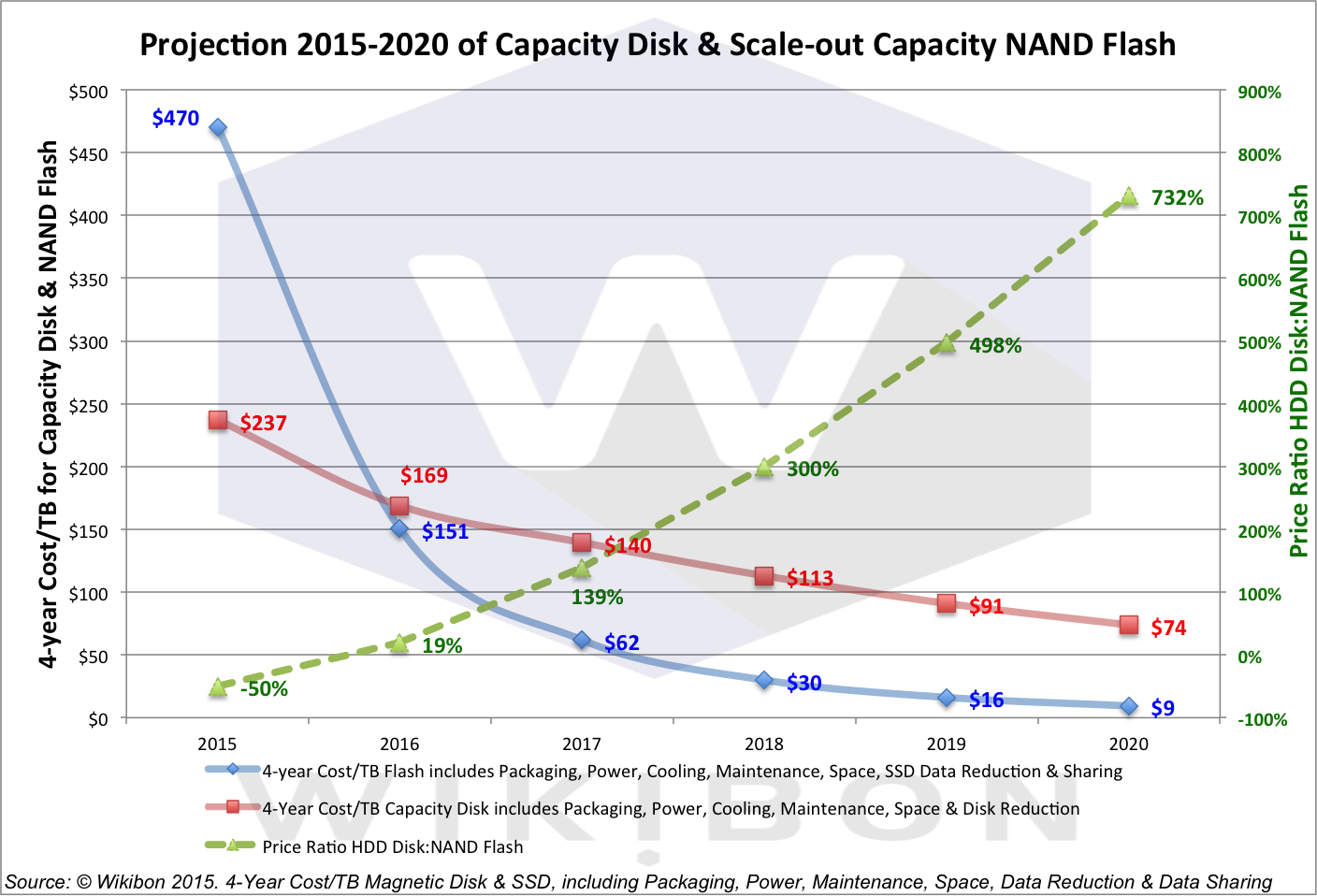
As you can see from the graph above, by 2017 the 4 year cost per TB of flash will be well below that of HDDs, and that this trend will continue until 2020 when the 4 year cost per TB of flash hits $9 per TB vs $74 per TB for HDDs. You can read the entire article here.
Conclusions
So, what does all this mean? Among other things, it means that you can expect a shift to what the Wikibon article calls the "Electronic Data Center". The Electronic Data Center is simply a data center where the mechanical disk drive has been replaced by something like flash, thus eliminating the last of the mechanical devices (they assume tape and tape robots are already gone in their scenario). This will reduce the electricity and cooling needs, as well as the size/footprint of the data center of the future.
Let's assume for a moment that Wikibon is correct. What does this mean to the data center infrastructure industry?
- Companies that build traditional storage arrays will need to shift their technology to "all flash", and they need to do it quickly. You can see this already happening in companies such as EMC with the acquisition of XtremIO in order to obtain all flash technology. Companies like NetApp, on the other hand, are developing their all flash solutions in house. In both those cases, however, all flash solutions are facing internal battles against engineering organizations that are vested in the status quo. That will mean they could be slow to market with potentially inferior products. However, their sheer size in the market may protect them from complete failure.
- What about the raft of new startups producing all flash arrays? Might the above provide an opening for one or more of those startups to "go big" in the market? What about the rest? My take on this is that indeed, one or more might have the opportunity to "go big" due to the gap that might be created by the "big boys" moving too slowly or trying to shoe-horn old existing technologies into the data center. Most of them, however, will either die off, or be acquired buy a larger competitor.
Specifically, the trends towards cloud computing, Hyper-converged, and more and more emphasis on automation that is being driven by other IT trends such as DevOps will make standalone storage arrays less and less desirable to IT organizations. This will force those companies to move beyond their roots into hyper-converged infrastructure, for example where they currently have little or no engineering expertise or management experience.
The companies who are able to embrace these kinds of moves will likely have a bright future in the data center of the future. However, issues around "not invented here", and lack of engineering talent in the new areas of technology are going to make it a challenge for those very large storage companies going forward. Again, how they address these issues is going to be a determining factor in their future success.
To wrap it it up, I firmly believe that not everything is "moving to the public cloud" in the enterprise space. What I do believe is that:
- Some workloads currently running in the enterprise data center will move to the public cloud, and be managed by IT.
- Some workloads will remain in "private" clouds owned and operated by IT. However, those private clouds must offer at all of the same ease of use the internal customers that the public could offers. Most likely, they will leverage web-scale architectures (hyper-converged) in order to make management and management automation easier.
- Hybrid cloud management software will be used to allow both management, and automation to span between the enterprises private cloud and it's public cloud(s).
- DevOps and similar initiatives will drive significant automation into the hybrid clouds I describe above, as well as significant change to IT organizations.
- these changes will all be highly disruptive, and those IT organizations that embrace change will have an easier time over the next few years than those that don't. Very large IT organizations will have the hardest time making the changes. Yes, it is hard to turn the aircraft carrier. However, internal customers are demanding it of IT, and will go outside the IT organization to get what the want/need if necessary.
Wednesday, April 22, 2015
Structured or Unstructured PaaS??
Words, labels, tags, etc. in our industry mean something – at least for a while – and then marketing organizations tend to get involved and use words and labels and tags to best align to their specific agenda. For example, things like “webscale” or “cloud native apps” were strongly associated with the largest web companies (Google, Amazon, Twitter, Facebook, etc.). But over time, those terms got usurped by other groups in an effort to link their technologies to hot trends in the broader markets.
Another one that seems to be shifting is PaaS, or Platform as a Service. It’s sort of a funny acronym to say out loud, and people are starting to wonder about it’s future. But we’re not an industry that likes to stand still, so let’s move things around a little bit. Maybe PaaS is the wrong term, and it really should be “Platform”, since everything in IT should eventually be consumed as a service. I'm already hearing about XaaS (X as a Service) which pretty much means anything as a server, or perhaps everything as a service.
But not everyone believes that a Platform (or PaaS) should be an entirely structured model. There is lots of VC money being pumped into less structured models for delivering a platform, such as Mesosphere, CoreOS, Docker, Hashicorp, Kismatic, Cloud66, Apache Brooklyn (project) and Engine Yard acquiring OpDemand.
I’m not sure if “Structured PaaS” and “Unstructured PaaS” are really the right terms to use for this divergence of thinking about how to deliver a Platform, but they work for me. The Unstructured approach seems to appeal more to the DIY-focused start-ups, while Structured PaaS (eg. Cloud Foundry, OpenShift) seem to appeal more towards Enterprise markets that expect a lot more “structure” in terms of built-in governance, monitoring/logging, and infrastructure services (eg. load-balancing, higher-availability, etc.). The unstructured approach can be built in a variety of configurations, aka “batteries included but removable“, whereas the structured model will incorporate more out-of-the-box elements in a more closely configured model.
Given the inherent application portability that comes with either a container-centric model, or PaaS-centric, both of these are areas that IT professionals and developers should be taking a close look at, especially if they believe in a Hybrid Cloud model – whether that’s Private/Public or Public/Public. It’s also an area that will drive quite a bit of change around the associated operational tools, which are beginning to overlap with the native platform tools for deployment or config management (eg. CF BOSH or Dockerfiles or Vagrant).
It’s difficult to tell at this point which approach will likely gain greater market-share. The traditional money would tend to follow a more structured approach which aligns to Enterprise buying centers. But the unstructured IaaS approach by AWS has led it to a significant market-share lead for developers. Will unstructured history be any indication of the Platform market? Or will too many of those companies struggle to find viable financial models after taking all that VC capital and eventually just be a feature within a broader structured platform? I want to hear what you think, all respectful comments are welcome.
Another one that seems to be shifting is PaaS, or Platform as a Service. It’s sort of a funny acronym to say out loud, and people are starting to wonder about it’s future. But we’re not an industry that likes to stand still, so let’s move things around a little bit. Maybe PaaS is the wrong term, and it really should be “Platform”, since everything in IT should eventually be consumed as a service. I'm already hearing about XaaS (X as a Service) which pretty much means anything as a server, or perhaps everything as a service.
But not everyone believes that a Platform (or PaaS) should be an entirely structured model. There is lots of VC money being pumped into less structured models for delivering a platform, such as Mesosphere, CoreOS, Docker, Hashicorp, Kismatic, Cloud66, Apache Brooklyn (project) and Engine Yard acquiring OpDemand.
I’m not sure if “Structured PaaS” and “Unstructured PaaS” are really the right terms to use for this divergence of thinking about how to deliver a Platform, but they work for me. The Unstructured approach seems to appeal more to the DIY-focused start-ups, while Structured PaaS (eg. Cloud Foundry, OpenShift) seem to appeal more towards Enterprise markets that expect a lot more “structure” in terms of built-in governance, monitoring/logging, and infrastructure services (eg. load-balancing, higher-availability, etc.). The unstructured approach can be built in a variety of configurations, aka “batteries included but removable“, whereas the structured model will incorporate more out-of-the-box elements in a more closely configured model.
Given the inherent application portability that comes with either a container-centric model, or PaaS-centric, both of these are areas that IT professionals and developers should be taking a close look at, especially if they believe in a Hybrid Cloud model – whether that’s Private/Public or Public/Public. It’s also an area that will drive quite a bit of change around the associated operational tools, which are beginning to overlap with the native platform tools for deployment or config management (eg. CF BOSH or Dockerfiles or Vagrant).
It’s difficult to tell at this point which approach will likely gain greater market-share. The traditional money would tend to follow a more structured approach which aligns to Enterprise buying centers. But the unstructured IaaS approach by AWS has led it to a significant market-share lead for developers. Will unstructured history be any indication of the Platform market? Or will too many of those companies struggle to find viable financial models after taking all that VC capital and eventually just be a feature within a broader structured platform? I want to hear what you think, all respectful comments are welcome.
Friday, December 26, 2014
Some thoughts on Converged and Hyperconverged Infrastructure
First we had converged infrastructure and then hyperconverged infrastructure. If the trend continues, next up will be the ultimate hyperconverged infrastructure. As these systems continue to evolve and become more advanced, they are gaining in popularity. Very few people doubt that products from Nutanix or the newly released VMware EVO:RAIL will be huge hits. The real question is whether a hyperconverged infrastructure is right for your data center.
Before converged infrastructure, the IT world had limited choices when deploying x86-based architecture. Rack/tower units and blades were the only choices available. A common feature among these approaches is that they often used external storage to accommodate virtualization -- a common feature and a downside. Blades had an additional advantage in a shared networking, power and cooling infrastructure. Of course, the downside was that you had a higher density of servers in a single enclosure, which could increase your risk in the event of a failure. Rack servers had the advantage of separating the failure points at the additional cost of rack space and power, cooling and networking infrastructure. The middle ground between the two extremes did not exist until the introduction of converged and hyperconverged infrastructure.
Hyperconverged infrastructure in particular is looking to take the best points of the blades and rackmount servers and combine them into a better approach. This is a major step forward from most converged infrastructure solutions that marry traditional blade servers, external storage, and networking into a single consumable "block".
Compute: One of the drawbacks to blades was the high density of blades in the chassis. A single chassis failure could affect many hosts, bringing down hundreds or even thousands of virtual machines. A hyperconverged infrastructure often resembles four blade-style servers in a 2U form factor. This reduction of the possible outage footprint can be more appealing to the customer looking for higher availability. You are still gaining the benefit of data center consolidation while preserving a level of outage protection.
Networking: Connecting everything together presents a challenge in almost all environments. A rack server's ports are normally allocated for production traffic and storage. These ports come with a per-port cost, along with management overhead. In blade environments, virtual switching is often required, which adds an additional pair of switches to your environment but removes the trouble of having to cable the blades to it. A converged infrastructure does not include virtual switching and requires connections from each node to the existing switching infrastructure. This approach resembles the rack environment, just without the storage connections.
Storage: Traditional servers use internal server storage or larger external storage frames. The external storage frame enables the shared storage concept, and virtualization was quick to take advantage of the benefits shared storage enabled, including features like vMotion, load balancing and high availability. Hyperconverged infrastructure turns this on its head by using localized storage that is shared across the four hosts within the single frame or even further, across the entire cluster. This gives the advantage of shared storage without the need for the costly storage frames or the dedicated fiber infrastructure that often accompanies it. The local disk can be an enterprise-class spinning or solid-state drive, giving the converged infrastructure tremendous IOPS potential. As more converged infrastructure product vendors couple their hardware with software-defined storage abilities, the traditional storage frame designs are showing their age.
Compute, networking, storage: When you compare the benefits of the hyperconverged infrastructure over the traditional infrastructure, it's hard to not to see all of the positives (and very few negatives). Hyperconverged infrastructure has found that perfect midpoint between large blade enclosures and the single-server approach. With all of the benefits, where is the downside to going with the hyperconverged approach?
Design: When you look at your requirements and want to come to a decision about what hardware platform (hyperconverged or not converged) to go with, a key factor should come to mind: Do you plan to deploy or design in one or two deployment factors, or are you more likely to deploy in a two- to four-node method?
Nodes in a converged infrastructure are prepackaged, and knowing how you purchase is a big factor in knowing which is right for you. Converged infrastructure, by its nature, is not designed to support a single compute deployment where you would add additional compute nodes to an existing enclosure similar to a blade enclosure. The enclosure exists as a prepackaged unit that works with all of the compute nodes in the cluster.
As businesses trend toward the prepackaged approach, they also need to consider how they will approach working with a converged infrastructure.
Downside: With all the positives of a converged infrastructure, there are some downsides. The prepackaged nature of converged infrastructure is a higher investment in capital costs. This simple math would suggest it costs four times the price of a single server. However, this is a flawed assumption because a converged infrastructure also replaces some storage and networking needs. Traditional external storage frames with fiber cabling and switches are expensive.
The second downside can also be leveraged as an upside since today's IT departments are often silos of professionals responsible for defined infrastructure roles with little cross-training or responsibility. While virtualization has started to break down these IT staff silos, it is still a work in progress and moving very slowly for many organizations. Infrastructure ownership and the division of groups have deep roots in IT. Combining these silos in not simply about reducing the hardware pieces; it can also affect staffing levels. The integration of virtualization has caused some jobs to be eliminated and others expanded, but IT continues to survive and evolve, and the same will occur with a hyperconverged infrastructure. Sometimes the introduction of hyperconverged infrastructure can be the catalyst needed to break down these silo's since it often comes with management software that handles servers, storage, and some networking tasks from the same GUI.
Hyperconverged infrastructure isn't for everyone right now, with its prepackaged requirements and price. However, its ease of use and integration of storage and networking means it's only going to grow. The breakdown of separate IT silos is not a stopping point, as it is something that the business world cannot ignore even if traditional IT would like to. Just like virtualization, it is not a question of whether to use Hyperconverged infrastructure. The real question is whether you choose to adopt it soon or find yourself in a constantly shrinking pool that is having trouble keeping up.
Before converged infrastructure, the IT world had limited choices when deploying x86-based architecture. Rack/tower units and blades were the only choices available. A common feature among these approaches is that they often used external storage to accommodate virtualization -- a common feature and a downside. Blades had an additional advantage in a shared networking, power and cooling infrastructure. Of course, the downside was that you had a higher density of servers in a single enclosure, which could increase your risk in the event of a failure. Rack servers had the advantage of separating the failure points at the additional cost of rack space and power, cooling and networking infrastructure. The middle ground between the two extremes did not exist until the introduction of converged and hyperconverged infrastructure.
Hyperconverged infrastructure in particular is looking to take the best points of the blades and rackmount servers and combine them into a better approach. This is a major step forward from most converged infrastructure solutions that marry traditional blade servers, external storage, and networking into a single consumable "block".
Compute: One of the drawbacks to blades was the high density of blades in the chassis. A single chassis failure could affect many hosts, bringing down hundreds or even thousands of virtual machines. A hyperconverged infrastructure often resembles four blade-style servers in a 2U form factor. This reduction of the possible outage footprint can be more appealing to the customer looking for higher availability. You are still gaining the benefit of data center consolidation while preserving a level of outage protection.
Networking: Connecting everything together presents a challenge in almost all environments. A rack server's ports are normally allocated for production traffic and storage. These ports come with a per-port cost, along with management overhead. In blade environments, virtual switching is often required, which adds an additional pair of switches to your environment but removes the trouble of having to cable the blades to it. A converged infrastructure does not include virtual switching and requires connections from each node to the existing switching infrastructure. This approach resembles the rack environment, just without the storage connections.
Storage: Traditional servers use internal server storage or larger external storage frames. The external storage frame enables the shared storage concept, and virtualization was quick to take advantage of the benefits shared storage enabled, including features like vMotion, load balancing and high availability. Hyperconverged infrastructure turns this on its head by using localized storage that is shared across the four hosts within the single frame or even further, across the entire cluster. This gives the advantage of shared storage without the need for the costly storage frames or the dedicated fiber infrastructure that often accompanies it. The local disk can be an enterprise-class spinning or solid-state drive, giving the converged infrastructure tremendous IOPS potential. As more converged infrastructure product vendors couple their hardware with software-defined storage abilities, the traditional storage frame designs are showing their age.
Compute, networking, storage: When you compare the benefits of the hyperconverged infrastructure over the traditional infrastructure, it's hard to not to see all of the positives (and very few negatives). Hyperconverged infrastructure has found that perfect midpoint between large blade enclosures and the single-server approach. With all of the benefits, where is the downside to going with the hyperconverged approach?
Design: When you look at your requirements and want to come to a decision about what hardware platform (hyperconverged or not converged) to go with, a key factor should come to mind: Do you plan to deploy or design in one or two deployment factors, or are you more likely to deploy in a two- to four-node method?
Nodes in a converged infrastructure are prepackaged, and knowing how you purchase is a big factor in knowing which is right for you. Converged infrastructure, by its nature, is not designed to support a single compute deployment where you would add additional compute nodes to an existing enclosure similar to a blade enclosure. The enclosure exists as a prepackaged unit that works with all of the compute nodes in the cluster.
As businesses trend toward the prepackaged approach, they also need to consider how they will approach working with a converged infrastructure.
Downside: With all the positives of a converged infrastructure, there are some downsides. The prepackaged nature of converged infrastructure is a higher investment in capital costs. This simple math would suggest it costs four times the price of a single server. However, this is a flawed assumption because a converged infrastructure also replaces some storage and networking needs. Traditional external storage frames with fiber cabling and switches are expensive.
The second downside can also be leveraged as an upside since today's IT departments are often silos of professionals responsible for defined infrastructure roles with little cross-training or responsibility. While virtualization has started to break down these IT staff silos, it is still a work in progress and moving very slowly for many organizations. Infrastructure ownership and the division of groups have deep roots in IT. Combining these silos in not simply about reducing the hardware pieces; it can also affect staffing levels. The integration of virtualization has caused some jobs to be eliminated and others expanded, but IT continues to survive and evolve, and the same will occur with a hyperconverged infrastructure. Sometimes the introduction of hyperconverged infrastructure can be the catalyst needed to break down these silo's since it often comes with management software that handles servers, storage, and some networking tasks from the same GUI.
Hyperconverged infrastructure isn't for everyone right now, with its prepackaged requirements and price. However, its ease of use and integration of storage and networking means it's only going to grow. The breakdown of separate IT silos is not a stopping point, as it is something that the business world cannot ignore even if traditional IT would like to. Just like virtualization, it is not a question of whether to use Hyperconverged infrastructure. The real question is whether you choose to adopt it soon or find yourself in a constantly shrinking pool that is having trouble keeping up.
Saturday, December 20, 2014
I think that the definition of company culture is wrong
Although cool, your company’s free organic food and Uber allowance are not “culture.” The fact that everyone, including the CEO, comes to work clad in jeans and a hoodie is not “culture” either.
When we talk about culture, too often we talk about the wildly luxurious perks, or we celebrate employees’ traits or behaviors that have little to do with their actual performance at work, as if those were the reasons why the tech sector has been so successful.
Something like, “Company X is cool because they give everyone a free puppy and they’re known to be rockstar engineers and they all kite surf,” is really only describing a company at a very surface level, if at all.
Unfortunately, celebrating, or at minimum acknowledging, that definition of culture is now the cost of doing business, especially when you’re hiring talented engineers, fresh out of school. I can imagine that when you’re looking for your first job, a doggy-day-care subsidy might seem more like a concrete, positive reason to work at a given company, versus transparency or continuous improvement.
Company culture should be about the business
Here’s how I would define company culture:
It’s the set of values, traits, and systems that are deliberate, obvious and inherent in a company, existing to make the company successful.
When you define (and celebrate!) company culture this way, it becomes obvious why culture should be important to an organization, why culture eats perks for breakfast. Culture is the way the work gets done, the decisions get made, the people get hired. If you’re not focused on culture as a holistic mechanism to build the company’s success, then you’re coming at it from a potentially bifurcated point of view.
Call it culture, beliefs, values, organizing principles, whatever. It can be real and right now, but also aspirational. But no matter what, it has to come back to driving company success.
Let’s take a value like distributed decision making: trusting and empowering the experts (not necessarily the execs) in a company to make decisions in their domain. A company might value distributed decision making because it increases the speed of business; employees can move faster and do more if they don’t have to wait on executive approval, and if the decisions are made by the people with the most information.
Sounds great, right? Is that kind of empowerment part of your company’s culture? Here’s how you can tell:
- When you hire someone, do you ask questions to see if they have decision making skills, if they’re able to make decisions without looking upwards?
- Do you get rewarded through formal rewards programs for having made good decisions?
- Are negotiation and evaluation skills critical to your career development?
- When you finish big projects, do you do a post-mortem that includes assessing whether or not you made the right decisions?
Basically, your company’s culture should be baked into the org structure, the people systems (hiring, firing, performance management), and especially into your business plan.
Let’s get to work on the real definition of company culture
And I know, this process of inculcating a true definition of culture sounds like a lot of work. No organization is perfect at living up to its values. But rather than spend hours and hours wordsmithing the perfect vision for your company’s culture, the real work is find and bridge the gap from where your culture is today and where you want it to be. Aligning the company culture with the success of your business takes it from a nice-to-have to an imperative - a way to achieve success, not just market it.
Saturday, May 17, 2014
The Task of Democratizing Big Data
Companies that fail to take advantage of the opportunities presented by "big data" management and analytics technologies can expect to fall behind the competition and possibly go out of business altogether.
The world is just getting started with big data technologies like Hadoop and MapReduce, and several obstacles – such as a dearth of skills and old-fashioned thinking about data -- continue to stand in the way of their adoption.
But, companies that embrace the concept now are the ones who will lead the way in the not-too-distant future when entry barriers are not so high. Companies that exploit big data will gain the ability to make more informed decisions about the future and will ultimately bring in more money than those that do not.
The phrase "big data" is most often used to refer to the massive amounts of both structured and unstructured information being generated by machines, social media sites and mobile devices today. The phrase is also used to refer to the storage, management and analytical technologies used to draw valuable business insights from such information. Some of the more well-known big data management technologies include the Apache Hadoop Distributed File System, MapReduce, Hive, Pig and Mahout.
There is certainly no shortage of hype around big data management technologies, but actual adoption levels remain low for two main reasons. First, Hadoop and other big data technologies are extremely difficult to use and the right skill sets are in short order. Today, organizations often hire PhDs to handle the analytics side of the big data equation, and those well-educated individuals demand high salaries.
The skills used to manage, deploy and monitor Hadoop are not necessarily the same skills that an Oracle DBA might have. For instance, if you want to be a data scientist on the analytics side, you need to know how to write MapReduce jobs, which is not the same as writing SQL queries by any means.
The second major obstacle standing in the way of increased adoption centers on the notion that most companies currently lack the mindset required to get the most out of big data.
Most large companies today are accustomed to gaining business insights through a combination of data warehousing and business intelligence (BI) re¬porting technologies. But, the BI/data warehousing model is about using data to examine the past, whereas big data technologies are about using data to predict the future. To take advantage of big data requires a shift, a very basic shift in some organizations, to actually trusting data and actually going where the data leads you. Big data is about looking forward, making predictions and taking action.
As with all emerging technologies, big data management and analytics will eventually become more accessible to the masses -- or democratized -- over time. But some important things need to happen first.
For starters, new tools and technologies will be needed to reduce the complexity associated with working with big data technologies. Several companies -- like Talend, Hortonworks and Cloudera -- are working to reduce big data difficulties right now. But, more innovation is needed to make it easier for users to deploy, administer and secure Hadoop clusters and create integrations between processes and data sources.
Right now you need some pretty sophisticated skills around MapReduce and other languages, or SAS and others to be a top line data scientist. We need tools that can abstract away some of that expertise so that you don't need to have a PhD to really explore big data.
The task of democratizing big data will also require a great deal of user training and education on topics like big data infrastructure, deploying and managing Hadoop, integration and scheduling MapReduce jobs. We really need to tackle the problem from both ends. One is to make the tools and technologies easier to use. But we also have to invest in training and education resources to help DBAs and business analysts up their game and operate in the big data world.
The world is just getting started with big data technologies like Hadoop and MapReduce, and several obstacles – such as a dearth of skills and old-fashioned thinking about data -- continue to stand in the way of their adoption.
But, companies that embrace the concept now are the ones who will lead the way in the not-too-distant future when entry barriers are not so high. Companies that exploit big data will gain the ability to make more informed decisions about the future and will ultimately bring in more money than those that do not.
The phrase "big data" is most often used to refer to the massive amounts of both structured and unstructured information being generated by machines, social media sites and mobile devices today. The phrase is also used to refer to the storage, management and analytical technologies used to draw valuable business insights from such information. Some of the more well-known big data management technologies include the Apache Hadoop Distributed File System, MapReduce, Hive, Pig and Mahout.
There is certainly no shortage of hype around big data management technologies, but actual adoption levels remain low for two main reasons. First, Hadoop and other big data technologies are extremely difficult to use and the right skill sets are in short order. Today, organizations often hire PhDs to handle the analytics side of the big data equation, and those well-educated individuals demand high salaries.
The skills used to manage, deploy and monitor Hadoop are not necessarily the same skills that an Oracle DBA might have. For instance, if you want to be a data scientist on the analytics side, you need to know how to write MapReduce jobs, which is not the same as writing SQL queries by any means.
The second major obstacle standing in the way of increased adoption centers on the notion that most companies currently lack the mindset required to get the most out of big data.
Most large companies today are accustomed to gaining business insights through a combination of data warehousing and business intelligence (BI) re¬porting technologies. But, the BI/data warehousing model is about using data to examine the past, whereas big data technologies are about using data to predict the future. To take advantage of big data requires a shift, a very basic shift in some organizations, to actually trusting data and actually going where the data leads you. Big data is about looking forward, making predictions and taking action.
As with all emerging technologies, big data management and analytics will eventually become more accessible to the masses -- or democratized -- over time. But some important things need to happen first.
For starters, new tools and technologies will be needed to reduce the complexity associated with working with big data technologies. Several companies -- like Talend, Hortonworks and Cloudera -- are working to reduce big data difficulties right now. But, more innovation is needed to make it easier for users to deploy, administer and secure Hadoop clusters and create integrations between processes and data sources.
Right now you need some pretty sophisticated skills around MapReduce and other languages, or SAS and others to be a top line data scientist. We need tools that can abstract away some of that expertise so that you don't need to have a PhD to really explore big data.
The task of democratizing big data will also require a great deal of user training and education on topics like big data infrastructure, deploying and managing Hadoop, integration and scheduling MapReduce jobs. We really need to tackle the problem from both ends. One is to make the tools and technologies easier to use. But we also have to invest in training and education resources to help DBAs and business analysts up their game and operate in the big data world.
Monday, May 12, 2014
Modernizing Your Backups
This week, I'd like to spend a little time talking about backup modernization, or as I prefer to call it, data protection modernization. The process we use for traditional backups hasn't really changed much in 20 or 30 years. We do a full backup once per week, and take some kind of incremental backup of our data every day in between. These backups are aways copied to some other storage mechanism like tape, or now disk and a retention is attached to the backups that defines how long we need to keep that backup. Those retentions are important, since they define things like how much dedicated backup disk we need, or how many tapes we need to have on hand, etc. They also play an important roll later on when/if we decide to change the way we do backups.
But first, let's talk about the fact that traditional backup processes are really beginning to become more and more problematic. Why? There are actually a number of reasons. First, and perhaps the most obvious, are that data sets are becoming lager and larger every day. This means that either the backups are taking longer and longer to complete, or, more and more backup infrastructure needs to be put in place. Dedicated 10GbE connections, backup to disk, more and more and faster and fast tape drives, all need to be put into place to keep up. Yet it's a losing battle. The data sets just keep getting bigger. For example having a NAS array today that holds a petabyte of data isn't terribly unusual like it was not all that long ago. These bigger and bigger data sets are now benign to outstrip the ability of the storage system to send data to the backup system in a timely manner. Things like NDMP are just not able to keep up with these very large data sets. So data set size is certainly one of the more pressing reasons that people are beginning to look into modernizing their backups.
Another reason that people are bringing to look at modernizing their backup processes is that backup windows are getting smaller and smaller, and in some cases, closing completely. Back in the day, we had all night to run backups. Yes, of course we had to dodge in-between the batch jobs, that that was easy enough to do when you had 12 or more hours to do that. Those days are pretty much over. Today you are luck to get any time at all to backup the data, and as I said above, in some cases, you really don't have a window at all.
Finally, Recovery Time Objectives (RTO's) are getting shorter and shorter and the Recovery Point Objectives are getting smaller and smaller. What this means for the backup administrator is that they must take more backups, and must be able to retire form those backups more quickly.
So, what to do? The first step that many of my customers have taken s to start to include snapshots are part of the backup process. This addressees the issue of RTOs and RPOs since you can take those snapshots quickly, and you can recover from them quickly. You can also take multiple snapshots per day, so you have a much more fine grained ability to recover that data to a particular point in time. However, must people continue to do their regular backups as well, based on the premiss that snapshots aren't backups since they don't make a full copy of the data to another storage medium. However, for some customers it's beginning to become so problematic to do those tradition fills and incrementals, they are revisiting this position. Specifically, if they were to have a problem with their storage array, such that they lost data, and couldn't recover from a snapshot, isn't that the definition of a disaster in the data center? if you accept that premise, then you can start to consider a combination of snapshots, and say data replication for disaster recover, as a fixable, complete backup solution and drop traditional backups entirely.
A move to nothing but snapshots and replication as your data protection mechanism solves a number of issues. It address the ever growing backup infrastructure, for example, by leveraging space you already have on your storage array, and a DR plan (replication) you may very well already have in place. Admittedly, for some longer retentions it might mean you need a bit more disk space in your array, but because of the nature of snapshots it's probably the same or less space than you would need for disk based backups. If you are already backing up to an external backup to disk array like a Data Domain, you can repurpose your DD budget and add the space you need to your storage array to hold all of the snapshots you need/want.
Another method now bringing to become popular to modernize your backups is to leverage change block tracking. This is a mechanism in which the backup application, the storage array, or the hypervisor keeps track of the specific blocks that have changed, and the backup application only "backs up" these changed blocks. This can reduce the amount of backup traffic from the storage array to the backup infrastructure significantly, thus addressing the issue of the ever growing backup data sets. If you couple this with CDP (Continuous Data Protection) or near CDP functionality, it will also address the RPO issues, and since recovery from this kind of backup often means sending less data back to the storage array/application it can also address the RTO issues.
However, since you are probably already do some kind of backup, most like a traditional backup, the question becomes, how do I get from my current traditional backups to one of these more modern backup techniques? While on the surface it may seem simple enough, there are a number of issues to consider. First, you need to consider your existing backups. Those backups have a retention, and so you need to keep you existing backup software/mechanism in place, at least until the retentions on those existing backups have expired. One question that often crops up in this regard is what if I have backups with very long retentions, like 7 years? Does this mean I need to keep my existing backup mechanism in place for 7 years?Well, that's certainly one way to handle the problem. One way to mitigate the issue a little if you can, is to PTV your existing backup servers once you've switch all you backups to the new method. You can then shut down those VM's, and only spin them up if you need to get back at that old data for some reason. Another way to address the issue to to recognize that backups with long retentions are often not backups at all, they are actually archives, and they probably shouldn't have been backups in the first place. This is the perfect opportunity to start a dialog with your customers about the difference between backup and archive, and getting an archive mechanism in place to handle that data. The difference between archive and backup is a topic near and dear to my heart, but it's also beyond the scope of this posting. Just keep this in mind when you go to do your backup modernization planning.
The other issue to that you should consider when planning to modernize your backups is management. Much of the utility of today's backup software such as CommVault, NetBackup, and TSM is around managing the backups. Scheduling them, monitoring that they complete successfully, and reporting on them both from a administrative perspective, but also up the management tree and to your customers so that everyone is assured that their data is protected. Many people think that moving to a new more modern backup process means getting rid of these tried and true software programs. However, these may be an advantage to keeping them in place. For example, that reportage mechanism that is so important to your business then also stays in place. Considering that many snapshots, for example, are managed by software provided by the array manufacturer, and often only manage the snapshots on once array at a time, you could end up in a situation where your backups are modernized, but your backup management has taken a step back in time. this is also true if you bring on several deterrent techniques to backup you data. For example, I know of customers who use snapshots and replication for the databases, and then use something like Veeam to backup their virtual infrastructure. This has the potential to create an even bigger management/administrative/reporting headache.
So, if you can leverage your current backup software to manage your snapshots, and/or perform CDP like functions via change block tracking, then I believe that you've hit on the best of both worlds. The good news is, that most of the backup software vendors are recognized this, and are moving aggressively to add these kinds of features into their products. Admittedly, some are further ahead in some areas than others, but it's not like you have to change overnight, so implementing the features as they appear in your backup software isn't necessarily a bad thing.
But first, let's talk about the fact that traditional backup processes are really beginning to become more and more problematic. Why? There are actually a number of reasons. First, and perhaps the most obvious, are that data sets are becoming lager and larger every day. This means that either the backups are taking longer and longer to complete, or, more and more backup infrastructure needs to be put in place. Dedicated 10GbE connections, backup to disk, more and more and faster and fast tape drives, all need to be put into place to keep up. Yet it's a losing battle. The data sets just keep getting bigger. For example having a NAS array today that holds a petabyte of data isn't terribly unusual like it was not all that long ago. These bigger and bigger data sets are now benign to outstrip the ability of the storage system to send data to the backup system in a timely manner. Things like NDMP are just not able to keep up with these very large data sets. So data set size is certainly one of the more pressing reasons that people are beginning to look into modernizing their backups.
Another reason that people are bringing to look at modernizing their backup processes is that backup windows are getting smaller and smaller, and in some cases, closing completely. Back in the day, we had all night to run backups. Yes, of course we had to dodge in-between the batch jobs, that that was easy enough to do when you had 12 or more hours to do that. Those days are pretty much over. Today you are luck to get any time at all to backup the data, and as I said above, in some cases, you really don't have a window at all.
Finally, Recovery Time Objectives (RTO's) are getting shorter and shorter and the Recovery Point Objectives are getting smaller and smaller. What this means for the backup administrator is that they must take more backups, and must be able to retire form those backups more quickly.
So, what to do? The first step that many of my customers have taken s to start to include snapshots are part of the backup process. This addressees the issue of RTOs and RPOs since you can take those snapshots quickly, and you can recover from them quickly. You can also take multiple snapshots per day, so you have a much more fine grained ability to recover that data to a particular point in time. However, must people continue to do their regular backups as well, based on the premiss that snapshots aren't backups since they don't make a full copy of the data to another storage medium. However, for some customers it's beginning to become so problematic to do those tradition fills and incrementals, they are revisiting this position. Specifically, if they were to have a problem with their storage array, such that they lost data, and couldn't recover from a snapshot, isn't that the definition of a disaster in the data center? if you accept that premise, then you can start to consider a combination of snapshots, and say data replication for disaster recover, as a fixable, complete backup solution and drop traditional backups entirely.
A move to nothing but snapshots and replication as your data protection mechanism solves a number of issues. It address the ever growing backup infrastructure, for example, by leveraging space you already have on your storage array, and a DR plan (replication) you may very well already have in place. Admittedly, for some longer retentions it might mean you need a bit more disk space in your array, but because of the nature of snapshots it's probably the same or less space than you would need for disk based backups. If you are already backing up to an external backup to disk array like a Data Domain, you can repurpose your DD budget and add the space you need to your storage array to hold all of the snapshots you need/want.
Another method now bringing to become popular to modernize your backups is to leverage change block tracking. This is a mechanism in which the backup application, the storage array, or the hypervisor keeps track of the specific blocks that have changed, and the backup application only "backs up" these changed blocks. This can reduce the amount of backup traffic from the storage array to the backup infrastructure significantly, thus addressing the issue of the ever growing backup data sets. If you couple this with CDP (Continuous Data Protection) or near CDP functionality, it will also address the RPO issues, and since recovery from this kind of backup often means sending less data back to the storage array/application it can also address the RTO issues.
However, since you are probably already do some kind of backup, most like a traditional backup, the question becomes, how do I get from my current traditional backups to one of these more modern backup techniques? While on the surface it may seem simple enough, there are a number of issues to consider. First, you need to consider your existing backups. Those backups have a retention, and so you need to keep you existing backup software/mechanism in place, at least until the retentions on those existing backups have expired. One question that often crops up in this regard is what if I have backups with very long retentions, like 7 years? Does this mean I need to keep my existing backup mechanism in place for 7 years?Well, that's certainly one way to handle the problem. One way to mitigate the issue a little if you can, is to PTV your existing backup servers once you've switch all you backups to the new method. You can then shut down those VM's, and only spin them up if you need to get back at that old data for some reason. Another way to address the issue to to recognize that backups with long retentions are often not backups at all, they are actually archives, and they probably shouldn't have been backups in the first place. This is the perfect opportunity to start a dialog with your customers about the difference between backup and archive, and getting an archive mechanism in place to handle that data. The difference between archive and backup is a topic near and dear to my heart, but it's also beyond the scope of this posting. Just keep this in mind when you go to do your backup modernization planning.
The other issue to that you should consider when planning to modernize your backups is management. Much of the utility of today's backup software such as CommVault, NetBackup, and TSM is around managing the backups. Scheduling them, monitoring that they complete successfully, and reporting on them both from a administrative perspective, but also up the management tree and to your customers so that everyone is assured that their data is protected. Many people think that moving to a new more modern backup process means getting rid of these tried and true software programs. However, these may be an advantage to keeping them in place. For example, that reportage mechanism that is so important to your business then also stays in place. Considering that many snapshots, for example, are managed by software provided by the array manufacturer, and often only manage the snapshots on once array at a time, you could end up in a situation where your backups are modernized, but your backup management has taken a step back in time. this is also true if you bring on several deterrent techniques to backup you data. For example, I know of customers who use snapshots and replication for the databases, and then use something like Veeam to backup their virtual infrastructure. This has the potential to create an even bigger management/administrative/reporting headache.
So, if you can leverage your current backup software to manage your snapshots, and/or perform CDP like functions via change block tracking, then I believe that you've hit on the best of both worlds. The good news is, that most of the backup software vendors are recognized this, and are moving aggressively to add these kinds of features into their products. Admittedly, some are further ahead in some areas than others, but it's not like you have to change overnight, so implementing the features as they appear in your backup software isn't necessarily a bad thing.
Saturday, May 3, 2014
It takes courage to say "yes"
Today I want to talk about something a little different. While my posts on here have, in the past, all been technical, some of us are also in leadership roles. So, I think that occasionally I might share some of my near 30 years of experience in that regard as well.
What I want to talk about in this post is, from a leadership pony of view, it really does take courage to say "yes", especially to a new idea. “Definitely not,” is quicker, simpler, and easier than, saying, “Tell me more.” But, a quick “no” devalues and deflates teammates.
Some of the reasons that leaders are constantly saying "no" include:
Here are 8 questions to yes:
So, are you a leader that says "yes"?
What I want to talk about in this post is, from a leadership pony of view, it really does take courage to say "yes", especially to a new idea. “Definitely not,” is quicker, simpler, and easier than, saying, “Tell me more.” But, a quick “no” devalues and deflates teammates.
Some of the reasons that leaders are constantly saying "no" include:
- They think that it makes them look weak when they say "yes" too often.
- They prefer the "safety" of the state-quo. This is another way of saying they are afraid of change, or at least it makes them uncomfortable.
- They haven’t clearly articulated mission and vision. Off-the-wall suggestions indicate the people in the ranks don’t see the big picture.
Here are 8 questions to yes:
- What are you trying to accomplish?
- How does this align with mission or vision?
- Who does this idea impact? How?
- How will this impact what we are currently doing?
- What resources are required to pull this off?
- How does this move us toward simplicity and clarity? But, remember new ideas often feel complex at first.
- Is a test-run appropriate?
- How will we determine success or failure?
So, are you a leader that says "yes"?
Wednesday, April 23, 2014
Openstack Icehouse release, a first look
On April 17, the OpenStack Foundation announced the availability of the ninth release of OpenStack, codenamed Icehouse. The release boasts 350 new features, 2,902 bug fixes and contributions from over 1200 contributors.
Icehouse focuses on maturity and stability as can be seen by its attention to continuous integration (CI) systems, which featured the testing of 53 third party hardware and software systems on OpenStack Icehouse.
The hallmark of the Icehouse release consists of its support for rolling upgrades in OpenStack Compute Nova. With Icehouse's support for rolling upgrades, VMs no longer need to be shut down in order to install upgrades. Icehouse "enables deployers to upgrade controller infrastructure first, and subsequently upgrade individual compute nodes without requiring downtime of the entire cloud to complete." As a result, upgrades can be completed with decreased system downtime, thereby rendering OpenStack significantly more appealing to enterprise customers. There are also some added functions for KVM, Hyper-V, VMware, and XenServer which are too numerous to go into here. See the Openstack Icehouse release notes for more details.
Icehouse also features a "discoverability" enhancement to OpenStack Swift that allows admins to obtain data about which features are supported in a specific cluster by means of an API call. Swift now also supports system-level metadata on accounts and containers. System metadata provides a means to store internal custom metadata with associated Swift resources in a safe and secure fashion without actually having to plumb custom metadata through the core swift servers. The new gatekeeper middleware prevents this system metadata from leaking into the request or being set by a client.
On the networking front, OpenStack now contains new drivers and support for the IBM SDN-VE, Nuage, OneConvergence and OpenDaylight software defined networking protocols. It also supports new load balancing as a service drivers from Embane, NetScaler, and Radware as well as a new VPN driver that supports Cisco CSR.
Meanwhile, OpenStack Keystone identity management allows users to leverage federated authentication for "multiple identity providers" such that customers can now use the same authentication credentials for public and private OpenStack clouds. The assignments backend (the source of authorization data) has now been completely separated from the identity backend (the source of authentication data). This means that you can now back your deployment's identity data to LDAP, and your authorization data to SQL, for example.
The Openstack Dashboard (Horizon) has support for managing a number of new features.
Horizon Nova support now includes:
Horizon Cinder support now includes:
Horizon Neutron support now includes:
Horizon Heat support now includes:
Horizon Ceilometer support now includes:
In total, Icehouse constitutes an impressive release that focuses on improving existing functionality as opposed to deploying a slew of Beta-level functionalities. OpenStack's press release claims "the voice of the user" is reflected in Icehouse but the real defining feature of this release is a tighter integration of OpenStack's computing, storage, networking, identity and orchestration functionality.
Icehouse focuses on maturity and stability as can be seen by its attention to continuous integration (CI) systems, which featured the testing of 53 third party hardware and software systems on OpenStack Icehouse.
The hallmark of the Icehouse release consists of its support for rolling upgrades in OpenStack Compute Nova. With Icehouse's support for rolling upgrades, VMs no longer need to be shut down in order to install upgrades. Icehouse "enables deployers to upgrade controller infrastructure first, and subsequently upgrade individual compute nodes without requiring downtime of the entire cloud to complete." As a result, upgrades can be completed with decreased system downtime, thereby rendering OpenStack significantly more appealing to enterprise customers. There are also some added functions for KVM, Hyper-V, VMware, and XenServer which are too numerous to go into here. See the Openstack Icehouse release notes for more details.
Icehouse also features a "discoverability" enhancement to OpenStack Swift that allows admins to obtain data about which features are supported in a specific cluster by means of an API call. Swift now also supports system-level metadata on accounts and containers. System metadata provides a means to store internal custom metadata with associated Swift resources in a safe and secure fashion without actually having to plumb custom metadata through the core swift servers. The new gatekeeper middleware prevents this system metadata from leaking into the request or being set by a client.
Meanwhile, OpenStack Keystone identity management allows users to leverage federated authentication for "multiple identity providers" such that customers can now use the same authentication credentials for public and private OpenStack clouds. The assignments backend (the source of authorization data) has now been completely separated from the identity backend (the source of authentication data). This means that you can now back your deployment's identity data to LDAP, and your authorization data to SQL, for example.
The Openstack Dashboard (Horizon) has support for managing a number of new features.
Horizon Nova support now includes:
- Live Migration Support
- HyperV console support
- Disk config option support
- Improved support for managing host aggregates and availability zones.
- Support for easily setting flavor extra specs
Horizon Cinder support now includes:
- Role based access support for Cinder views
- v2 API support
- Extend volume support
Horizon Neutron support now includes:
- Router Rules Support -- displays router rules on routers when returned by neutron
- Support for creating public containers and providing links to those containers
- Support explicit creation of pseudo directories
Horizon Heat support now includes:
- Ability to update an existing stack
- Template validation
- Support for adding an environment files
Horizon Ceilometer support now includes:
- Administrators can now view daily usage reports per project across services.
In total, Icehouse constitutes an impressive release that focuses on improving existing functionality as opposed to deploying a slew of Beta-level functionalities. OpenStack's press release claims "the voice of the user" is reflected in Icehouse but the real defining feature of this release is a tighter integration of OpenStack's computing, storage, networking, identity and orchestration functionality.
Saturday, April 12, 2014
Simplivity vs. Nutanix
At a high level both of these products provide the same service(s) for the user. Certainly the two “leap-frog” each other in terms of features, but at this point in time, they are very close. Both of them are “Hyper-converged VMware appliances”, though Nutanix is able to support other hypervisors such as Hyper-V and KVM as well as VMware. Simplivity will allow large customers to utilize their own hardware, however, the customer must buy the Simplivity software as well as the OmniCube Accelerator Card for each server since the card is what does all of the writes in the Simplivity architecture.
From an architectural perspective both systems provide a “hyper-converged” solution made up of X86 servers with internal storage which are networked/clustered together. You grow the overall system by simply adding additional nodes to the cluster. As of this writing, Nutanix offers more different kinds of options for those nodes, giving the user more flexibility on how the clusters is gown. Both systems provide for multiple tiers of storage including SSD and HDDs and will automatically move hot data between tiers. It should be noted that Nutanix offers an interesting feature that Simplivity does not. Nutanix has the concept of “data locality”. With data locality, when you v-motion a VM to a different node in the cluster, Nutanix will move the datastore(s) for that VM to the same node (assuming there is space). This movement is done in the background, over time so as not to impact performance.
As of the latest version both systems provide deduplication of data natively built into the system. There is some discussion about which method of deduplication is “better”, however, in the end I believe that both will provide the user good deduplication results. Both systems also provide compression of data at the lower tiers.
Again, in regards to backups, replication, DR, etc. both system provide very similar features. Both systems allow for replication of deduplicated/compressed data thus providing “WAN optimization”, both systems provide for snapshots, and both systems replicate data within the cluster for data durability. Simpilivity is able to provide one feature that Nutanix is not currently able to support, and that is replication to the “cloud”. Specifically, Simplivity provides their software as a VM image running in AWS which can be federated to an Omnicube running in the users data center.
In regards to management. Both systems provide for a GUI management environment which allows the user to manage the entire footprint from a single pane of glass. Again, how this is implemented is somewhat different. Nutanix provides a somewhat traditional management GUI based on HTML 5 that can be used to manage the Nutanix system. Simplivity takes a different approach. Simplivity utilizes a Vcenter plug-in to manage the Simplivity Omicube. This ties Simplivity to VMware, and will make it more difficult to support other hypervisors.
In conclusion, I believe that the two products would provide effectively the same capabilities for most customers with the single exception of the AWS support that Simplivity provides. This support would provide the ability for customers to create a Hybrid cloud infrastructure that span the customers private cloud and the AWS public cloud.
Wednesday, April 2, 2014
Is 2014 the Year of Object Based Storage?
Object based storage has actually been around for a long
time. Some implementations started to
appear as early as 1996, and there have been different vendors offering the
technology ever since. However, it has never
experienced the “explosion” in usage that some were predicting that it would.
It least until now.
IDC said the OBS market is still in its infancy but it
offers a promising future for organizations trying to balance scale,
complexity, and costs. The leaders include Quantum, Amplidata, Cleversafe, Data
Direct Networks, EMC, and Scality, with other notables such as Caringo,
Cloudian, Hitachi Data Systems, NetApp, Basho, Huawei, NEC, and Tarmin.
Last year OBS solutions were expected to account for nearly
37% of file-and-OBS (FOBS) market revenues, with the overall FOBS market
projected to be worth $23 billion, and reach $38 billion in 2017, according to
IDC. At a compound annual growth rate (CAGR) of 24.5% from 2012 to 2017,
scale-out FOBS – delivered either as software, virtual storage appliances,
hardware appliances, or self-built for delivering cloud-based offerings – is
taking advantage of the evolution of storage to being software-based.
IDC predicts that scale-up solutions, including unitary file
servers and scale-up appliances and gateways, will fall on hard times
throughout the forecast period, experiencing sluggish growth through 2016 before
beginning to decline in 2017.
IDC said emerging OBS technologies include: Compustorage
(hyperconverged), Seagate Open Storage platform, and Intel’s efforts with
OpenStack. The revenue of all of OBS vendors combined is relatively small right
now (but expected to grow rapidly) with a total addressable market (TAM)
expected to be in the billions. Noted Ashish
Nadkarni, Research Director, Storage Systems, IDC. “Vendors like EMC and NetApp
have not ignored this market – if anything they have laid the groundwork for
it.”
One of the challenges that IT continues to confront is the
growth of unstructured data. This growth
creates challenges around data protection, as well as for users when they go to
find their data. Object based storage
addresses both of these issues. Use of technologies like Erasure Codes allows
OBS to store data in a way that is both highly durable, as well as
geographically distributed. This
eliminates the need to create multiple full copies of the data in multiple
locations, as you would have to do with traditional NAS arrays. So, rather than
having to place storage systems that comprise 300% of your actual data size,
you can utilize as little as 50%.
In addition, because many object storage systems are
software solutions that can be run on nodes using low cost server hardware and
high capacity disk drives, they can cost significantly less than proprietary
NAS systems. Throw in better data protection and enhanced features that can
enhance search performance and efficient data tiering and it’s easy to see why
OBS is catching on.
So, what’s the downside?
There are a couple. First, it’s
performance. OBS typically cannot match
the performance of traditional NAS arrays. With object retrieval latency in the
30-50ms range, applications that require high performance are going to have a
problem with OBS. This is one of the
reasons that AWS recommends that you put data on Elastic Block Storage if you
need good performance, as opposed to using S3.
The other challenge is that applications today are often not written to
access data on OBS. Therefore changes to applications must be made, or the OBS
storage must be accessed through a NAS gateway.
Introducing a NAS gateway, however, eliminates the flat namespace, as
well as the ability to attach meaningful metadata to your files/object. This reduces the utility of OBS
significantly. However, the use of NAS
gateways as an interim solution may simply be a necessity if OBS is to take
over the NAS space.
Subscribe to:
Posts (Atom)